
Depop selling tips: 11 tested tactics for more sales in 2026

If your Depop listings aren't selling, the fix usually comes down to improved titles, photos, pricing, and response time. Here are 11 tips for selling on Depop that I’ve developed after using the platform for 7 years.
11 tips for selling more on Depop: TL;DR
1. 📝 Use clear, useful descriptions
2. 🔎 Write titles buyers actually search for
3. 📸 Use all photo slots
4. 📏 Add flat measurements
5. 💰 Price using real Depop comps
6. 💬 Respond to buyer messages quickly
7. 🏷 Use relevant hashtags (not spam)
8. 📦 Pack well, ship quickly, and communicate tracking
9. 📆 List items consistently and refresh unsold items
10. 🚀 Use the Boost feature selectively
11. 🌍 Crosslist items to increase exposure
1. Use clear, useful descriptions
A clear description helps Depop's search algorithm find your listing and helps buyers know exactly what they're getting. Vague phrases like "gorgeous vintage find" don't help anyone searching, but a buyer who types "wool crombie coat camel medium" will find the listing that used those words.
A good description includes the brand, item type, size, condition, material, and any flaws.
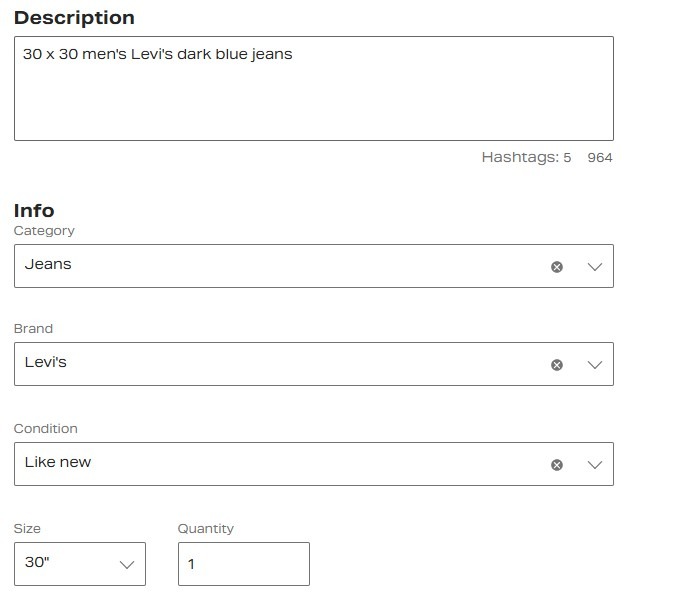
For example, instead of leaving the condition to guesswork, a seller listing jeans could write “30 x 30 men's Levi’s Dark Blue Jeans.” Buyers who find that listing already know what they're getting just from the description.
2. Write titles buyers actually search for
Your title is the first thing Depop's algorithm reads to decide if your listing appears in search. Build your title around brand, item type, and style keywords to match what buyers actually search for.
For instance, if you’re listing a Ralph Lauren shirt, title it, “Ralph Lauren Oxford button-down shirt blue striped size L,” you’ll hit search queries for brand, style, and size.
Vague titles like “vintage preppy top” don’t give buyers (or Depop) much information at all.
3. Use all photo slots
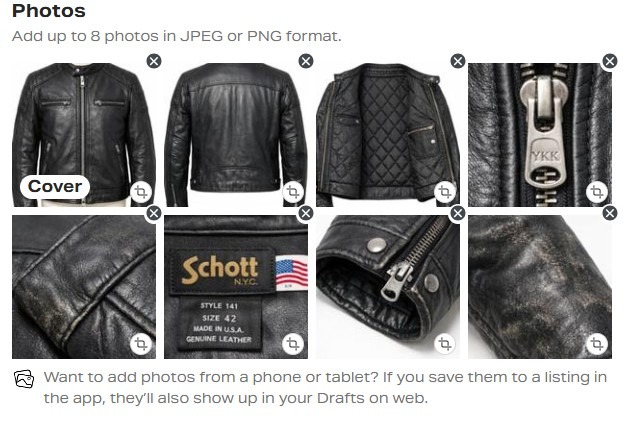
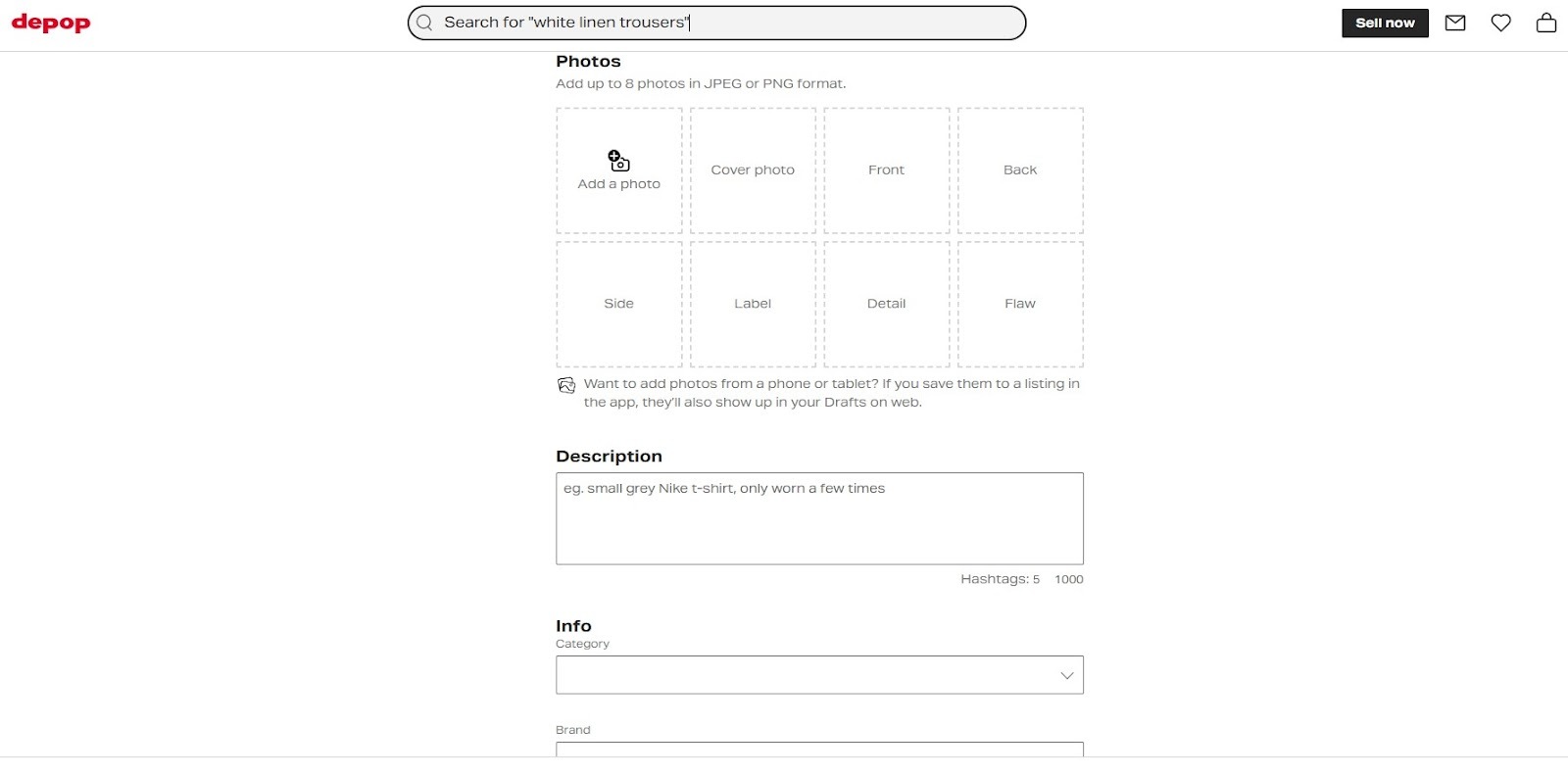
Depop allows up to 8 photos per listing, so take advantage of each one so you don’t leave buyers with unanswered questions. Feature the item’s front, back, brand tag, fabric label, any flaws, and a detail shot of texture or hardware.
For example, if you’re listing a leather jacket, take a picture of the front, the lining, the zip hardware, and a close-up of a scuff on the left sleeve. That scuff, shown rather than hidden, builds more trust than a perfect-looking single shot ever would.
Pro tip: Use a photo-editing tool so you can apply filters, crop images, and enhance their appearance.
4. Add flat measurements
Flat measurements are the actual dimensions of a garment laid on a surface: pit-to-pit, waist, hip, inseam, or length, recorded in inches or centimeters. Don’t list only the garment’s size found on the label, because a vintage size 12 and a modern size 12 actually have very different fits, and can generate a return or a dispute.
5. Price using real Depop comps
Price using real Depop comps by basing your price on what similar items actually sold for, not what other sellers are asking. Before you publish, visit the shops of sellers who offer items similar to yours. Depop shows their sold items in a separate section below their active listings, so you can browse real sale prices directly within the app. That’s where you’ll find prices that buyers have already accepted.
Also factor in both buyer and seller fees. In the U.S. and U.K., buyers will pay up to 5% and up to $1/£1 on the purchase price. As a seller, Depop takes a small payment processing fee of 3.3% + $0.45 if you’re in the U.S.
Pro tip: Check the Depop Circular Blog to find out what sells best for the current month or season.
6. Respond to buyer messages quickly
On Depop, a buyer who sends a message about fit or condition is often interested in buying. But if you reply slowly, buyers will most likely move on to the next seller.
Reply within no more than 2 hours (replying within minutes is ideal) with a clear answer and the flat measurements they need. Always treat messages as one of the final steps a potential buyer takes before making a purchase. Many times, replies in just a few hours decide who gets the sale.
7. Use relevant hashtags (not spam)
Relevant hashtags on Depop describe an item’s brand, style, era, or aesthetic. That’s really all you need to add. Adding loads of unrelated hashtags violates Depop’s Community Guidelines and could get your account suspended for fraudulent behavior.
Use 3 to 5 accurate tags. Depop allows no more than 5. If only 3 or 4 hashtags are relevant to your item, don’t stretch the truth by adding another tag.
We wrote an article about Depop hashtags that outlines how to pick the right ones for your items.
8. Pack well, ship quickly, and communicate tracking
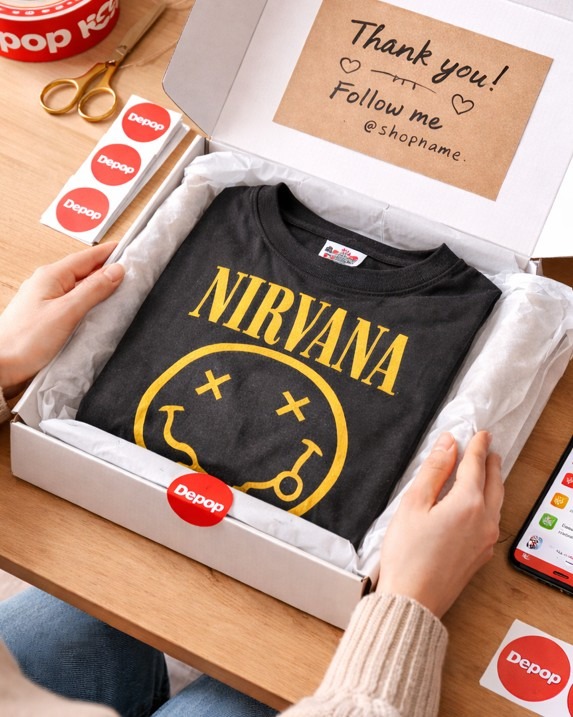
How you pack and ship an item can affect whether a buyer leaves a good review, asks for a return, or opens a dispute. Use packaging that fits the item and protects it during shipping. A box works best for shoes or bulky items, while a sturdy paper mailer usually works for clothing.
Choose recyclable materials like tissue paper or paper tape if they can protect the item well. You can reuse packaging from past deliveries, but only if it’s still strong. Make sure you remove or cover any old labels or barcodes. Depop’s guide is an excellent source of information about packaging.
Personalize each shipment by adding a short handwritten note or small branded insert. Buyers might mention these personal touches in positive reviews.
Upload the tracking number as soon as you ship the package. Then, send the buyer a quick message to confirm that the item is on the way.
9. List items consistently and refresh unsold items
Depop gives active shops more visibility. If you list a few items daily, they’ll often appear higher in search than if you don’t list anything for several weeks.
Don’t list several items at once and then stop. Try to maintain a listing schedule so your items consistently appear at the top of feeds.
You can also refresh older listings, which creates a new listing for an item that hasn’t sold. However, you should wait 30 days before refreshing. And, you should update the pricing and description of the original listing. Read our guide on how to relist on Depop for more info.
10. Use the Boost feature selectively
Depop’s Boosted Listings feature promotes listings so they appear higher in search. Boosted listings show a small “Boosted” label on search results feeds.
In the U.S. and U.K., boosting costs 12% of the item’s sale price, not including taxes. If you arrange your own shipping, the boost fee also applies to those shipping costs. Depop only charges the fee if the item sells after someone sees the boosted listing within 28 days.
This extra fee can reduce profit. For example, you’ll pay $12 + $3.30 + $0.45, for a total of $15.75 on a $100 sale (using a Depop shipping label). If you arrange your own shipping and charge the buyer $10 for postage, the boost fee applies to $110, adding an extra $1.20; that brings your total fees to $16.95.
However, you’ll most likely still pay less than a marketplace like Poshmark, which takes $2.95 on sales under $15 and 20% on sales of $15 or more.
Boost works best when a listing is already strong and can push that listing in front of competitors. Clear photos, good titles, and full descriptions help turn views into sales. But if your listing has poor photos or missing details, you’ll probably still struggle to sell.
11. Crosslist items to increase exposure
Crosslisting means posting the same item on several marketplaces at the same time, not just Depop.
Each platform attracts a different type of buyer. Depop tends to have younger shoppers who follow trends. eBay attracts a wider age range, and Poshmark focuses heavily on fashion buyers with different budgets and expectations. Vintage buyers and people looking for handmade goods flock to Etsy.
If you only list on Depop, many potential buyers never see your items. Crosslisting helps you increase your potential buyer pool, so you can sell more items more often.
Crosslisting tools like Nifty, Vendoo, and Crosslist make this process a lot easier. These tools let you create one listing and publish it to several marketplaces.
How to sell on Depop
You can start selling on Depop by creating an account on the Depop homepage, setting up payments and shipping, then listing and sending your items. Follow these steps:
Step 1: Create your account
Sign up on the homepage or download the app from the App Store or Google Play. Enter your phone number and email address, then choose a username and write a short bio. If you have a specific style or niche, mention it so buyers know what you’re selling.
Sometimes, Depop offers free or discounted boosting promotions for new or eligible sellers, which can help drive early traffic before you’ve built up reviews. Check your account or Depop’s current promos to see what’s available.
Step 2: Set up payments and shipping policies
Connect a verified bank account and turn on Depop Payments so buyers can pay with Apple Pay, Google Pay, Klarna, or a credit or debit card. U.S. and U.K. sellers are required to have Depop Payments enabled, so make sure you set this up before you list anything.
Decide on your shipping plan. Will you charge buyers for shipping or cover the cost yourself, and how fast will you commit to sending orders out? Sorting all of this out ahead of time keeps checkout simple.
Step 3: List your item
Take clear photos from multiple angles and include any flaws. Write a title and description with searchable keywords. For example, “90s Levi’s 550 relaxed fit denim” will appear in search results more often than something vague like “cute blue jeans.”
Quick recap
Before setting a price, check what similar items actually sold for so you don’t rely on overly optimistic listing prices. Take the payment processing fee of 3.3% + $0.45, plus a Boosting fee of 12% (if you use the feature), and the 5% + $1 buyers' fee into consideration on top of your asking price.
Step 4: Ship promptly
Once a buyer purchases, pack the item securely and use the shipping option you set up, such as a Depop label or your own postage. Ship it within your stated handling time. Upload or confirm tracking quickly so buyers feel confident and disputes are less likely.
To keep up to date with Depop’s policies and learn about promotions, follow @howtodepop and @depop on social media and Depop’s YouTube Channel.
Nifty scales your listings across Depop and other platforms
If you want to sell more items on Depop, automate relisting, and crosslist to other platforms, try Nifty, a crosslisting and automation tool that handles inventory management and other manual processes so you can focus on selling.
Here’s why over 10,000 sellers trust Nifty:
- AI listing: Snap a pic and let Nifty's AI build an optimized listing, with SEO-optimized titles and descriptions, and trending hashtags already filled out for you. Plus, it's cloud-based, mobile-friendly, and easy to use.
- Crosslist now: With a couple of clicks, post your items across Poshmark, eBay, Mercari, Depop, and Etsy. No copy-paste and no multi-tab chaos. (More marketplaces coming soon!)
- Automatic delisting? Handled: When you make a sale, Nifty's sales detection auto-delists that item from every marketplace. Say goodbye to double-selling disasters and “sorry, it's already gone” apology messages.
- Bulk tools = no busywork: Share and relist daily with just a few clicks. Update or discount dozens of items at once. You can even schedule drafts to go live while you sleep.
- Analytics and profits are real: Track sales, fees, top performers, and slow movers in one clean dashboard, so you can actually see what's working and what's just dead space.
After a few weeks, Nifty pays for itself. So, our last tip for selling on Depop is to start with Nifty’s 7-day free trial and see how much faster your Depop inventory sells.
FAQs
1. How do you sell fast on Depop?
You sell fast on Depop by providing quality listings, competitive prices, and a quick response time. Use searchable titles, accurate descriptions, and flat measurements. Price within the range of comparable items actually sold for. Reply to buyer messages within a few hours. Sellers who do all three often move inventory faster than those who only do one.
2. What sells best on Depop?
Y2K clothing, vintage denim, branded sneakers, and streetwear sell best on Depop. Demand for these categories stays high because Depop's buyer base skews young and trend-driven. Listing these items with accurate keywords puts them in front of buyers already searching for them.
3. Is Depop free to sell on?
Depop is free to list on, but selling is not entirely free. U.S. sellers pay no Depop commission, but every transaction incurs a payment processing fee of 3.3% plus $0.45. Buyers also pay up to 5% plus $1 on top of your asking price, which affects how competitively you need to price. And if you choose to boost your listings, you pay an extra 12% on the final sale price.


.png)
.png)
.png)