
Etsy scams for sellers: Spot fake buyers & requests | 2026
.png)
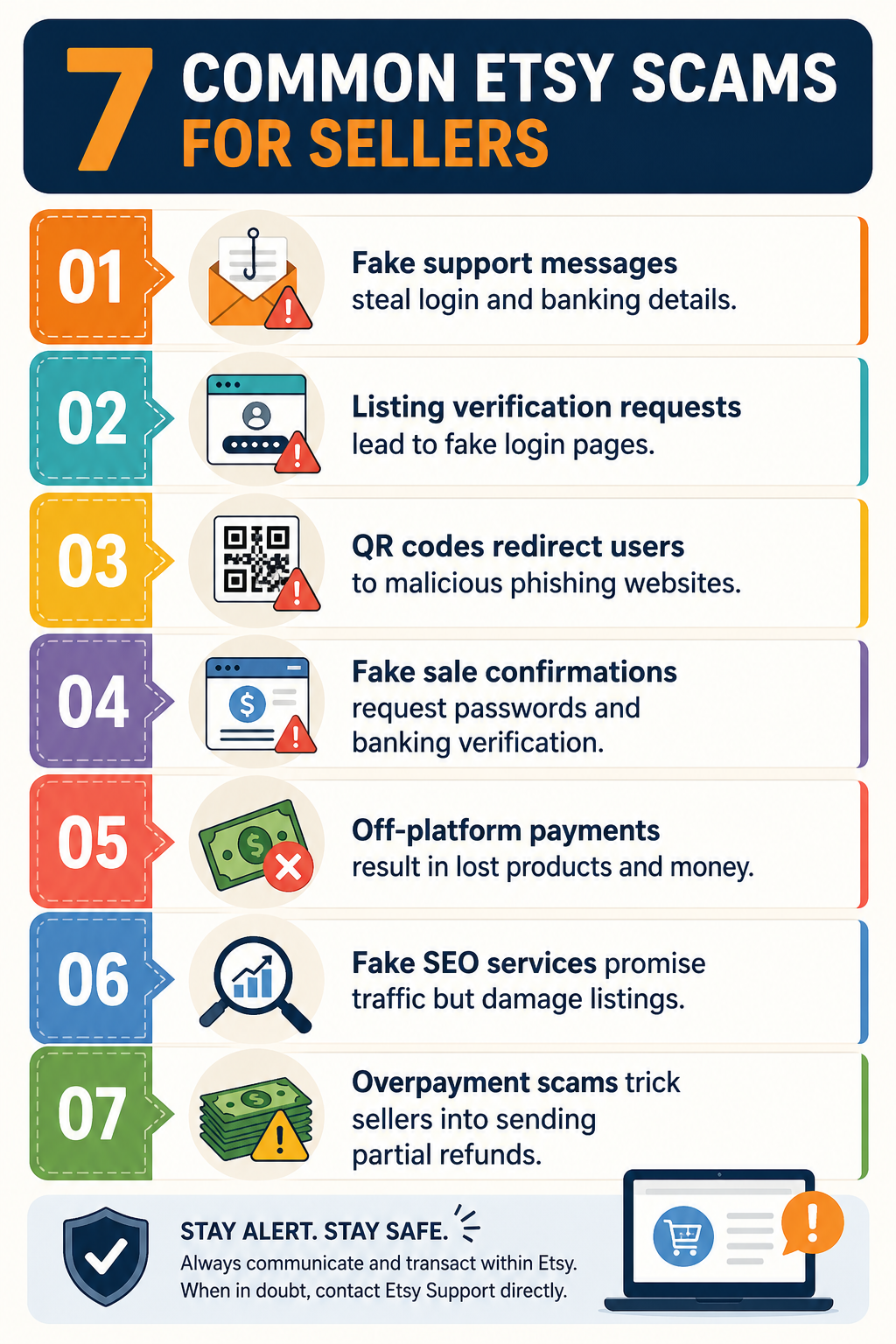
I’ve met dozens of sellers who’ve fallen victim to Etsy scams like phishing for login credentials from fake websites and QR code schemes that can expose your device to malware, including ransomware. Here are the top 7 Etsy scams for sellers, how to avoid them, and what to do if you get caught up in one.
What are Etsy seller scams?
Etsy seller scams are fraud schemes targeting Etsy shop owners. Scammers usually contact sellers through messages, fake support emails, social media DMs, or fake login pages to steal account details and money.
Many scammers want to quietly change your banking details to theirs, so when a real buyer makes a purchase from your Etsy shop, the funds flow into their account.
Sometimes, these scams work because Etsy allows anyone to message a new shop. Scammers can reach sellers before any checks or filters stop them. Unfortunately, new shops are the most at risk and often lose the most money.
7 Common Etsy Scams for Sellers: At a glance
| Scam | Method | Defence |
|---|---|---|
| 1. Fake Etsy support | Phishing email; DM mimicking Etsy branding | Only trust Etsy dashboard banners; verify sender domain |
| 2. Listing verification | Fake "verify your listing" message with login link | Etsy never requires extra listing approval |
| 3. QR code | QR code sent via message leads to fake login or payment page | Never scan QR codes from messages or emails |
| 4. Fake sale confirmation | Fake congratulations message asking to confirm banking | Etsy never asks you to confirm payment after a sale |
| 5. Off-platform payment | Buyer asks to pay via PayPal, Zelle, or bank transfer | Never accept payment outside Etsy's system |
| 6. Fake SEO or promotion | Paid "guaranteed rankings" via DM or Fiverr gig | Ignore unsolicited SEO offers; learn Etsy keywords yourself |
| 7. Overpayment refund | Claims overpayment; requests refund via Venmo/PayPal | All refunds through Etsy on the original order only |
Etsy seller scams usually start with a fake message or email claiming to be from Etsy’s support team. These messages are actually an attempt by criminals to break into your account or steal your money. Here are the top 7 Etsy scams for sellers to always be on the lookout for:
Scam #1: Fake Etsy support messages
Scammers send fake messages via Etsy DM or email that look like they come from Etsy support because they copy Etsy’s logo, layout, and writing style. These posers ask you to enter your account password or banking information.
Then they often warn that your shop may be suspended if you don’t act fast. Scammers want to steal your login credentials, take over your account, and redirect your payouts.
Emails or DMs with login links are likely a scam trying to steal your account details. If you receive one of these messages, ignore it. Contact Etsy support directly and confirm that they didn’t send the message.
Real Etsy account notifications and shop alerts (like suspensions) appear as banners inside your Seller Dashboard. Messages from buyers appear in your Message inbox, while official messages from Etsy staff appear in the “From Etsy” folder with an “Etsy staff” badge.
Etsy emails from actual support come from the following domains:
- transaction@etsy.com: Purchase receipts and transaction alerts
- emails@e.etsy.com: Marketing emails and promotional newsletters
- registration@mail.etsy.com: New account setup and registration emails
- noreply@etsy.com: Password resets and automated alerts, e.g., shipping updates
- conversations@mail.etsy.com: Inbox messages and conversation notifications
- etsy@mail.etsy.com: General updates and platform information
- emails@mail.etsy.com: Confirmations, Etsy Finds, and newsletter updates
- mail@etsy.com: Informational messages about Etsy activity
Scammer email domains aren’t the same as the above domains. For instance, if you receive an email from @etsy.help.com or @support.etsy.com, it’s most likely a scam.
Scam #2: Listing Verification Scams
In listing verification scams, a scammer sends you a message soon after you post a new listing. It claims Etsy needs you to “verify” or “authenticate” your item before you can sell it, and takes you to a fake login page.
This scammer’s goal is to steal your password and 2FA code. Not cool.
Etsy doesn’t require extra approval to list an item. That alone is a clear warning sign.
Scam #3: QR code scams
Scammers use QR code fraud when they (allegedly) want to pay for shipping, but only with a special label. Or “they’re having problems accessing your shop,” and “you need to re-verify your credentials” (or so they claim).
The bottom line: These scammers need you to scan their QR code … if you don’t, they can’t buy from your shop (which is a lie).
The scammer’s QR code, sent via message or email, brings you to a fake payment or login page that looks like Etsy.
- You might have trouble spotting that the site you’re on is fake because your phone screen may hide the full URL.
- Once you enter your banking information, these scammers could enroll you in a service that bills your bank every month and gives you nothing in return.
Other scams bring you to a malicious website that could plant ransomware on your phone or steal data.
Avoid these scams by never scanning QR codes from messages or emails. If you don’t play the QR code game, the scammers lose.
Scam #4: Fake sale or payment confirmation scams
Some scammers take the stealth angle, and like creepy KGB agents from a bygone era, spy on you. Scammers specifically target new Etsy stores at the moment of their first listing.
Because you've never seen a real sale confirmation, you have no frame of reference to detect the fake. They scrape your actual listing details (e.g., product name, image, price) and embed them into a convincing clone of Etsy's order confirmation page.
The message will claim to be from the Etsy team, and it’ll congratulate you on the big win (but it’s not genuine). The scammer tells you that your payment will only go through if you “enter your password” and “confirm your banking details” using a link.
Once they have your credentials, they’ll break into your account and enter their banking details, so the money from this sale flows to them. Money from future sales will also go to them, until you change your payment details. Awful!
Etsy won’t ask you to confirm your payment details whenever you make a sale. Money will flow into your account based on the payment plan you selected when you created your store. Simply ignore scammers’ directions.
Scam #5: Off-platform payment scams
Fraudsters use off-platform payment scams by asking you to finish the sale outside of Etsy.
- They may suggest paying you via PayPal, Venmo, Zelle, or a direct bank transfer, often saying that their card doesn’t work.
- They could also try to convince you that you can avoid Etsy fees, which will fatten your profit margin.
As soon as you send out the item, scammers will immediately cancel the transaction on their credit card. They receive your product, you receive nothing.
But it gets worse: Etsy Seller Protection doesn’t apply because you moved the payment off the platform. And Etsy strictly forbids off-platform payments, so you might suffer consequences.
Never ever accept off-platform payments. Always use Etsy’s system.
Scam #6: Fake SEO or promotion scams
Scammers often target newer Etsy sellers by offering an SEO strategy or a promotion that promises quick visibility and sales. They charge a fee for their “services.”
Here’s a rundown of SEO “snake-oil” pitches:
- Where these offers show up: These pitches come through Instagram DMs, Fiverr gigs, and Etsy messages, usually aimed at shops with low review counts.
- What they promise: They claim to deliver first-page rankings, guaranteed sales, or “verified” promotion.
- What actually happens: Most do nothing, send bot traffic that hurts conversion rates, or use keyword stuffing that gets listings demoted.
- Why it backfires: Etsy’s algorithm rewards real sales and listing quality, so attempts to manipulate it usually lead to worse rankings.
Instead of paying a scammer for fake SEO services, read our guide on how to use the right Etsy keywords.
Scam #7: Overpayment and refund scams
Overpayment and refund scams involve a “buyer” who claims that they paid too much. They may even send a fake screenshot to “prove” it. Then they ask for a partial refund through Venmo or PayPal before the original payment clears.
If you follow their direction, the buyer’s first payment gets reversed. But the buyer never sends the item back, and you lose both the refund money and the item.
All refunds should go through Etsy using the original order. Etsy doesn’t require separate payments for refunds. If a buyer asks for a refund outside of Etsy, treat it as a scam.
What to do if you click an Etsy scam link
If you click on an Etsy scam link, immediately change your login credentials and contact your bank to report fraud. Follow these steps:
Step 1: Change your Etsy password
Create a new, unique password that you’ve never used before on any other site (use a password manager). Use a random mix of letters, numbers, and special characters.
A new password invalidates any info a scammer may have captured through a fake login page. They won’t be able to access your account.
Step 2: Check recent account activity
Open your login history (Account Settings → Security) and order activity panels. Look for sessions from unfamiliar locations, devices, or listings edited without your input. Catching unauthorized changes early prevents scammers from changing payout settings or creating fraudulent listings under your shop's name.
Step 3: Contact your bank and review payout settings
Call your bank immediately to flag the card and request a replacement. Then open Etsy's payout settings (Shop Manager → Finances → Payment settings) and check to see if the scammer has altered your deposit bank account and billing card.
If the scammer did change the info to their bank info, take a screenshot for your records. Immediately delete their information.
Step 4: Report the message to Etsy
Forward the original phishing message (with intact email headers) to reportphishing@etsy.com, and send any screenshots of their banking details. If you give Etsy the technical details, they can block the sender, block the malicious link, and warn other shops.
Reporting also creates an official record if disputes or chargebacks surface later.
Step 5: Enable two-factor authentication
Go to Account Settings → Security → Two-Factor Authentication and enable it using an authenticator app like Google Authenticator, Authy, or Microsoft Authenticator. Avoid using SMS because it’s vulnerable to SIM-swap attacks.
Once you’ve activated 2FA, a stolen password alone stops working since login requires a time-based code tied to your device.
Step 6: Inform the Etsy community
Share the scam in seller groups like r/EtsySellers or the Etsy Forums to help turn your experience into a warning for other sellers. Include details like the sender’s name, the message they sent, and any fake links.
Sell more on Etsy with Nifty
Now that you know how Etsy seller scams work, the next move is finding ways to increase your sales revenue. Nifty, a crosslisting and automation tool, allows you to do just that by increasing your items’ buyer exposure. You can list on several different platforms and see a breakdown of how your items are performing.
Here's why Nifty's so helpful:
- Customized AI listing: Snap a pic and let Nifty's AI build a high-quality listing, with SEO-optimized titles and descriptions, and trending hashtags already filled out for you. You can even customize how Nifty’s AI writes your listings to follow your unique style.
- Crosslist now: With a couple of clicks, post your items across Whatnot, Poshmark, eBay, Mercari, Depop, and Etsy. No copy-paste clutter and no multi-tab hopscotch. (More marketplaces coming soon!)
- Automatic delisting? Handled: When you make a sale, Nifty's sales detection auto-delists that item from every marketplace. Say goodbye to double-selling disasters and "sorry, it's already gone" apology messages.
- Bulk tools = no busywork: Share and relist daily in just a few clicks. You can even schedule drafts to go live while you sleep and set automatic discounts that run deeper over time.
- Analytics and profits are real: Track sales, fees, top performers, and slow movers in one clean dashboard, so you can actually see what's working and what's just dead space. You can also set and track seller goals directly from your home screen.
Nifty pays for itself after just a few weeks, and centralizing your items on one interface can help avoid scattered logins for scammers to target. Start with a 7-day free trial and see how Nifty can help you run a tighter, safer Etsy shop.
FAQs
1. How can I tell if an Etsy message is fake?
You can tell if an Etsy message is fake by checking its source and where it appears. Real messages show up in your "From Etsy" inbox on Etsy.com (desktop only) with a "From Etsy" badge below the subject. Authentic emails come from @etsy.com or @mail.etsy.com. When unsure, log in directly to etsy.com to verify.
2. Does Etsy ask sellers to verify bank details through messages?
No, Etsy doesn’t ask sellers to verify bank details through messages. The company will never ask you to confirm this information via email or external links, either. Messages requesting payment verification are attempts to steal your credentials and hijack your account (known as phishing). Ignore any of these messages to keep your info safe.
3. What should I do if I gave a scammer my card details?
If you gave a scammer your card details, you first need to quickly contact your bank and cancel your card. Change your Etsy password and check payout settings for unauthorized changes, and enable two-factor authentication. Report the message to Etsy using the “Report” button in Messages. Fast action limits financial damage and prevents repeat fraud.
4. Are new Etsy sellers targeted more often by scammers?
Yes, new Etsy sellers are targeted more often because they're less familiar with platform norms and more likely to fall for phishing schemes. Scammers specifically seek out new sellers who may not recognize red flags and are more likely to give away credentials.


.png)
.png)
.png)