
Sellbrite review: Is it worth it in 2026?
.png)
Sellbrite is worth it if you’re a dropshipper or traditional e-commerce seller selling on platforms like Amazon and Walmart. However, many sellers run into issues when creating listings, as the tool lacks modern features like AI-powered listing generation.
After evaluating the tool through its free trial, my Sellbrite review breaks down its inventory sync, order management, and fulfillment features. Compare my findings with user feedback to decide if Sellbrite fits your selling workflow.
Sellbrite review: Snap judgment
Sellbrite is a multichannel listing tool that works well for established sellers. It favors sellers managing existing inventory over building fresh listings from scratch. The tool is more of an inventory tracker than a multi-platform inventory management tool.
Pricing plans range from a free tier up to $679/month across three product lines, scaling from 30 to 100,000 monthly orders. So, there's an entry point for both hobbyists and high-volume operations.
Key features I evaluated
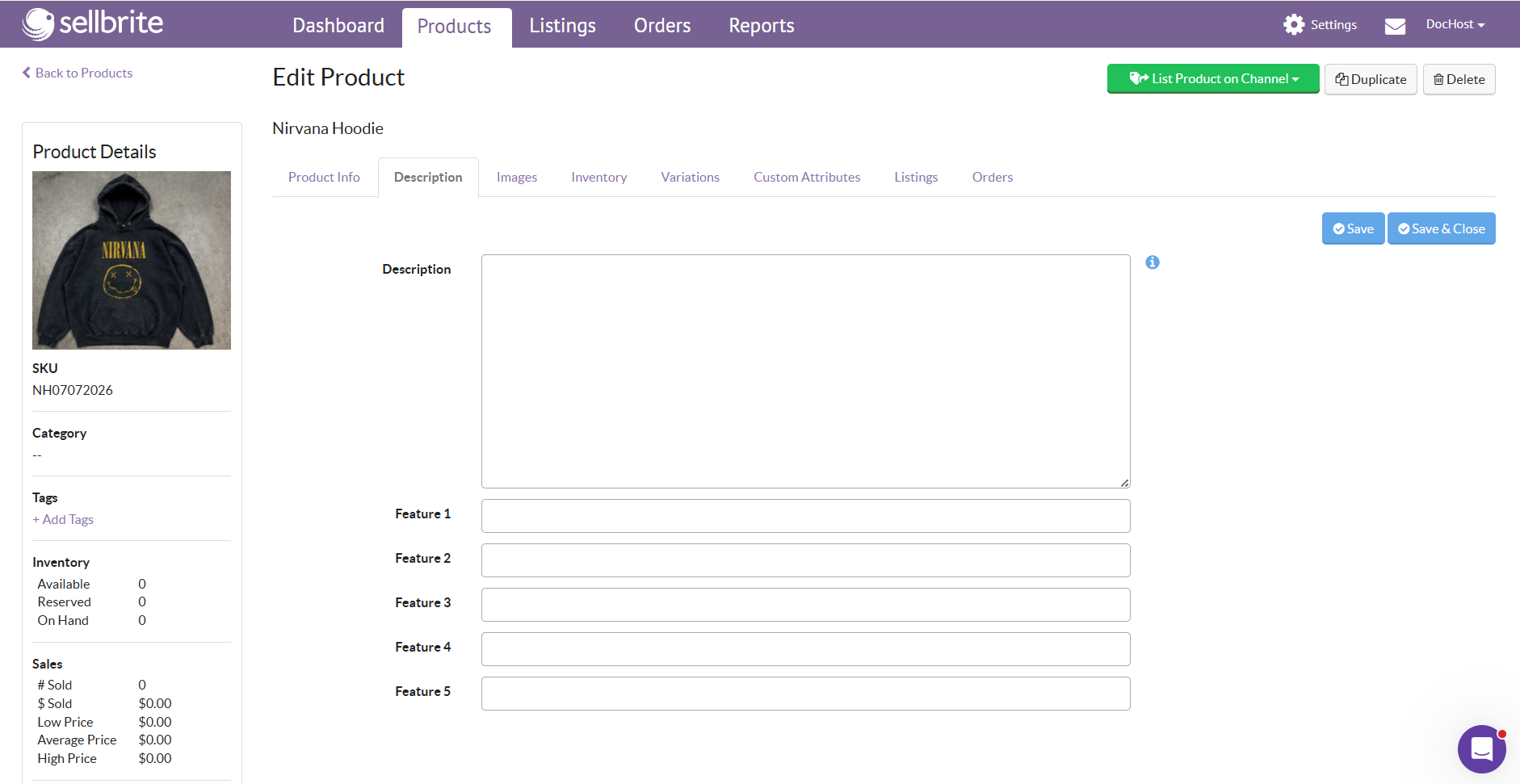
I tested Sellbrite by using the free 14-day trial and assessing how it connected to marketplaces and its overall listing experience. Here’s what I found:
Inventory sync
Sellbrite’s inventory sync keeps items aligned across Amazon, eBay, Walmart, Etsy, Sears, Newegg, Google Shopping, Shopify, BigCommerce, and WooCommerce. If you already have listings on these platforms, you can import them into your Sellbrite dashboard in just a few clicks.
But when I connected my eBay listings, Sellbrite imported only the first 12 photos, the product title, and the price. I had to manually enter the remaining product details, including the description and package weight.
Once I put a few items in Sellbrite, bulk editing was much smoother. The tool uses listing templates that let you bulk edit fields like titles, descriptions, and pricing across multiple listings at once. Instead of editing each listing individually, you change the template once, and Sellbrite applies those updates everywhere the template is assigned.
Sellbrite lacks a fast way to create new listings. Every listing starts from a blank page, so you have to enter all the product information yourself. It doesn't currently offer an AI listing tool that generates titles or descriptions from photos, which would save a lot of time when creating a listing and publishing it across multiple marketplaces.
Order management
Sellbrite centralizes orders from your connected sales channels into a single dashboard. You can view and fulfill orders from Amazon, eBay, Etsy, Walmart, and your online store without switching between platforms.
When a linked product sells on one marketplace, Sellbrite automatically imports the order and updates that product's inventory across your other connected channels. It removes available stock everywhere the item is listed, helping prevent overselling.
You can assign inventory to specific warehouse locations, and Sellbrite tracks stock levels for each one. When an order comes in, Sellbrite removes that item from the correct warehouse, allowing you to see where products are stored and how much stock remains after every sale.
Shipping and fulfillment
Sellbrite lets you connect FedEx, UPS, and USPS accounts so you can buy and print shipping labels from one interface.
When you create a shipment through Sellbrite, the tool automatically saves your tracking number with the order. You can view the tracking details directly in Sellbrite so you don’t need to bounce between shipping websites. The tool also lets you send tracking info back to your connected sales channels.
The tool supports several fulfillment methods, including merchant-fulfilled orders and channels that use Amazon FBA, although each follows its own workflow. Once you create a shipment through a connected carrier, Sellbrite stores the tracking information with the order so shipping updates remain available after dispatch.
Reporting and analytics
Sellbrite organizes its reporting feature into 4 views that help sellers understand sales and inventory across multiple marketplaces. Here’s what Sellbrite’s analytics does:
- Tracks sales by marketplace: See marketplace sales reporting that separates orders by sales channel so you can see which marketplace generates the most revenue. Sellbrite attributes every order to its source, making channel performance easier to compare.
- Monitors inventory performance: The tool’s inventory performance reporting shows which products sell quickly and which remain in stock, helping you identify slow-moving inventory before it ties up too much cash.
- Identifies top-selling products: Sellers with large catalogs can quickly identify the products generating the most sales instead of relying on memory. Sellbrite highlights these best performers, so restocking decisions become easier.
- Measures revenue across channels: Revenue reporting compares sales across your connected marketplaces. Instead of looking at one combined sales figure, you can review each channel's contribution individually.
Sellbrite pricing tiers
Two of the three Sellbrite pricing tiers have a free plan. Every plan comes with a 14-day free trial.
| Tier | Product | Best for | Key features |
|---|---|---|---|
| 1 | Sellbrite Pro | Multi-platform sellers | Unlimited users/SKUs/channels; 2-hour sync (free), 15-min (paid); $19 FBA add-on; phone support on 2K |
| 2 | Sellbrite for Shopify | Shopify sellers reaching marketplaces | Shopify storefront + Sellbrite manages marketplace orders; excludes FBA; flexible up/downgrade |
| 3 | Power Sellbrite for Shopify | High-volume Shopify sellers | Tier 2 rules; unlimited everything; onboarding + support included |
Tier 1: Sellbrite Pro plans
Sellbrite Pro plans fit normal sellers aiming to list across multiple platforms:
- Forever Free: $0 and allows for up to 30 monthly orders. Get unlimited users, SKUs, and channels. Syncs every two hours to detect sold items. No add-ons available.
- Pro 100: $29/month for up to 100 orders with 15-minute syncing. Same user, SKU, and channel limits as free. Optional $19 monthly FBA integration and app store integrations, plus access to Walmart 2-day shipping, API access, and eBay guaranteed delivery tags.
- Pro 500: $79/month for up to 500 orders. All other features the same as Pro 100.
- Pro 2K: $179/month for up to 2,000 orders with the same features as Pro 100. This plan also has phone support via callback request (i.e., you call, leave a message, and a specialist returns your call) available Monday through Friday, 7 a.m. to 4 p.m. PST.
Tier 2: Sellbrite for Shopify
Sellbrite for Shopify connects your Sellbrite account to a Shopify store as part of a multichannel selling setup. Shopify acts as your storefront, but Sellbrite manages inventory and orders across connected sales channels.
It’s suited for sellers who use Shopify as their main catalog and inventory hub, and want to extend those products to marketplaces like eBay, Walmart, Etsy, or Amazon via Sellbrite.
Marketplace order limits are based on orders imported into Sellbrite, not orders placed directly through your Shopify store. All plans exclude FBA orders. This means that you’ll manage Shopify orders through your Shopify account, not through Sellbrite.
- Forever Free: Free Shopify plan for up to 30 marketplace orders monthly.
- Pro 100: $19/month for up to 100 marketplace orders.
- Pro 500: $59/month for up to 500 marketplace orders, with upgrade or downgrade flexibility anytime.
- Pro 2K: $99/month for up to 2,000 marketplace orders, with high-volume plans available afterward.
Tier 3: Power Sellbrite for Shopify
The Power Sellbrite for Shopify tier follows the same rules and standards about where you can sell as the Sellbrite for Shopify. But this tier fits large-volume Shopify sellers. Each plan includes unlimited channels, SKUs, users, onboarding, support, listings, inventory, and order management tools.
Let’s look at the plans:
- Power 10K: $159/month for up to 10,000 marketplace orders.
- Power 25K: $279/month for up to 25,000 marketplace orders.
- Power 50K: $399/month for up to 50,000 marketplace orders.
- Power 100K: $679/month for up to 100,000 marketplace orders.
What other users are saying
I searched sites like Reddit, Trustpilot, Shopify App Store, and Facebook to see what other users said about Sellbrite:
Sellbrite pros
- Paid plan improved inventory syncing: A user upgraded from Sellbrite’s free plan to a paid plan after they experienced faster inventory updates and sales increases on Etsy. (Shopify App Store; February 13th, 2026)
- Trusted Sellbrite for years: A user enjoyed years of trouble-free Sellbrite use and received patient, thorough support when issues arise. (Shopify App Store; March 18th, 2026)
- Exceptional Sellbrite support experience: One person had a highly positive Sellbrite experience, praising responsive support and reliable inventory management. (Trustpilot; March 20th, 2025)
Sellbrite cons
- Walmart sync issues: One user experienced constant Sellbrite Walmart sync and publishing problems and switched away after frustration. (Reddit; May 27th, 2026)
- Etsy order titles caused Shopify clutter: A Sellbrite user complained about messy Sellbrite Etsy-to-Shopify order imports where custom variations duplicated titles and issues. (Reddit; February 7th, 2026)
- Variant import limits disrupted workflows: One person became frustrated after Sellbrite’s Shopify variant limits forced months of manual inventory management. Plus, they said that support communicated poorly with their team. (Shopify App Store; January 20th, 2026)
Sellbrite alternatives
| Tool | Best for | Pros | Cons | Starting pricing |
|---|---|---|---|---|
| Shopify Marketplace Connect | Shopify-first marketplace sellers | Native integration, free entry, simple | Shopify-focused, limited advanced automation | 1% after 50th order, capped at $99/month |
| Linnworks | Scaling multichannel retail brands | Powerful automation, broad integrations, scalable | Steep learning, custom pricing, complexity | Custom |
| Extensiv Order Manager | High-volume inventory operations | Warehouse tools, forecasting, purchasing automation | Expensive, enterprise-focused, complex onboarding | Custom |
| ChannelEngine | International marketplace expansion | Global marketplaces, automation, scalable operations | Enterprise pricing, complex implementation, onboarding | Custom |
| Nifty | AI-powered reseller crosslisting and automation | AI listings, affordable, beginner-friendly interface | Limited enterprise inventory management features | $25/month |
My final verdict: Is Sellbrite right for you?
Sellbrite suits some seller types, but not all. Let’s see how you can determine if Sellbrite fits your workflows:
Use Sellbrite if you …
- Are an e-commerce seller: Sellbrite fits sellers managing items across traditional e-commerce marketplaces like Walmart, eBay, and Amazon who need centralized inventory and order management.
- Are a dropshipper: Sellbrite helps dropshippers coordinate product listings and orders across channels by connecting to shippers and services like FBA.
- Manage multiple warehouses: The tool works well for sellers with multiple warehouses that need better inventory visibility across sales channels.
Avoid Sellbrite if you …
- Need a quick listing creation tool: It’s not ideal for sellers who prioritize fast listing creation over broader marketplace management features.
- Handle shipping yourself or with a team: The tool may not fit small teams handling fulfillment manually without complex multi-channel inventory needs.
- Are a reseller: Sellbrite may disappoint resellers who need faster crosslisting tools built around flipping items across Mercari, Depop, or Poshmark.
Nifty: Best for multi-marketplace sellers
If this Sellbrite review showed you that you need faster listing creation and support for marketplaces like Poshmark and Depop, Nifty is worth considering. Built for sellers who crosslist across multiple platforms, Nifty uses AI listing tools to turn photos into ready-to-publish listings, reducing the time spent creating each item manually.
Here's why over 10,000 sellers trust Nifty:
- Customized AI listing: Snap a pic and let Nifty's AI build a complete listing, with SEO-optimized titles and descriptions, and trending hashtags already filled out for you. You can even customize how AI writes your listings to follow your unique style.
- Crosslist now: With a couple of clicks, post your items across Whatnot, Poshmark, eBay, Mercari, Depop, and Etsy. No copy-paste clutter and no multi-tab hopscotch. (More marketplaces coming soon!)
- Automatic delisting? Handled: When you make a sale, Nifty's sales detection auto-delists that item from every marketplace. Say goodbye to double-selling disasters and "sorry, it's already gone" apology messages.
- Bulk tools = no busywork: Share and relist daily in just a few clicks. You can even schedule drafts to go live while you sleep and set automatic discounts that run deeper over time.
- Analytics and profits are real: Track sales, fees, top performers, and slow movers in one clean dashboard, so you can actually see what's working and what's just dead space. You can also set and track seller goals directly from your home screen.
Nifty pays for itself in just a few weeks. Start with a 7-day free trial and see how Nifty can help you list once and sell on 6 platforms, without the manual listing creation.
FAQs
1. Is Sellbrite legit?
Yes, Sellbrite is a legit multi-channel inventory management tool. It’s best used by established e-commerce sellers to sync inventory and orders across marketplaces like Amazon, eBay, and Walmart. It can help reduce overselling risk through automatic sale detection, but it lacks AI listing creation that many similar tools have.
2. Is Sellbrite good for dropshipping?
Yes, Sellbrite is good for dropshippers. The tool helps coordinate listings and orders across channels while connecting to fulfillment services like FBA. This capability helps reduce manual order tracking and organize multi-channel dropshipping operations.
3. Does Sellbrite work with Amazon FBA?
Yes, Sellbrite supports Amazon FBA as one of its fulfillment workflows on its paid Pro Plans, but not on Shopify plans. It also supports merchant-fulfilled orders, helping sellers avoid stockouts by keeping inventory synced across FBA and other connected marketplaces.


.png)
.png)
.png)