What is a SKU on Etsy? How to add one and build a system

What is SKU on Etsy? SKU, short for Stock Keeping Unit, is a code you create yourself to identify each item, or each variation of an item, in your shop. Etsy recommends SKUs for tracking inventory and locating stock in your shop, studio, or storage space.
We checked both sets of steps below against Etsy Help. You’ll see how to add a SKU in Etsy’s listing editor, variations included, and how to build a code system that still works when your shop reaches 500 listings.
What is a SKU on Etsy? TL;DR
- A SKU (pronounced “skew”) is a code you make up, such as EAR-HOOP-GLD-S, because Etsy doesn’t issue codes or set a format.
- You add it in the SKU field under Inventory and pricing, or toggle on SKUs under Item options so each variation gets its own code.
- Good codes put the most important attribute first, start with a letter, and leave out commas and slashes.
- Using the same SKU on Etsy, eBay, and Shopify lets you match stock counts and sales reports across channels.
How SKUs work on Etsy
Etsy’s SKU field accepts numbers, letters, or both, and Etsy leaves the format to you. The field is optional, so you decide which listings get a code.
You’ll rewrite a listing title each time you test new keywords, while the SKU stays the same. That fixed code is how you match a listing to the exact item on your shelf after a title change.
Etsy Help doesn’t say whether buyers can see SKUs. Sellers in the Etsy Community say buyers can’t see SKUs before placing an order. You can view every SKU on the Listings page in Shop Manager and in your listing data CSV, which covers your active listings.
How to add a SKU on Etsy
You can give a whole listing one SKU, or give every variation its own code. Our steps follow the guidance on Etsy Help.
Add a SKU to a listing
- In Shop Manager, open Listings and choose the listing you want to edit, or add a new listing.
- Scroll down to Inventory and pricing.
- Type your code into the SKU field.
- Click Publish to save the change.
Updating SKUs on dozens of listings? Use Quick edit on the Listings page to view, add, or edit SKUs without opening each listing. Creating a brand-new listing? We cover the rest of the form in our guide to listing on Etsy.
Add a SKU to each variation
- Open the listing from your Listings page.
- Under Item options, select Add variation.
- Pick a variation type, such as size or color. The types Etsy offers depend on your listing’s category.
- Toggle on SKU numbers. You can also vary price, quantity, and processing profile here.
- Choose Done, then enter a code next to each option under Variations.
- Click Publish to save.
Etsy lets you add variations for up to 3 item attributes. If you vary SKUs on both size and color, every combination needs its own code, so 3 sizes and 4 colors means 12 SKUs.
According to Etsy’s variations guide, you can set unique SKUs for up to 400 option combinations. A listing with 3 variation types can hold 2,500 combinations, so a big listing hits the SKU limit first.
We’d split a listing in two before it passes 400 combinations, so every version you stock keeps its own code. Etsy doesn’t support variations on digital listings, so each digital listing gets a single SKU.
How to create a SKU system for your Etsy shop
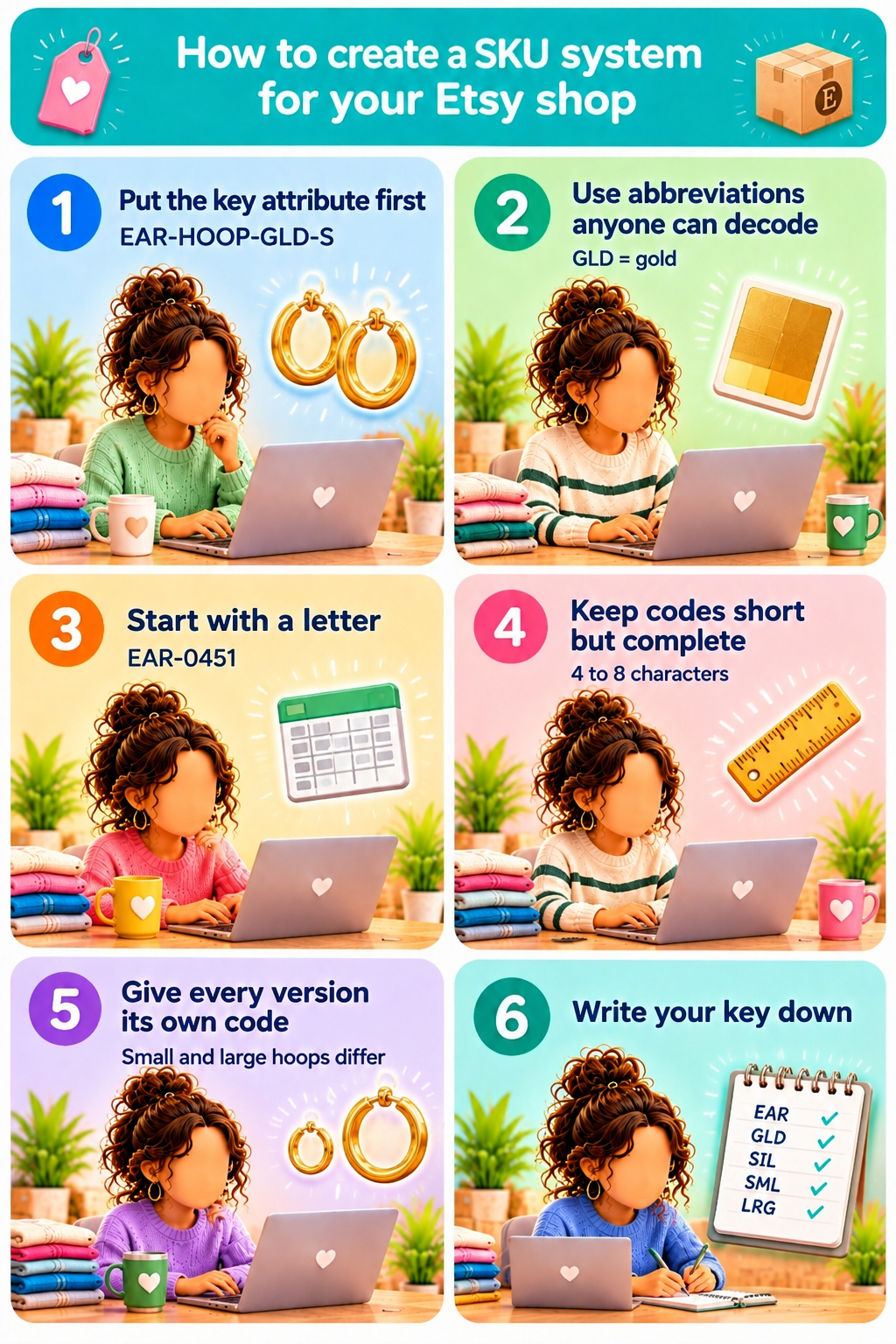
Etsy doesn’t set a format, so you design the system. Etsy’s own example is a ribbon shop that uses RV101, RC101, and RS101 for velvet, cotton, and silk.
We’d build on that with the six rules below. Each one makes codes easier to read for you and for anyone who helps you pack orders.
1. Put the most important attribute first
Start with the detail you sort by first, which is usually the product type, then narrow down. You can read EAR-HOOP-GLD-S left to right as earring, hoop style, gold, and small.
2. Use abbreviations a helper can decode
GLD for gold and BLU for blue are easy to decode at a glance. A code like C7 for coral pink forces a new helper to look it up in your key. Etsy also suggests skipping the letters O and I, which people often misread as 0 and 1.
3. Start with a letter and skip symbols
Etsy advises against symbols such as commas and slashes, because they can confuse programs like Excel. We’d keep one symbol, the hyphen, as long as every SKU starts with a letter.
Excel turns a code like 3-12 into the date March 12, and it drops the leading zeros from an all-number code like 00451. Starting with letters, as in EAR-0451, keeps both intact when you open your listing CSV.
4. Keep codes short but complete
Etsy recommends 4 to 8 characters for most inventory. A code that covers four attributes will be longer than that, so we’d cap each segment at three or four characters instead of dropping a detail you’ll need later.
5. Give every sellable version its own code
Small gold hoops and large gold hoops need different SKUs, because you stock and sell them separately. Never reuse a retired SKU on a new product, or the old item’s sales will mix with the new item’s in any report grouped by SKU.
6. Write your key down
Keep a list of every abbreviation you use, for example in an Etsy inventory spreadsheet. When you add a new product, you can then build its SKU with the same pattern as everything else.
Example: SKUs for a jewelry shop
Here’s how those rules work for a shop that sells hoop earrings and bar necklaces:
Do you store stock in bins or drawers? Etsy suggests adding your workspace location to your SKUs, so D2-EAR-HOOP-GLD-S means the pair is in drawer 2. Only add a location if each product stays in one spot. Moving stock to a new drawer would mean changing the SKU, and that breaks the link to the item’s past sales.
Why use SKUs on Etsy?
Some sellers on r/Etsy have asked whether SKUs are useless on Etsy. If you only sell one-of-a-kind vintage, a product code adds little, because each listing is already a unique item.
For one-of-a-kind stock, we’d tell resellers to use the SKU field for the storage spot instead, such as BIN-12. You find the item in seconds when it sells, and nobody has to search the shelf by title.
If you ship to the EU, add the item to the code too, as in the drawer example above. As of November 1st, 2026, Etsy sends your listing SKU to EU customs as a product identifier on labels you buy through Etsy, and asks that it be specific to the item you’re shipping.
Once you sell repeatable products with variations, SKUs save you time and money in four ways:
- Faster stock checks: Type a SKU into the Listings search bar in Shop Manager to find that exact listing, instead of scrolling past similar titles.
- Sales by variation: With a SKU on each variation, you can match your Etsy sold orders to exact versions and see which size or color sells best. Etsy also includes SKUs in its order CSV downloads.
- Fewer packing mistakes: Label each bin or bag with its SKU, then check it against the variation in the order before you ship, so a large hoop doesn’t go to a buyer who ordered a small one.
- Cost of goods per item: Log what each version costs you under its SKU, so you can see your margin per variation after Etsy’s fees. Nifty’s Analytics pulls the SKU and cost of goods from your listings, automatically parses marketplace fees, and calculates your actual profit.
ProfitTree, an Etsy profit tracker, also matches cost of goods to sales by SKU, and its help center warns that if two different items share a SKU, ProfitTree merges them.
For the bigger picture on tracking stock, read our guide on Etsy inventory management.
How to use the same SKU across sales channels
If you also sell on eBay or your own Shopify store, give each item the same SKU everywhere. Etsy notes that SKUs help you track inventory when you fulfill orders across several channels, such as Etsy and a personal website.
SKU fields on other platforms
eBay calls its field Custom label (SKU). eBay’s Seller Hub helps confirm buyers don’t see it. Shopify stores a SKU on each variant.
Since November 2021, Shopify has warned merchants about duplicate SKUs already in use in the store, which helps you catch a copying error when you move your Etsy codes over.
Match your variations before you link two stores
Match your variations on both platforms before you connect them. Matching SKUs alone won’t connect two stores if the listings are built differently. One seller used the same SKUs on Etsy and Shopify, but kept all 9 colors of a sweater in one Etsy listing with 27 SKUs.
On Shopify, the same seller split those sweaters into 9 listings with 3 SKUs each. The app they tried linked by Etsy product ID instead of SKU. (Shopify Community, September 29th, 2024)
In the same thread, a Marketplace Connect support rep explained that the app can link an Etsy listing to a Shopify product only when both use the same variation setup.
Keeping SKUs consistent in Nifty
Nifty keeps one SKU per item in the shared Item overview, next to price, quantity, and cost of goods. You can search and sort the Inventory Manager by SKU, and bulk edit the SKU field on a page of up to 25 selected items. Bulk edit gives every selected item the same code, so set unique SKUs one item at a time.
You can also give Nifty’s AI listing generator custom instructions for how to write SKUs. On the Crosslisting and Bundle plans, the Missing SKU warning flags items without a code and makes the SKU field required.
We’d turn that warning on before your first big crosslisting batch, so every new item gets a code from the start. Selling on several marketplaces already? We explain the full setup in our guide to reseller inventory management.
Sell more with Nifty
You get the most from a SKU on Etsy when each item carries the same code on every marketplace you sell on. Nifty, a crosslisting and automation tool, lets you manage and crosslist inventory from one interface, so you store each item’s SKU, price, and quantity in one record.
Here’s why sellers and resellers trust Nifty:
- Customized AI listings: Upload photos and let Nifty generate search-optimized titles, descriptions, and item details. Review the draft, then use custom instructions to shape its writing style.
- Crosslist now: List eligible items across eBay, Etsy, Poshmark, Whatnot, Mercari, and Depop from one interface instead of re-entering the details on each marketplace. Marketplace access and features depend on your connected accounts and plan.
- Bulk crosslisting: Select multiple existing listings in Nifty, choose your target marketplaces, pricing, and shipping, then save the AI-generated results as drafts or publish them.
- Marketplace-specific Pricing Rules: Set a primary marketplace and rules for how prices should change on other marketplaces, so you don’t have to calculate every crosslisted price from scratch.
- Built-in auto-delisting: Enable auto-delisting and Nifty can remove an eligible sold item from your other connected marketplaces, so you don’t risk selling the same item twice.
- Bulk tools = less busywork: Relist selected items in batches, schedule ready-to-publish drafts, and use supported automations to handle recurring selling tasks.
- Analytics and profits, made clearer: Track sales, fees, profit, and your top-selling brands and categories. You can also set seller goals and check your progress from Nifty’s home screen.
Start with a 7-day free trial and see how Nifty can help you sell across multiple marketplaces. Nifty pays for itself in the hours you stop spending re-entering the same item, and its SKU, on each marketplace.
If you’re in Australia or the UK and selling on eBay, Etsy, Whatnot, and/or Depop, Nifty’s now available.
FAQs
1. How do I find my SKU number on Etsy?
You can find your SKU number on Etsy in the SKU field under Inventory and pricing when you edit a listing, or next to each option under Variations. To see the SKUs on all your active listings at once, download your listing CSV from Shop Manager under Settings > Options > Download Data.
2. How do I get a SKU for my product?
You get a SKU for your product by creating it yourself. No company or agency issues SKUs, so you choose a code, type it into Etsy’s SKU field, and use the same code wherever you sell that item.
3. What does SKU mean when selling?
When selling, SKU means stock keeping unit, a code a seller creates for each version of a product they stock. Two shops can assign different SKUs to the same product, because each shop builds codes for its own inventory.
4. What’s the difference between a SKU and a UPC or barcode?
The difference between a SKU and a UPC is that you create a SKU for free to track your own stock, while a UPC is a 12-digit product number that brands license from GS1 US. A barcode is the scannable image that can encode either one.