Does Depop sell fakes? How to spot them & get a refund (2026)

Depop doesn’t sell fakes or replicas, but some sellers still list them on their accounts. Depop works to find and remove fakes. However, some inevitably slip through.
I reviewed Depop's rules on fake items and appeals to see how well the platform protects you, whether you’re a buyer or a seller.
By the end, you'll know how to spot fakes before buying and request a refund if you receive one. You'll also learn how to protect your own listings from counterfeit claims.
Does Depop allow fake or replica items?
No, Depop bans fakes, replicas, and counterfeits on its prohibited items list.
Describing an item as a “replica” or “copy” doesn’t make it acceptable under Depop’s rules. If you’re new to the platform, read our guide to selling on Depop to learn how to get started.
How does Depop detect counterfeit products?
Depop detects counterfeit products by using automated systems, machine-learning tools, user reports, and human reviewers. When the platform finds items that violate its rules, Depop removes some content automatically. It sends other cases to human reviewers.
These checks don't guarantee that every listed item is real. Depop can remove listings after they go live, but it can make mistakes. Buyers should still check whether an item is genuine, even if its listing remains active.
For instance, sellers offering genuine Supreme clothing should keep clear photos of labels, purchase receipts, and other proof of authenticity. If Depop removes a listing by mistake, sellers can use the appeal link in the removal email to challenge the decision. A Depop team member will review the appeal and decide whether to restore the listing.
How to spot fake items on Depop
You can spot fake items on Depop by checking for unusually low prices and fake clothing tells in photos. Here’s how to avoid fakes:
- Suspiciously low prices: Prices significantly below those of comparable sold items deserve closer scrutiny, especially for popular brands. Check recent sales for the same model and condition. A brand new Essentials Hoodie, valued between $80 and $150 but listed at $25, should raise questions about whether it's real.
- Seller history: A seller's account age, reviews, past sales, and listings can help you decide whether to trust them. New accounts aren't always suspicious, but unusual stock deserves a closer look. For example, a three-week-old shop selling twelve identical Jordan 4s in different sizes should be able to explain where the shoes came from.
- Product photographs: Clear, authentic photos help buyers check an item's condition and details. Stock images and blurry pictures are a red flag. Ask sellers for more close-up photos of labels, stitching, and signs of wear. If a seller sends another catalog photo when you ask for size-tag pictures, avoid them.
- Brand details: Logos, stitching, labels, serial numbers, and hardware can help you spot fake products. For example, a Louis Vuitton date code that doesn't match the bag's claimed age deserves a closer look. However, a date code alone can't prove whether a bag is real.
- Reverse image search: Apps that identify items from photos can help you find the same listing images on other websites. Matching images may mean a seller copied the photos. If a Carhartt Detroit jacket appears in an older eBay listing, ask the Depop seller for fresh photos proving they have the item.
- Proof of purchase: Receipts, order confirmations, and authentication documents can help support a seller's claims. However, scammers can fake these documents, too. Check that the proof matches the item and the seller's story. For example, a StockX tag beside worn sneakers doesn't prove they're real. Ask for more evidence before buying.
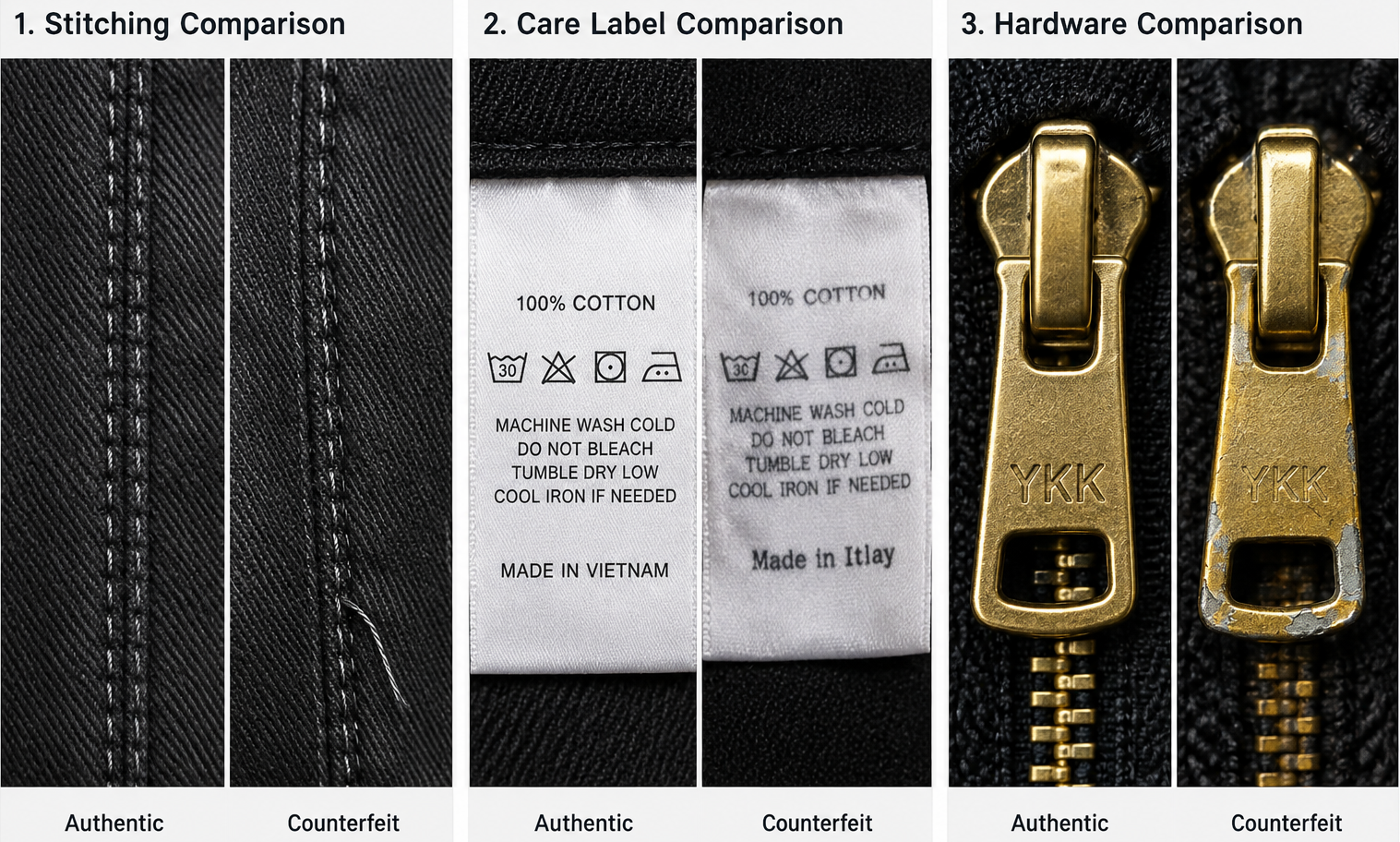
Here’s an example of how to tell the difference between authentic and fake items:
What happens if you think you bought a fake on Depop?
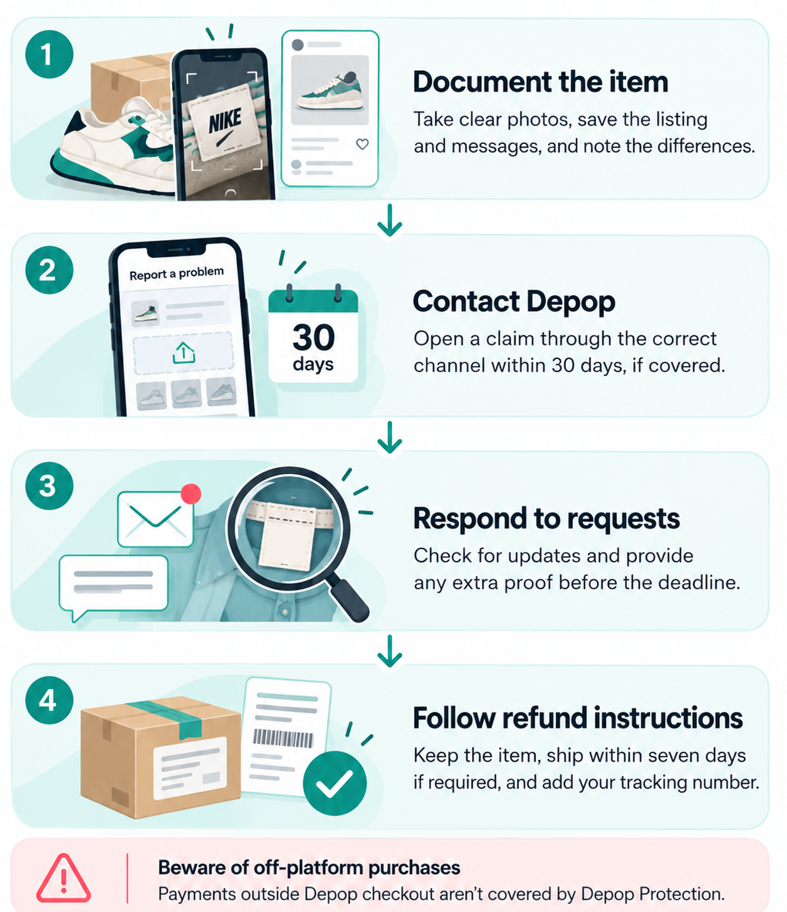
If you think you bought a fake on Depop, document the item, preserve the original listing, and report the problem through Depop's official support channels. Follow these 4 steps:
Step 1: Document the item
Take photos of the item, packaging, and details that make you think it's fake. Save screenshots of the original listing and your messages with the seller.
Note down how the item you received differs from what the seller advertised. Depop asks for clear photos and details about these differences.
For example, show photos of a suspicious size tag next to the seller's description or listing photos. Clearly explain the differences.
Step 2: Contact Depop
Report the purchase as “significantly not as described” using the claim process for your payment method. For claims handled by Depop, use its Resolution Center and follow its steps for an item that’s not as described, or contact Support.
Add the photos and proof you gathered in Step 1. You must report the problem within 30 days of purchase to keep your Depop Protection, if your purchase has it.
Step 3: Respond to requests
Check your messages and email for updates about your claim. Send any extra proof Depop requests before your case deadline. Clear photos help Depop check what's wrong with the item. If Depop asks for close-ups of labels or product details, send them as soon as possible.
Step 4: Follow refund instructions
Keep the item while Depop reviews your claim. Follow Depop’s instructions and wait for approval before you return or throw away anything. If Depop asks you to return the item, ship it within seven days of setting up the return.
Use tracked shipping and keep your tracking number and shipping receipt. Add the tracking number to your claim right away, or Depop will close it. Once tracking shows the item was delivered, confirm it in the app so Depop can finish the refund process.
Beware of off-platform purchases: Payments made outside Depop checkout, such as Venmo transfers and bank transfers, aren't covered by Depop Protection.
Other refund options depend on your payment provider and how you paid. Don't assume you'll get your money back after paying outside the app. Use Depop's BUY button to stay eligible for its purchase protection, where available.
What if Depop wrongly flags your genuine item as fake?
If Depop wrongly flags your genuine item as fake, submit an appeal through the platform. Follow these steps:
- Open the appeal link: Use the unique link in Depop’s removal email to appeal the decision. Follow the steps in Depop’s appeals policy.
- Send proof: Provide original photos, purchase receipts, or documents that prove your item is real.
- Wait before relisting: Don’t relist the item while Depop reviews your appeal. Doing so breaks Depop’s rules. Wait until Depop approves your appeal.
- Handle a suspension: If Depop suspends your account, read our guide on what to do if your Depop account gets suspended.
- Respond to buyer disputes: If a buyer claims your item is fake, follow Depop’s dispute process and submit your proof before the deadline.
- Keep your records: Save your receipts, photos, and messages in case you need them later.
How to avoid counterfeit disputes when selling on Depop
Avoid counterfeit disputes when selling on Depop by providing clear, accurate photos and writing precise descriptions. Follow these tips:
- Use original photographs: Take clear photos of labels, logos, stitching, and product condition. Include close-ups of details buyers might question, and keep the original images for future disputes. Use a quality photo-editing tool to give those images some extra pizzazz.
- Describe items accurately: Verify that branded products are genuine before listing them. Include the correct brand, model, size, and condition, and disclose any flaws buyers should know about.
- Keep purchase records: Save receipts, order confirmations, and other authenticity evidence for expensive branded items. Match each record to its listing so you can retrieve it when buyers raise concerns.
- Handle disputes on-platform: Check Depop messages regularly and respond to buyer concerns through the app. Follow the official dispute process when a claim is opened, submitting supporting evidence within Depop's deadlines.
Move more inventory with Nifty
Now that you know the answer to “Does Depop sell fakes?” you can make sure that your listings match your stock with Nifty. It’s a crosslisting and automation tool that lets you manage your items from eBay, Etsy, Poshmark, Depop, and other platforms in one place. Plus, it provides solid photo editing software so you can easily improve your images.
Here’s why more sellers trust Nifty:
- Customized AI listings: Upload your own photos and Nifty generates search-optimized titles, descriptions, and item details with the correct brand and model. Review every draft, then use custom instructions so authenticity language stays factual and defensible.
- Crosslist now: List eligible items across eBay, Etsy, Poshmark, Whatnot, Mercari, and Depop (more platforms coming soon). Marketplace access and features depend on your connected accounts and plan.
- Bulk crosslisting: Select multiple existing listings in Nifty, choose your target marketplaces, and set your pricing and shipping options. Then save the AI-generated results as drafts or publish them with consistent descriptions across platforms.
- Marketplace-specific Pricing Rules: Set a primary marketplace and rules for how prices adjust elsewhere, so a $220 pair of Jordan 1s lands at a believable, market-rate price on every platform. Prices far below resale draw counterfeit suspicion; consistent rules keep yours credible.
- Built-in auto-delisting: Enable auto-delisting and Nifty removes an eligible sold item from your other connected marketplaces, cutting the risk of selling the same item twice and facing a dispute over stock you no longer hold.
- Bulk tools = less busywork: Relist selected items in batches, schedule ready-to-publish drafts, and use supported automations for recurring selling tasks, leaving more time to photograph tags, labels, and serial numbers properly.
- Analytics and profits, made clearer: Track sales, fees, profit, and your top-selling brands and categories. Set seller goals, monitor your progress from Nifty’s home screen, and identify high-value items that need additional authenticity documentation.
Start with a 7-day free trial and see how Nifty helps you publish accurate, consistent listings across every marketplace, so your authentic inventory sells with fewer questions and fewer disputes. And if you’re selling on Depop, eBay, Etsy, or Whatnot in the UK or Australia, Nifty’s available for you, too.
FAQs
1. Does Depop authenticate items before they are sold?
No, Depop doesn’t authenticate items before they’re sold. It uses automated systems, machine-learning tools, user reports, and human reviewers to detect counterfeits. These checks don’t verify every product. Inspect photos, labels, and seller history yourself, which reduces the risk of buying a fake.
2. Does Depop allow replicas if they're labeled as fake?
No, Depop doesn’t allow replicas, even if they’re labeled as such. Its prohibited items list bans counterfeits and replicas outright, however they’re labeled. Listing only genuine branded items helps you avoid removed listings, account penalties, and buyer disputes.
3. Does Depop refund counterfeit items?
Yes, eligible purchases made through Depop checkout may qualify for a refund when you report counterfeit items as significantly not as described within 30 days of purchase. Depop reviews your supporting evidence before deciding whether to approve the claim.
4. Can Depop ban you for selling fake items?
Yes, Depop can ban you for selling fake items by removing listings and restricting or suspending your account. If Depop wrongly flags a genuine item, use the appeal link in the removal email and provide receipts, original photographs, or other authenticity evidence.