
How to organize Poshmark inventory: 6 simple steps (2026)

Organize your Poshmark inventory by first sorting it by type and condition, giving it a dedicated SKU, and storing it with similar items. Over the years, I’ve helped many Poshmark sellers make more sales and save time by showing them how to properly organize their inventory.
Discover when to start organizing new items, how to create SKUs, and how much storage space you should have.
How to organize Poshmark inventory in 6 steps
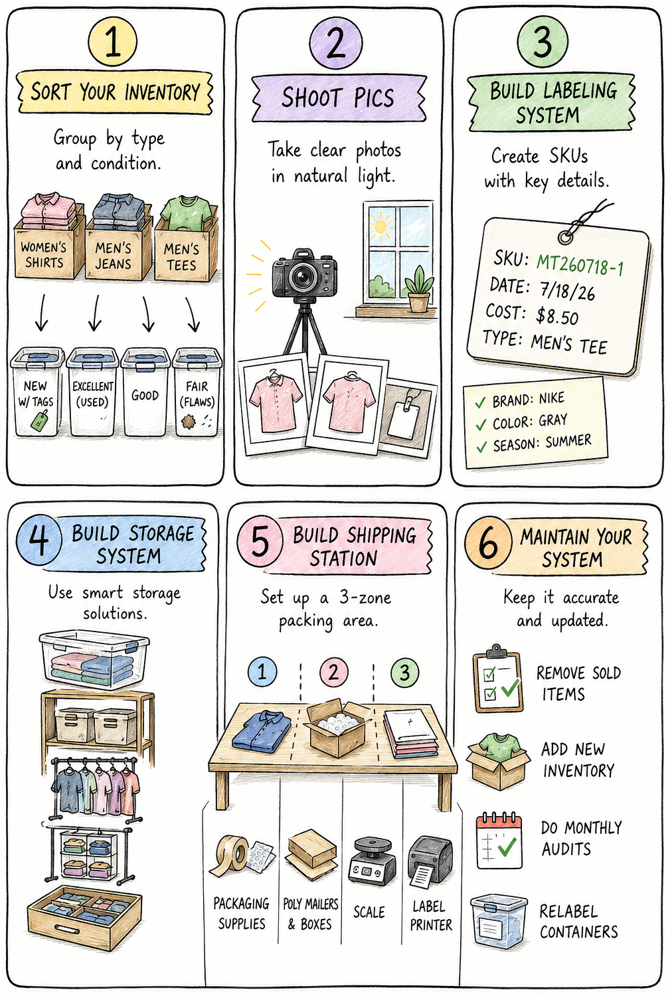
Step 1: Sort your inventory
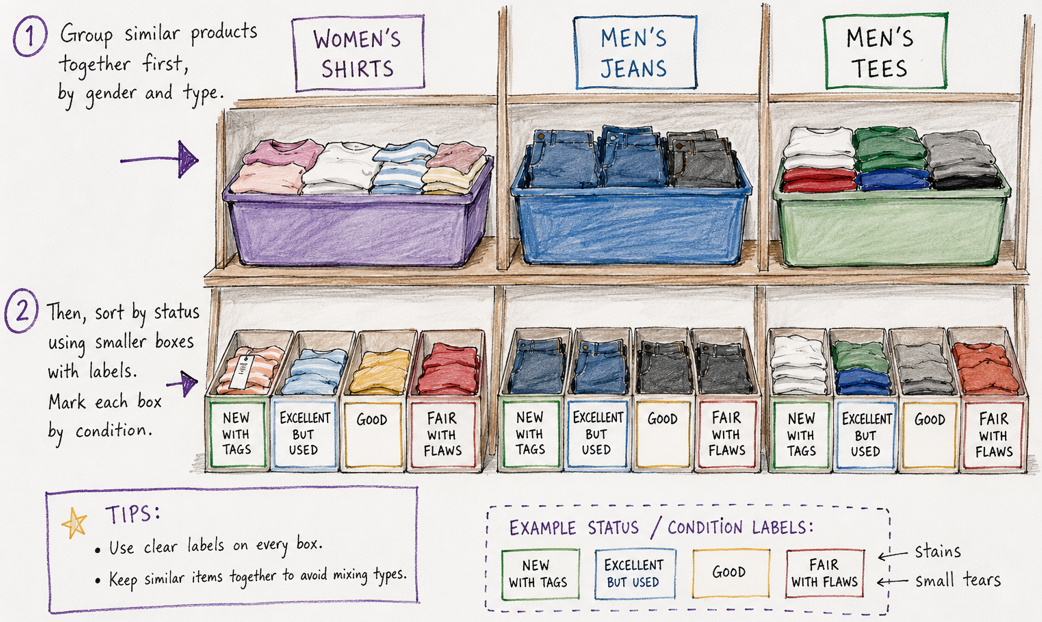
Sort your inventory by grouping similar products together first, by gender, and then by condition. For instance, put your women’s shirts in one section, men's jeans in another, and men’s tees in another. To avoid mixing types, use boxes with clear labels.
Then, sort by condition, using smaller boxes with labels. Mark each box by condition, such as new with tags, excellent but used, good, and fair with flaws like stains or small tears.
Step 2: Shoot pics
Now that your inventory is sorted, it’s time to photograph your inventory. I recommend shooting product pics in a place that offers as much natural light as possible.
Poshmark allows for up to 16 pictures and 1 video, but I always take 30 and pick the best 16. Shoot fronts, backs, tags, stitching, and any flaws.
Consider investing in a quality photo-editing tool that lets you sharpen images, remove backgrounds, and add ghost mannequin effects that mimic what your clothes look like when worn.
Step 3: Build a labeling system
Begin building your inventory storage system by creating a labeling system. Label each item with its purchase date, cost, and SKU (stock-keeping unit). Create SKUs that identify the item type followed by a unique number. For example, a men's T-shirt purchased on May 18, 2026, could use the SKU MT260518-1 (item type + YYMMDD purchase date + unique number).
You can also add labels that mention brands, colors, and seasons, too. Most labeling systems work, as long as you consistently label your items and store them in the right places.
Use a Poshmark software tool that lets you enter your storage information. You can also use a spreadsheet, but you’ll need to manually enter lots of info. Software tracks each listed item, including likes, sending offers, and sales. When an item sells, it automatically calculates Poshmark fees, shipping, and profit margins while keeping your inventory up to date.
Step 4: Build a storage system
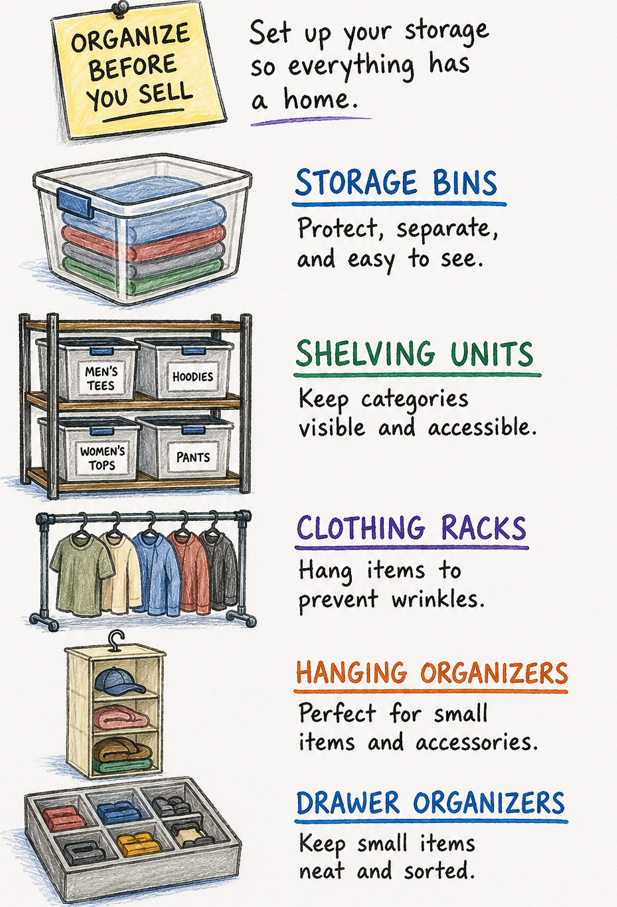
Now it's time to organize each item into its permanent storage location before you sell it. Label each area with the type of item you're storing, like “men’s tees.” Consider these organization methods:
- Storage bins: I recommend using clear containers because they separate inventory into defined groups and protect clothing from dust. Plus, you can easily see items through clear plastic. Every product stays contained, searchable, and ready for retrieval.
- Shelving units: Vertical storage keeps containers visible instead of stacking them across the floor. Finding inventory becomes faster because every category remains accessible without moving other items.
- Clothing racks: Garments that wrinkle easily stay hanging instead of folded inside containers. Better presentation reduces preparation time before photographing, measuring, or shipping each order.
- Hanging organizers: Fabric compartments hold lightweight accessories and smaller apparel that disappear inside larger containers. Small inventory stays visible and easy to locate.
- Drawer organizers: Divided compartments keep compact inventory from moving into mixed piles over time. Every section holds a defined product group, preventing unnecessary searching before shipment.
Step 5: Build a shipping station
Clear out a dedicated area that you can use for packing items after they’ve sold. Set it up like an assembly line, with a place to set the item immediately after you’ve grabbed it from storage and a second place to package it. The third section will be the ready-to-ship area.
Here’s what you need to build a shipping station:
- Packaging supplies: Tape, bubble wrap, and tissue paper should be in the second section of your shipping station. Store these in drawers or boxes so they aren’t strewn all over the place.
- Poly mailers and boxes: Have a variety of different boxes and poly mailers on hand.
- Scale: Weighing packages before printing labels stops mismatched postage that gets flagged, delayed, or returned for insufficient payment at the carrier.
- Label printer: Printing shipping tags at home instead of the post office saves time, which will pay off when you grow your reselling business.
Step 6: Maintain your inventory system
Maintain your inventory system by packing and shipping items as soon as they sell and adding new inventory immediately after sourcing trips. Follow these pointers:
Always remove sold items
Once an item sells on Poshmark, the item should leave your storage system as soon as it ships. Outdated inventory records waste time searching for products that no longer exist, creating confusion during listing, relisting, and inventory counts. Accurate storage reflects reality and helps you keep clear, accurate records so you can make money on Poshmark.
Add new inventory immediately
Before you set out on sourcing trips, have your organizing boxes ready for your return. When you get home, immediately start sorting, organizing, and recording your new inventory.
Delaying organization creates piles that quickly become permanent clutter. That makes items harder to find and increases the risk of misplaced or forgotten inventory.
Do monthly audits (inventory counts to match your records)
A scheduled count compares physical inventory against your records. It helps you catch small mistakes that snowball into lost revenue. Audits allow for corrections while problems remain manageable instead of spreading across your entire storage system over several months.
Relabel damaged containers
Over time, storage labels fade, tear, or detach. Replacing worn labels keeps every location readable, which prevents misplaced inventory and helps you accurately retrieve products.
How much storage space do you need for Poshmark inventory?
The right amount of storage depends on how many active listings you keep. I’ve helped casual sellers organize a total of 100 to 200 items using a single shelving unit or 10 clear storage bins.
Larger resale businesses usually need multiple shelving racks, which often takes a dedicated room. Garage space can work well, but beware of damage from humidity and dust.
Leave extra space for new inventory so your system keeps working instead of overflowing into unorganized piles.
Organize your Poshmark inventory with Nifty
If you're looking for how to organize Poshmark inventory faster, use a record-keeping system that tracks your cost of goods (COGs), automatically deducts fees and shipping, and calculates your profit. Nifty does exactly that while also helping you organize and manage inventory across five other marketplaces.
Here's why over 10,000 sellers use Nifty:
- Customized AI listing: Snap a pic and let Nifty's AI build a complete listing, with SEO-optimized titles and descriptions, and trending hashtags already filled out for you. You can even customize how AI writes your listings to follow your unique style.
- Crosslist now: With a couple of clicks, post your items across Whatnot, Poshmark, eBay, Mercari, Depop, and Etsy. No copy-paste clutter and no multi-tab hopscotch. (More marketplaces coming soon!)
- Automatic delisting? Handled: When you make a sale, Nifty's sales detection auto-delists that item from every marketplace. Say goodbye to double-selling disasters and "sorry, it's already gone" apology messages.
- Bulk tools = no busywork: Share and relist daily in just a few clicks. You can even schedule drafts to go live while you sleep and set automatic discounts that run deeper over time.
- Analytics and profits are real: Track sales, fees, top performers, and slow movers in one clean dashboard, so you can actually see what's working and what's just dead space. You can also set and track seller goals directly from your home screen.
Nifty pays for itself in just a few weeks. Start with a 7-day free trial and see how Nifty can take the inventory system you just built and keep it accurate across several other platforms.
FAQs
1. What's the best way to organize Poshmark inventory?
The best way to organize Poshmark inventory is to sort by type, gender, and condition. Then, to keep track of your items, you’ll give each one a specialized SKU and store them in labeled bins or shelves alongside similar inventory. This system reduces overselling risk and helps you find items fast for shipping.
2. How do I label Poshmark inventory?
The best way to label your Poshmark inventory is to tag its purchase date, cost, and a unique SKU that identifies the item type. For instance, use WTT251111-2 for the second (-2) women’s tank-top (WTT) that you purchased on November 11th, 2025. You can then use that SKU in your inventory software or spreadsheet to reference sourcing costs and listing prices.
3. Should I use bins or shelves?
Clear bins work best for smaller sellers since they protect items and let you see contents instantly. Shelves suit larger inventories needing vertical space. Either choice avoids stockouts by keeping items visible and easy to retrieve.
4. Do I need to use SKU numbers to organize my Poshmark inventory?
Yes, you need to use SKU (stock-keeping unit) numbers to organize your Poshmark inventory. These numbers let you track each item's cost, purchase date, and status at a glance, even across thousands of listings. Using SKUs reduces overselling risk and cuts manual updates when calculating profit margins across multiple marketplaces.



.jpg)
.jpg)