
How to sell on OfferUp: A step-by-step guide (2026)
.png)
Sell on OfferUp by uploading clear photos and writing an accurate description of your item. OfferUp is great for larger items that require in-person meetings.
Here, I’ll discuss OfferUp buyer behavior, prohibited items, and how to safely meet with buyers to get paid.
How selling on OfferUp works
Selling on OfferUp works differently from many other marketplaces for the following reasons:
1. It’s a marketplace for local transactions
OfferUp focuses on local buyers only. The platform ended nationwide shipping in September of 2025. Buyers search by location, and the app shows them listings from nearby sellers first. Sellers compete mainly with other sellers in their area, not across the country.
Before listing anything, sellers should think about whether the item will sell well locally or if it needs a bigger national audience. Sellers should consider listing on platforms like eBay and Mercari if they can’t sell their products locally.
2. Buyers contact you first
Buyers usually message you first by asking questions, sending offers, or checking if the item is still available. Conversations can lead to sales.
Many buyers message several sellers at once, so if you want to make a sale, you need to reply quickly. The seller who replies first with a clear answer and firm price often gets the sale.
Offers that are 30–50% lower than your asking price are very common. Don’t take this personally. It’s just how the platform works. Counter this by starting higher so you can come down.
Buyers also flake often, which most sellers find very annoying. Don’t treat a meetup as a done deal until the buyer shows up and pays. Keep your listing active until you have the cash in your hand.
3. Deals close through meetups
OfferUp sales usually end with an in-person meetup. Beware of buyers who try to negotiate an even lower price at the last minute. If you’re not ready for that, you may accept less money than you wanted.
Price your item a little higher than your lowest acceptable price, so you have room to negotiate if the buyer gives a “now or never” offer.
What you can and can’t list on OfferUp
If you list any of the following items on OfferUp, the platform may remove them or even suspend your account without warning:
- Prohibited categories: You can’t sell certain things like weapons, illegal items, medical and healthcare products, and recalled products on OfferUp.
- Condition transparency requirements: Your listing must clearly show the true condition of the item. If you say something works when it doesn’t, buyers can report you.
- Duplicate listings: Don’t repost the same item over and over to stay at the top. OfferUp can detect this pattern. Instead, use the promote feature to refresh your listing safely.
Keep in mind that OfferUp doesn’t always ban accounts right away. First, it may reduce how often your listings show up. If your listings suddenly stop getting messages after a violation, the platform may have already limited your account. This can happen before a full suspension.
How to post an item that sells on OfferUp: Step-by-step
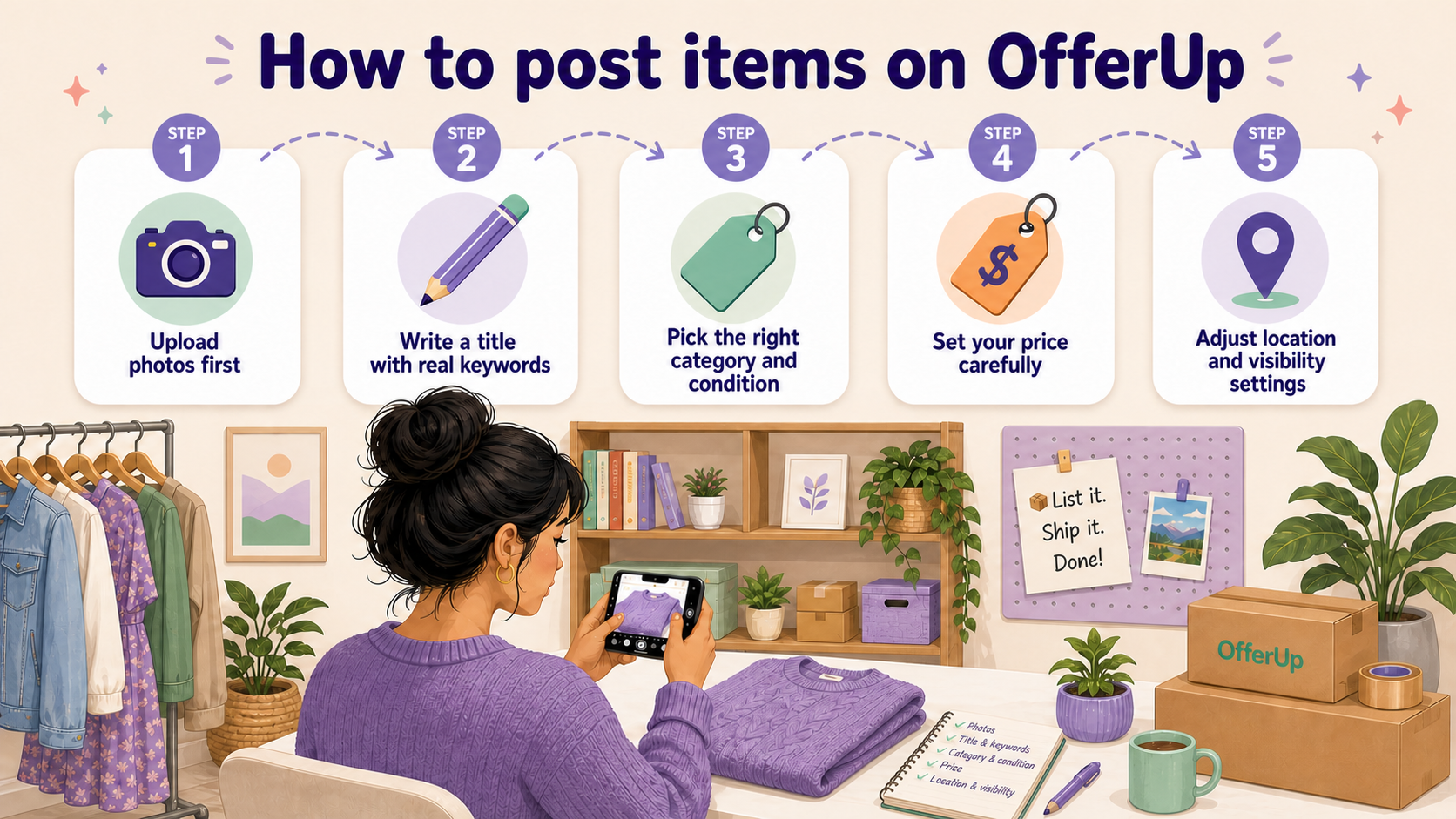
A well-built listing performs better from the start. If you follow these steps in order, buyers can find your listing more easily, and your post will look more appealing:
Step 1: Upload photos first
Buyers often look at photos before they read anything. Listings with several clear images (OfferUp lets you upload up to 12) show up more often than ones with only one photo.
Take photos in natural light. Show the front, back, any flaws, and tags or labels. Don’t leave out details like wear or flaws. Buyers may see this as dishonesty.
Step 2: Write a title with real keywords
The title helps buyers find your listing. OfferUp’s search depends heavily on it. Don’t use vague titles like “jacket.” Instead, write what a buyer would search for, like “men’s Carhartt brown canvas work jacket size large.” If you’re not sure what to write, search for the item you’re selling and model your title on the top results.
Include brand, item type, color, and size so more people can find it, and they know exactly what you’re selling.
Step 3: Pick the right category and condition
Choose the correct category so the right buyers see your listing. If you place it in the wrong section, people may ignore it or report it. Select the correct condition too.
Many buyers see this before they read your description. If the condition doesn’t match the item, you risk problems during the meetup.
Step 4: Set your price carefully
A random price can make your item sit unsold. Check what similar items sell for in your area. Set your price a little higher than your lowest acceptable amount. This gives you room to negotiate when buyers make offers in person.
Step 5: Adjust location and visibility settings
OfferUp uses your current location by default. You can change your radius to reach more buyers. A small radius targets nearby buyers who can meet quickly. A larger radius reaches people willing to commute. If you don’t adjust this setting, OfferUp decides for you.
Meeting your buyer safely and getting paid
On OfferUp, most sales happen in person, so you’ll need to follow these pointers to stay safe:
Where and how to meet
Meet in a public place with lots of people around, like a grocery store parking lot or near a police station. Avoid quiet side streets, and never ever give out your home address.
Only bring the item you are selling. Don’t bring extra items or anything unnecessary to the meetup. Before you leave your house, confirm the item details with the buyer. Make sure they understand the price, condition, and what they’re picking up.
Just to be safe, always tell a friend or family member who you’re meeting, where, and at what time. Providing information like this can help cover you in case of an emergency.
Getting paid without getting burned
Cash is the safest payment method because the buyer can’t reverse or cancel their payment. It removes the risk of chargebacks or payment scams.
Always count the money before you hand over the item. Do this in front of the buyer to avoid confusion.
When to walk away
Buyers who try to change the meeting location at the last minute might be trouble. Be firm about the location and cancel the sale if they refuse.
If the buyer suddenly pushes for a different payment method during the meetup, they’re not negotiating. They may be testing you for a scam. Firmly require cash, and if they don’t accept, walk away.
One more important reminder: If something feels off, trust your instincts and leave. No sale is worth putting yourself at risk.
Why your item isn’t selling on OfferUp
Many sellers can’t move items on OfferUp because of the following reasons:
If your listing is not getting attention, there is usually a clear reason. Guessing will waste time. These are the most common problems and what you should fix first:
- Your price is too high for your local market: OfferUp buyers compare prices in their area, not across the country. A price based on eBay sales is often too high for local buyers. Check similar listings on OfferUp in your city. Look at what items actually sold for, then adjust your price to match the local market.
- Listing lacks clear photos or details: Blurry photos or short descriptions turn buyers away. Most people will scroll past without clicking. Local buyers need enough information before they decide to meet. Give them clear photos and complete descriptions.
- Your item has low local demand: Some items sell well online but not in your area. For example, niche or specialty items may not have local buyers. If you can’t find similar listings nearby, demand is probably low. In that case, consider selling on one or more platforms with shipping.
- You respond too slowly: Buyers on OfferUp move fast. If you reply too late, they may already have a deal with someone else. Once you’ve posted an item, keep your phone nearby so you can immediately respond to messages.
- Listing has gone stale: Older listings get less visibility. If your post has been up for a few weeks with no activity, fewer buyers will see it. Delete and repost the listing or use the Promote feature to refresh it. If no one sees your listing, it will not sell.
Manage your listings with Nifty
Since you know how to sell on OfferUp, why not consider listing your items on other platforms so you can reach buyers in other states and countries? If you want to make selling on other marketplaces simple, try Nifty, an excellent crosslisting and automation tool that simplifies multi-platform selling by giving you a central command center for uploading and editing listings.
Here’s why over 10,000 sellers trust Nifty:
- AI listing: Snap a pic and let Nifty's AI build a complete listing with SEO-optimized titles, descriptions, and relevant hashtags already filled in. No writing from scratch for every item you post.
- Crosslist now: Post your items across Poshmark, eBay, Mercari, Depop, Whatnot, and Etsy in a couple of clicks. No copy-paste, no multi-tab. (More marketplaces coming soon!)
- Automatic delisting? Handled: When a sale comes in, Nifty auto-delists that item from every platform. No double-selling, no messages to buyers telling them the item is already gone.
- Bulk tools, no busywork: Relist and refresh your inventory daily in just a few clicks. Schedule drafts to go live while you sleep.
- Analytics and profits are real: Track sales, fees, top performers, and slow movers in one dashboard so you can see exactly what's moving and what's been sitting too long.
Nifty pays for itself in just a few weeks. Start with a 7-day free trial and free up more time so you can source more often and connect with more buyers.
FAQs
1. Is OfferUp only for local selling?
Yes, OfferUp is only for local selling, which means most transactions happen in person between nearby buyers and sellers. The platform adopted this policy in September 2025. Buyers search by location, and listings appear based on proximity. If your item needs a national audience, you may need to use platforms like eBay or Mercari instead.
2. What is the safest way to get paid on OfferUp?
Cash is the safest way to get paid on OfferUp because it can’t be reversed or disputed. Always meet in person, count the money before handing over the item, and avoid buyers who push for alternative payment methods at the last minute. These are common signs of scams.
3. Why is my item not selling on OfferUp?
Your item probably isn’t selling because of pricing, low local demand, or weak photos and titles. If your price is higher than similar local listings, buyers will skip it. Poor photos or missing details can also reduce interest. Check what similar items sell for in your area and adjust your listing to match local expectations.


.png)
.png)
.png)