What does boosted mean on Depop? Fees explained (2026)

“Boosted” on Depop means a seller has paid to promote a listing in search results and recommendations to reach more shoppers.
You pay nothing upfront, and boosting doesn't change your listing price. However, Depop takes 12% of each qualifying Boosted sale in the US and UK if a shopper purchases a Boosted item.
I’ll show you how much boosting costs on a $50 item and how to boost or unboost a listing. By the end, you'll know if boosting is worth it for you.
How much does Depop boosting cost?
Depop boosting costs 12% of qualifying boosted sales in the US and UK and 8% in Australia. The 12% rate applies to US and UK listings created from March 23, 2026.
The fee applies to the item price plus seller-arranged shipping, excluding taxes and Depop Shipping labels. Payment processing is charged separately on every sale.
Here’s how much you’ll have left on a Boosted sale of a $50 item:
How does boosting work on Depop?
Boosting on Depop is a form of pay-per-sale advertising that can place listings in front of more shoppers. Here’s how to understand the mechanics of boosting:
- Extra visibility for buyers: Boosting adds paid placements to search results and personalized recommendations for buyers. But extra exposure doesn't guarantee more views or sales. Australian buyers also pay a Marketplace fee, included in Depop's displayed pricing.
- No upfront payment: Depop charges boosting fees only when qualifying sales occur. So even if you boost 40 tees, you’ll incur no boosting fees unless qualifying sales occur. Australian sellers pay 8% on the item price and applicable shipping costs.
- 28-day attribution: Depop charges a boosting fee if someone buys your item within 28 days of seeing its boosted placement, even without clicking it. The fee still applies if they later find and buy the item through regular search, including after you've turned off boosting. But no boosting fee applies if they never saw the boosted placement.
How to boost or unboost listings on Depop
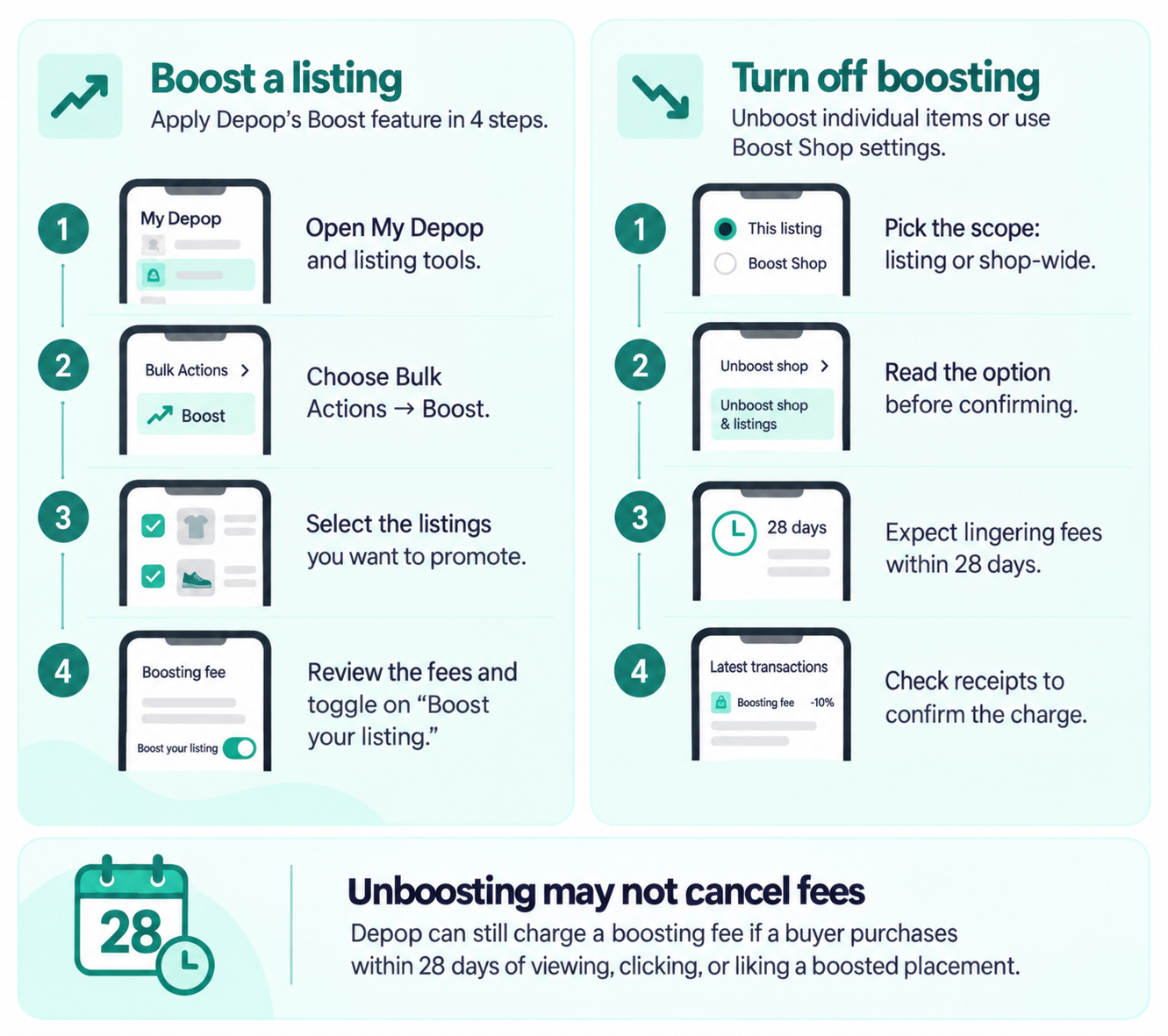
Boost or unboost your listings on Depop by following these directions:
How to boost a listing
Apply Depop’s Boost feature in these 4 steps:
- Open My Depop and find your listing tools.
- Choose Bulk Actions → Boost.
- Select the listings you want to promote.
- Review the boosting fees and toggle on “Boost your listing” to confirm. The menu may look different depending on your app version.

How to turn off boosting
You can unboost individual listings or use Boost Shop settings to manage promotions across your shop.
Follow these steps:
- Pick the scope: Unboost individual listings or use Boost Shop settings to manage your entire shop. If you unboost a single listing while Boost Shop is active, Depop will also turn off automatic boosting for your shop.
- Select the right option: Choose Unboost shop to stop boosting new listings automatically. Existing boosts will stay active. Choose Unboost shop & listings to turn off boosting for all listings, including existing ones.
- Expect lingering fees: Buyers who viewed, clicked, or liked a boosted placement can still trigger the fee by purchasing within the 28-day attribution window, even after boosting stops.
- Confirm the charge: Open Payments → Latest transactions → Receipts to check whether a boosting fee was deducted.
If you unboost on Depop, do you still pay the fee?
If you unboost on Depop, the platform may still charge a boosting fee if the buyer purchases the item within 28 days of viewing, clicking, or liking its boosted placement. This can happen even after you turn off boosting. Asking buyers to wait doesn't cancel the 28-day window.
For instance, if you unboost a jacket while messaging with a buyer, you’ll still need to pay the 12% fee (or 8% if you’re in the land of kangaroos and koalas) if the buyer viewed its boosted placement last week.
Purchases without boosting fees: If a shopper finds and buys your item without seeing its boosted placement in the previous 28 days, you won't pay a boosting fee. However, if they saw the Boosted version earlier, the fee can still apply even when they buy through regular search.
Is boosting on Depop worth it?
Boosting on Depop may be worthwhile when additional sales generate enough profit to cover the fee. Check these factors before choosing which listings to boost:
- Profit margins: Add up what you paid for each item, shipping costs, processing fees, and boosting fees before promoting it. Cheap items may leave little profit after these costs. For example, a $15 tee bought for $8 leaves about $4.26 after a 12% boosting fee and processing fees. This amount doesn't include shipping or other costs.
- Existing demand: Likes and clicks from regular, unpaid listings can show how much interest shoppers have in your items. Items already getting attention may be worth testing without boosting first. However, likes and clicks don't always lead to sales.
- Listing performance: Depop’s boosting stats show total views and clicks. They also show the percentage of views from boosted placements compared with regular listings since you started boosting. These percentages don’t measure changes in sales.
Boost your revenue on Depop & other platforms with Nifty
You know what boosting means on Depop, but did you also know there’s another way to put a slow item in front of more buyers? You can do this by listing your Depop items on other platforms, such as eBay and Poshmark. That’s where Nifty, a crosslisting and automation tool, comes in.
Here’s why more sellers trust Nifty:
- Customized AI listings: Upload photos and let Nifty generate search-optimized titles, descriptions, and item details, giving your listings a better shot at organic discovery before you pay for placement. Review the draft, then use custom instructions to shape its writing style.
- Crosslist now: List eligible items across Depop, eBay, Etsy, Poshmark, Whatnot, and Mercari from one platform, with no re-entering details on each marketplace. Marketplace access and features depend on your connected accounts and plan.
- Bulk crosslisting: Select multiple existing listings in Nifty, choose your target marketplaces, pricing, and shipping, then save the AI-generated results as drafts or publish them.
- Marketplace-specific Pricing Rules: Set a primary marketplace and rules for how prices should change elsewhere, so you never calculate every crosslisted price from scratch.
- Built-in auto-delisting: Enable auto-delisting, and Nifty can remove an eligible sold item from your other connected marketplaces, helping reduce the risk of selling the same item twice.
- Bulk tools = less busywork: Relist selected items in batches, schedule ready-to-publish drafts, and use supported automations to handle recurring selling tasks that keep listings fresh in search.
- Analytics and profits, made clearer: Track sales, fees, profit, and your top-selling brands and categories, so you can see what each sale actually nets once fees come out. You can also set seller goals and check your progress from Nifty’s home screen.
Start with a 7-day free trial and see how Nifty can help you reach more buyers on your other marketplaces before you pay Depop's boosting fee. And if you’re based in the UK or Australia and sell on Depop, Etsy, Whatnot, and eBay, Nifty’s now available for you, too.
Disclaimer: Nifty is designed to work within Depop’s rules and platform policies. Sellers should follow Depop’s current guidelines when using automation, crosslisting, and other listing management features.
FAQs
1. Does Depop automatically boost your listings?
No, Depop doesn’t automatically boost your listings unless you enable Boost Shop. This optional setting promotes existing listings and automatically boosts new ones. Check your Boost Shop settings before adding inventory to avoid unexpected advertising fees on qualifying sales.
2. Can you boost listings on Depop mobile?
Yes, Depop supports boosting through its mobile app. Open My Depop, tap Bulk Actions → Boost, and select the listings you want to promote. You can also enable Boost Shop to promote your shop. Review the applicable fees before confirming.
3. What is a Depop boost extension?
A Depop boost extension generally refers to an unofficial third-party browser tool marketed for listing promotion or automation. Unlike Depop's paid Boost feature, these tools don't purchase official boosted placements. Features vary by provider. Note that third-party Depop extensions aren’t officially endorsed by Depop.
Always check their compliance with Depop’s terms before using them to avoid potential account restrictions.