eBay Best Offer strategy guide: 7 tips (2026)
.png)
Let’s say an eBay buyer offers you $18 on a hoodie you listed for $30. Do you take it, counter it, or let it expire? Some sellers guess, which is how you end up losing money.
I've sold on eBay long enough to build a system around this: Calculate a minimum acceptable price before I ever list an item and set auto-accept and auto-decline thresholds around it. Below, I'll walk you through my Best Offer strategy guide so you can stop reacting to offers and use a system that makes you money.
My eBay Best Offer strategy: 7 tips at a glance
→ 1. Price your listing before enabling Best Offer
→ 2. Adjust Best Offer settings
→ 3. Evaluate other offers
→ 4. Decide whether to accept, counter, or decline
→ 5. Adjust your strategy as listings age
→ 6. Manage response timing and multiple buyers
→ 7. Track Best Offer performance
1. Price your listing before enabling Best Offer
Best Offer works best when your list price can compete with comparable items. Here are 3 pointers to help:
Check sold listings
Check other sellers’ sold listings on eBay to see which similar items sold and what buyers paid. This can help you find a realistic price range.
Only compare recent sales for similar items. Look for the same model, condition, features, and included parts. Don’t rely only on the prices sellers are currently asking.
Keep in mind that eBay may not show the final negotiated price when an item sells through Best Offer. Use several comparable sales to get a clearer picture of the market. I recommend that you track these prices in a spreadsheet to compare them side by side.
Read our eBay pricing guide for a deeper understanding of pricing.
Calculate your minimum acceptable price and set your price
Your minimum acceptable price is the lowest offer that can allow you to profit on eBay after selling costs. Account for how much you paid for the item, eBay fees, shipping, packaging, and any other expenses you pay.
First, determine a minimum profit margin. For items like the Nirvana hoodie I sold a few weeks ago, I usually set a 15% minimum profit margin. Here’s a look at each line-item cost and how I determined my profit margin:
eBay fee: 13.6% × $22.97 = $3.12, + $0.40 per-order fee = $3.52
Shipping: $6.00
Hoodie cost: $10.00
Total costs: $19.52
Minimum selling price: $22.97
Profit: $22.97 − $19.52 = $3.45
Calculate your minimum selling price for each item before enabling Best Offer. This helps you avoid accepting offers that leave too little profit or cause you to lose money after fees, shipping, and other selling costs.
Keep in mind that this is the minimum acceptable price, not the listing price. If you set this as your listing price, you’ll get Best Offers from buyers that will most likely fall under your 15% minimum threshold.
List your item priced above your minimum acceptable price. Read our article that walks you through how to list on eBay for more information.
2. Adjust Best Offer settings
By adjusting your Best Offer settings, which control how eBay handles offers from buyers, you can choose which listings accept offers. You can also set rules to automatically handle some offers. Here’s how to adjust these settings:
Choose which listings accept Best Offers
Best Offer lets buyers suggest a price. You can in turn accept, decline, or counter that suggestion. Turn it on for listings where you have room to negotiate.
For example, you might use Best Offer on a hoodie that gets views but hasn’t sold. But only do this with items that have low enough costs and will incur low enough fees to keep your profit margin at no less than 15%.
Set an automatic decline amount
Your automatic decline amount sets a hard floor. If a buyer offers less, eBay automatically declines the offer for you.
Set this amount at the price that clearly isn't worth your time. I set mine below my 15% target, at roughly a 10% profit margin, so offers between 10% and 15% still reach me to evaluate manually, while anything lower gets declined automatically.
Set an auto-accept amount
The auto-accept amount tells eBay when to accept an offer for you.
Since you already know your minimum price, ask yourself: What offer would I happily take without negotiating? Consider what you paid for the item and how long it has been listed. Also look at its views and the other offers you’ve received. These details can help you decide what counts as a strong offer.
For example, say your minimum for a hoodie is $23, and your Buy It Now price is $30. You could set auto-accept at $27.
3. Evaluate other offers
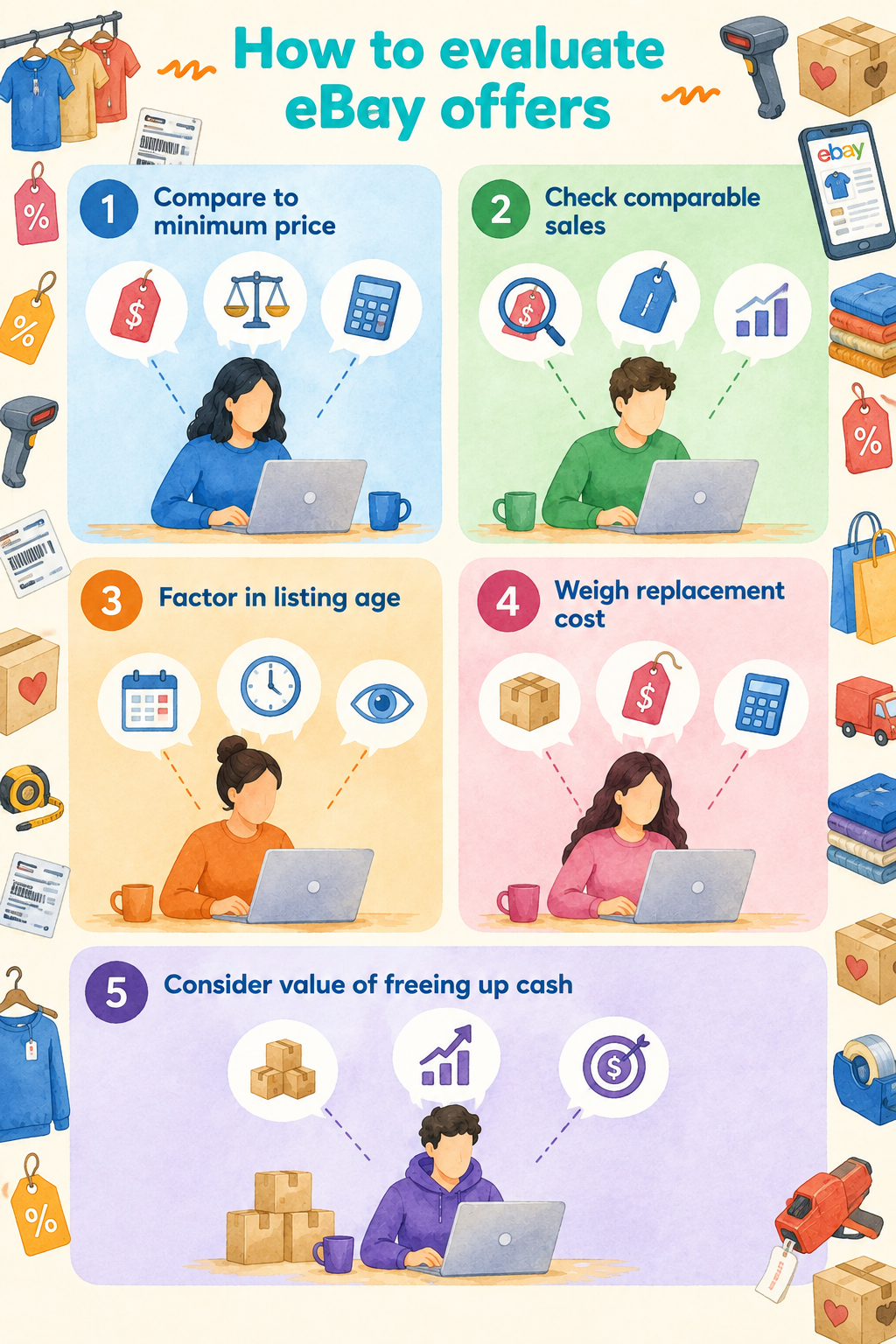
Now, let's talk about how to evaluate the offers that eBay won’t automatically reject or accept on your behalf. Here’s my 5-step system for eBay offer evaluation:
Step 1: Compare the offer with your minimum acceptable price
Start with the minimum price you calculated before listing. If the offer falls below that number, declining it protects the margin you already decided you need. But if the offer clears the minimum, move on to the other factors that determine whether accepting now makes sense.
For example, a $24 offer clears a $23 minimum acceptable price, while a $20 offer does not.
Step 2: Check recent comparable sales
If your item hasn’t received any interest, look at recently sold listings for the same or closely comparable item. Pay attention to condition, size, and model. Comparable sales can help show whether the current offer is close to what similar items have been selling for.
Comparable items selling near your asking price give you more reason to hold firm. Consistently lower sale prices can make the current offer more attractive.
For collectible, vintage, or sentimental items, don’t let personal attachment influence what you consider a fair offer. Use comparable sales to separate what the item is worth to you from what buyers are currently willing to pay.
Step 3: Consider how long the item has been listed
The length of time an item’s been listed can help you decide how patient you want to be about selling it. A recently listed item may justify waiting for more buyer interest. But an item that has been available for weeks without selling may justify more flexibility.
Use listing age alongside views, watchers, offers, and comparable sales. Don’t treat time as the only reason why demand is falling.
Step 4: Consider replacement cost and inventory scarcity
Think about how hard or expensive the item would be to replace. Also, look at how many similar items you already have. Rare, collectible, or hard-to-find items may be worth holding out for a better offer. Replacing them could cost more or take a long time.
Easy-to-find items give you more room to accept a slightly lower offer. You may also accept less when you already have several similar items.
Step 5: Consider the value of freeing up cash
Holding inventory ties up money that could otherwise be used elsewhere. Accepting a slightly lower offer (even one that dips below your usual 15% margin) may make sense when selling now frees cash for faster-moving or higher-margin inventory. Just compare the amount you are giving up with the value of getting your money back sooner.
4. Decide whether to accept, counter, or decline
When you get an offer, here’s some guidance on whether to accept, counter, or decline it:
If you accept the offer …
Accepting means agreeing to the price the buyer offered. You can accept when the offer clears your minimum acceptable price and makes sense based on comparable sales, demand, and how quickly you want to move the item. After you accept an offer, the sale proceeds through eBay's checkout and payment process before fulfillment.
If you counter the offer …
Counter by responding with a different price. You don’t accept or decline the buyer's offer. You can counter when an offer falls below your target, but it’s above your minimum acceptable price.
For instance, if the lowest price you can take on a hoodie listed for $45 is $30 and a buyer offers $35, counter with $40.50. Expect to settle somewhere around $38.
If you decline the offer …
Decline when a buyer’s current offer is below your minimum or too far from a price you would accept. Unlike making a counteroffer, declining doesn’t involve coming back with a new price for negotiation.
When you decline, your item stays available to other buyers. The same buyer may also be able to make another offer.
For example, a $15 offer on that $45 hoodie is probably too low to make negotiating worth your time. Decline it and move on.
Personally, I set my auto-decline at any price that would leave me with at or less than a 10% profit margin. That way, I don’t waste time dealing with offers I would never accept.
5. Adjust your strategy as listings age
You can become more flexible with your price the longer an item sits unsold. Just stay firmer on newer listings while you see how much buyer interest they get. For older listings, consider accepting lower offers, especially if comparable sales are lower. Look at views, watchers, recent sales, and how quickly you need the cash.
6. Manage response timing and multiple buyers
Don’t just respond to buyer offers point blank, especially when you have several offers. A buyer's Best Offer generally remains open for 24 hours, or until the listing ends, whichever comes first.
During that window, you can accept, decline, counter, or let the offer expire. But you don’t have to respond immediately.
An offer near your minimum price may be worth holding for a short time to see whether another buyer makes an offer. More buyer interest gives you a chance to compare offers and send counteroffers to several buyers. For a single item, the buyer who accepts your counteroffer and pays first gets it.
7. Track Best Offer performance
Best Offer works well when you track offer acceptance, average discount, and counteroffer conversion rates:
- Offer acceptance rate: This shows how many buyer offers you accept. Divide the number of accepted offers by the total offers you received. A low rate doesn’t always mean your minimum price is too high. Buyers may simply be sending very low offers. Check your completed sales, recent sale prices, and profits before lowering prices.
- Average discount from Buy It Now price: For each sale, subtract the final selling price from the Buy It Now price to get that item's discount. Add up all those discounts, then divide by your total number of sales, to see how far your accepted offers fall below your Buy It Now prices. This number can show how much buyers usually negotiate your prices down.
- Counteroffer conversion rate: Shows how often your counteroffers lead to sales. Divide sales from counteroffers by the total counteroffers you sent. A low rate may mean you need to adjust your strategy.
Sell more on eBay with Nifty
A strong eBay Best Offer strategy gets you better margins on most negotiations. But writing your listings and tracking your sales eats up serious chunks of time. That's where Nifty comes in. It’s a crosslisting and automation tool that lets you list and manage your items from eBay, Etsy, Poshmark, and other marketplaces all in one interface.
Here's why Nifty's so helpful:
- Customized AI listing: Snap a pic and let Nifty's AI build a high-quality listing, with SEO-optimized titles and descriptions, and trending hashtags already filled out for you. You can even customize how AI writes your listings to follow your unique style.
- Crosslist now: With a couple of clicks, post your items across Whatnot, Poshmark, eBay, Mercari, Depop, and Etsy. No copy-paste clutter and no multi-tab hopscotch. (More marketplaces coming soon!)
- Bulk crosslisting: Publish up to 25 listings at once with marketplace-specific pricing rules, shipping presets, and AI-enhanced titles and descriptions. Start in Nifty or import from eBay, then export everywhere in one action.
- Marketplace-specific Pricing Rules: Set your price once on a primary marketplace, and Nifty auto-calculates the rest with percentage or dollar adjustments so your take-home stays consistent when you crosslist.
- Auto-delisting: When you make a sale, Nifty's sales detection auto-delists that item from every marketplace. Say goodbye to double-selling disasters and "sorry, it's already gone" apology messages.
- Bulk tools = no busywork: Share and relist daily in just a few clicks. You can even schedule drafts to go live while you sleep and set automatic discounts that run deeper over time.
- Analytics show your real profit: Track sales, fees, top performers, and slow movers in one clean dashboard, so you can actually see what's working and what's just dead space. You can also set and track seller goals directly from your home screen.
Nifty pays for itself in just a few weeks. Start with a 7-day free trial and see how Nifty can help you decide which items you should use Best Offer for, without the manual tracking eating into your time.
Nifty’s also available for sellers in the UK and Australia for Depop, Whatnot, eBay, and Etsy.
FAQs
1. Can eBay sellers send offers to specific buyers?
Yes, sellers can send offers to eligible interested buyers, like watchers or folks who've added the item to their cart but didn't check out. You don’t need to pick usernames manually. This strategy helps convert existing listing interest into sales, cutting wasted time on uninterested shoppers.
2. What happens when I accept a Best Offer on eBay?
When you accept a Best Offer on eBay, you end the negotiation. You and the buyer agree on the price, and the buyer commits to purchase through eBay's checkout. On a single-item listing, you don't need to clear the other offers yourself; eBay automatically declines any remaining offers once the item sells.
3. Does eBay Best Offer include shipping?
eBay Best Offer applies to the item's price, not shipping. Whether shipping is included depends on who pays for it. If you offer free shipping, you cover the shipping cost, so factor that expense into the minimum Best Offer you're willing to accept. But if the buyer pays for shipping, eBay adds the shipping charge to the accepted offer price at checkout.


.png)