
eBay pricing guide: How to price items for profit | 2026

Many eBay sellers lose money because they don’t have a pricing process that works. So, I developed an eBay pricing guide that starts with researching prices of similar sold items and calculating your profit before listing. You’ll learn which items to research, how to estimate prices that buyers will pay, and when to adjust pricing.
eBay pricing guide: What actually determines your price
When it comes to eBay pricing, classic supply and demand set your listing price’s floor and ceiling. But eBay’s algorithm, which “ranks” your listings and depends on engagement, decides if your items get seen.
Even if you do everything right with SEO, like writing a strong title and clear description, eBay can still hide your listing if the price is too high compared to similar sold items. When that happens, buyers don’t see your listing, and it doesn’t get clicks. If you don’t price your listings right, they’ll probably never sell.
Follow my 4-step eBay pricing guide to set your prices right and help your items get seen:
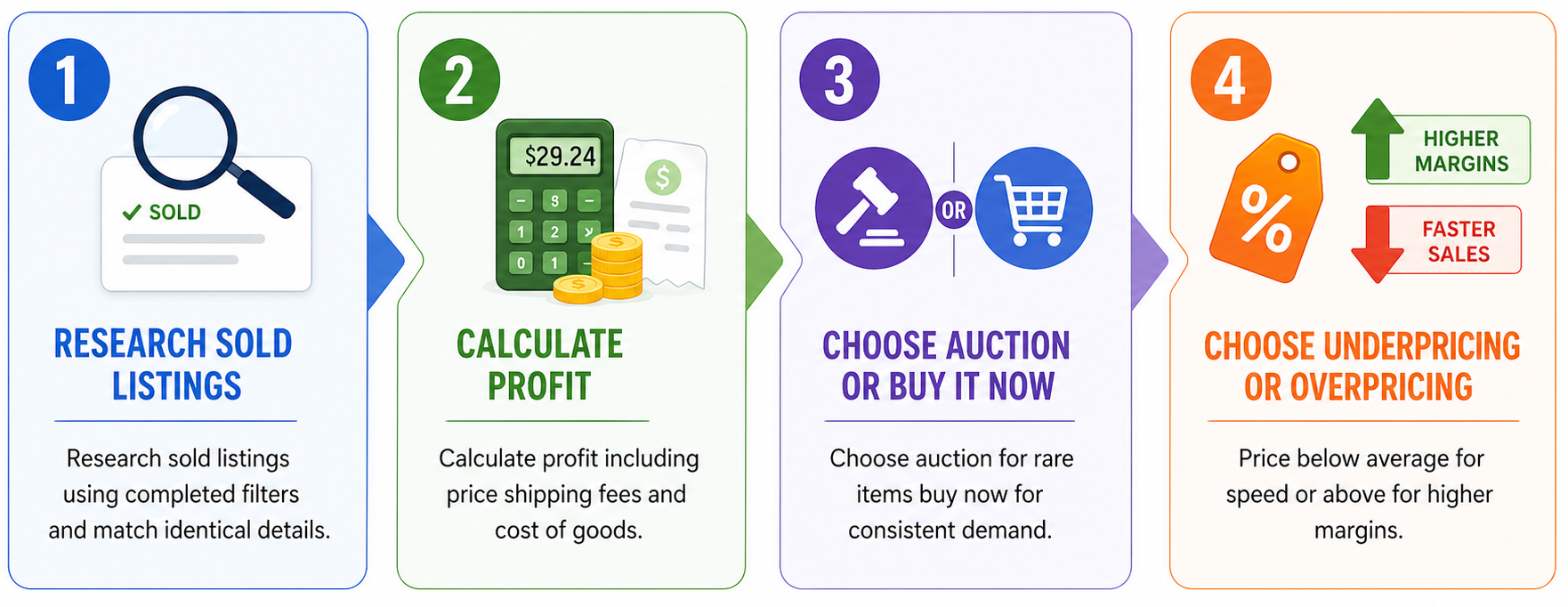
Step 1: Research sold listings to find a price
Use the eBay search bar to research similar items to yours that have recently sold, focusing on real purchase data. Follow these tips:
- Filter for completed sales only: Review only sold listings to see what buyers actually paid. Ignore active listings because they only reflect what sellers expect, not what buyers are willing to pay.
- Match exact item details: Compare listings with the same model, condition, and included accessories so you avoid mixing higher-value bundles with lower-value standalone items.
- Calculate an average and remove outliers: Find at least 10 sold listings and calculate the average selling price. Ignore unusually high or low sales, typically those ~20% above or below your calculated average price. These don’t reflect typical demand.
- Analyze sales frequency trends: Check how often items sell within 2 or 3 weeks, since low sales volume signals weak demand and requires more competitive pricing to attract buyers quickly. Some eBay listing software provides tools that help you monitor and track these trends.
Step 2: Calculate the estimated profit before you list
Once you have your items and an idea of your selling price, it’s time to calculate your estimated profit. Let’s take the example of how I recently priced my Air Jordan 1 Retro High OG “Chicago” sneakers:
- I calculated the average price across 15 pairs of these shoes, which came in at $244. But I added the anticipated shipping cost of $16, bringing the total to $260.
- Taking eBay's final value fee of 8% and no per-order fee into account, I projected that eBay would take $20.80 from this sale. But if I list the shoes when I have over 250 other listings, eBay would charge an additional $0.35. If you want to learn more about eBay’s fees, read our article here.
- My purchase price (COGS) was $195. To calculate profit, I’ll do the following: $260 [estimated price] – $195 [COGS] – $20.80 [fees] = $44.20 in total profit.
Important note: My profit margin could shrink if I decide to boost my listing with eBay ads, tacking on another 5% (in my case, $13) off the total price. Although ads help get your listing in front of more eyes, they don’t guarantee a sale, and they reduce your margins.
Key takeaway: Always give your listing a slight “price padding” to allow for negotiation. Finding the optimal price often involves comparing the prices of recently sold items to those that are currently listed. Use the difference as your starting point. But when calculating your profit, use the average price. This method gives you some space to negotiate, keeping you competitive.
Step 3: Choose between auction and Buy It Now
An auction starts at a set price and lets buyers bid until the item sells. Buy It Now offers a fixed price and sells as soon as someone agrees to it. Choosing between them depends on how often the item has sold recently.
Here’s a quick way to pick between auction and Buy It Now:
Use auction when …
- You have a collector item with no recently sold comps, and collector demand could push the final price.
- You need to sell inventory fast and are willing to let the market decide what it’s worth, even if that means selling at low margins or even at a loss.
- The item is rare, limited, or condition-graded in a way that makes fixed pricing a guess more than a strategy.
Use Buy It Now when …
- Sold listings show consistent pricing across multiple recent sales, letting you know what buyers are paying.
- You’re selling multiples of the same item and need predictable returns, and don’t want to manage multiple auctions.
- Your item has steady demand, and you’re willing to give buyers a discount with the Best Offer feature.
Step 4: Choose between underpricing and overpricing
If you want to make faster sales, consider pricing your items below the average sold listing price. This strategy moves inventory quickly but shrinks return on every unit.
Buyers aiming for higher margins should price above the average, but must also be ready to wait longer until the item sells.
Here’s a look at both strategies:
| Pricing strategy | Price vs. market | What it does |
|---|---|---|
| Underpriced | 10–15% below | Sells faster, ranks higher, lower return per unit |
| At market | Matches sold comps | Balances speed and margin, safest default |
| Overpriced | 10–20% above | Targets patient buyers, risks dead inventory |
Underpricing works when you must make more space for storage, you need cash, or you’re selling a lot of items. You might lose some profit on each item, but cash flows in faster by not letting inventory sit.
Overpricing works when your items are rare, in great condition, or there isn’t a sales history for comparison. In these cases, the market hasn’t set a clear price yet.
When to adjust your eBay prices
Adjust your eBay prices when shoppers aren’t viewing your listings, buyers stop purchasing, or when you notice more sellers offering similar items. Change your eBay pricing during the following situations:
- No views within 72 hours: Zero views is a placement problem because eBay users click on listings based on price competitiveness. If no one’s viewing your goods, the price is likely above what recent sales data supports.
- High views, no sales: When buyers click on your listing but then leave, it means your price is not up to par, but some competitors have the edge. Check competing listings and re-check sold listings. Also, determine if there’s anything about your item’s condition that could be pushing buyers to find other options.
- Increased competition: When new listings flood a category, the pricing often drops. Instead of holding the original number, pull fresh sold data and identify where the new range sits.
- Seasonal demand: Demand moves on a calendar, and many sellers underestimate it. Repricing ahead of the off-season often helps recover more margin than waiting for sell-through to collapse first. This is especially true if you’re selling seasonal items, like jackets or hoodies.
Price smarter for eBay with Nifty
My eBay pricing guide covers researching sold comps, calculating real profit, and timing your price adjustments. But if you want to make more sales, consider expanding your buyer base by selling on multiple platforms. Nifty, a crosslisting and automation tool, simplifies selling on several marketplaces, keeping you organized and freeing up time for sourcing.
Here's why Nifty's so helpful:
- AI-built listings: Snap a photo and Nifty generates SEO-optimized titles, descriptions, and hashtags automatically. You can tune the output to match your listing style.
- Crosslist in clicks: Post across Whatnot, Poshmark, eBay, Mercari, Depop, and Etsy without copy-paste clutter or multi-tab management. More marketplaces coming soon.
- Auto-delisting: When a sale closes, Nifty removes the item from every platform. No double-sells, no awkward follow-up messages.
- Bulk tools: Relist and share in a few clicks, schedule drafts to go live on your timeline, and set automatic discounts that deepen over time.
- Real profit tracking: Monitor sales, fees, top performers, and slow movers from one dashboard. Set seller goals and track them from your home screen.
Nifty pays for itself in just a few weeks. Start with a 7-day free trial and see how it can help track your eBay prices and reduce manual selling tasks.
FAQs
1. What is the best pricing strategy for eBay listings?
The best pricing strategy for eBay listings starts with researching and calculating the average of sold comps, not active listings, to find the price buyers actually paid. Subtract your COGS, eBay fees, and shipping from that price to get your anticipated margin. Add 10–15% to the average sold price so you can leave room to negotiate with buyers.
2. How do I know if my eBay item is priced too high?
You can tell if your item is priced too high if it has zero views within 72 hours, or a few views but no offers. When this happens, buyers usually go for cheaper competitors. Research similarly sold items from the last 72 hours and adjust pricing to meet the market.
3. Should I include shipping in my eBay price or charge separately?
Whether you include shipping in your eBay price or not depends on your margins. If your COGS are low and you want to entice more buyers, cover shipping. But if your margins are thin, requiring the buyer to pay for shipping is ideal. Either way, always factor shipping into your profit calculation because eBay's final value fee applies to the total paid, including shipping.


.png)

.png)