
How I made $450 on Facebook Marketplace in 4 days
.png)
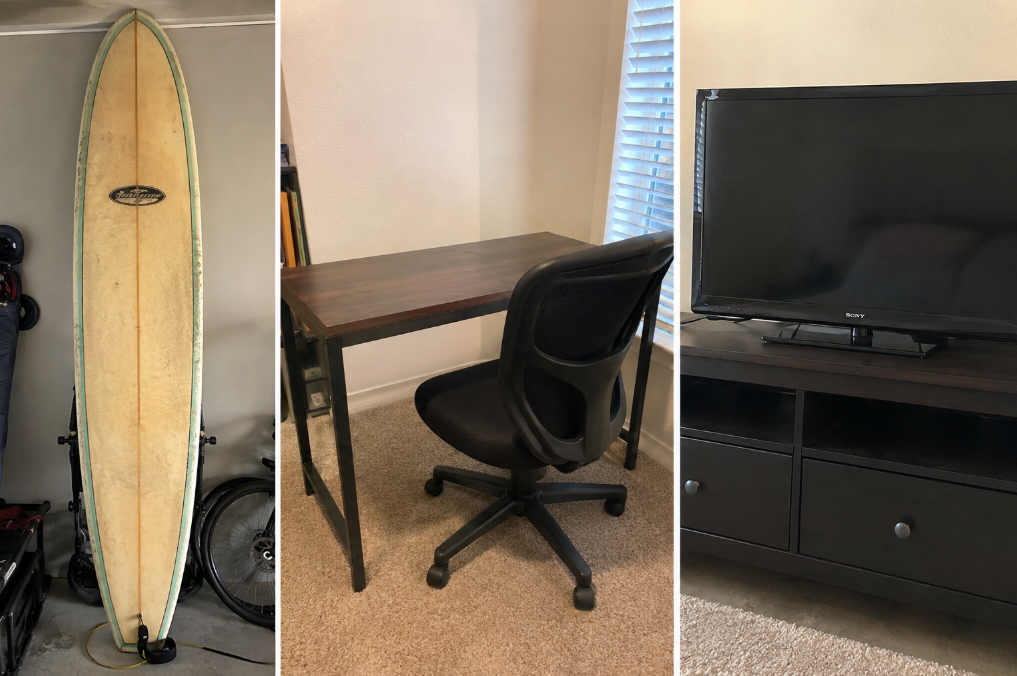
I made $450 on Facebook Marketplace in four days selling only three things: A surfboard I hadn't touched in 7 years, a desk-and-chair combo, and an old TV. All this stuff was sitting around my house, so I didn’t do any sourcing, inventory runs, or special connections.
I’ll show how to make money on Facebook Marketplace in 7 steps so you’ll know exactly how to create ideal prices and what to expect from buyers.
What I sold to make $450
Over a period of about 4 days, I made $450 on Facebook Marketplace by listing the following items:
- Old surfboard: For 7 years, I held on to the old 10-foot surfboard that I learned to surf on. After buying shorter boards, the longboard sat in my basement gathering cobwebs. I listed it on Facebook Marketplace for $200 with a leash, and it sold within 4 days.
- Desk and chair: My first workstation sold quickly because local buyers in my city (home to a state university) found it useful for studying. I listed this in mid-August, right when students started arriving for fall semester, and the desk and chair sold in 2 days for $100.
- Old TV: I replaced the Sony Bravia I purchased right before the pandemic with a new Samsung that has slick AI tools and better gaming features. After listing it for $250 and haggling with 3 potential buyers, I finally sold it for $150.
How to make money on Facebook Marketplace
After making $450 in just a 4 days, I found that a few factors, such as your location and the items you already own, play an enormous role in how you make money on Facebook Marketplace:
Step 1: Location is key
Your location, specifically the size of your city, can affect how quickly your item sells. If you live in a large city (like me), you’ll usually have more nearby buyers searching Facebook Marketplace.
If you live in a smaller town, you’ll most likely have fewer buyers. You may need to wait longer or attract people willing to drive farther. Or, you may need to make a small road trip to the nearest city if you want to offload that old sofa. Folks in this situation should take gas money and other costs into account.
Step 2: Start with items you already own
Find household items that you no longer use. You don’t need to spend money buying inventory, and when you sell these items, you free up space and get some extra cash.
If you’re interested in reselling, offloading a few household items also helps you learn what people in your area want to buy. You can then use the money you make to buy items specifically to resell.
Step 3: Research what similar items actually sell for
By researching comparable items, you can learn 2 things: Actual selling price and buyer expectations. Start your research by searching for similar listings on Facebook Marketplace in your area. Compare the brand, condition, age, and size of similar items.
Keep in mind that Facebook Marketplace doesn't reliably show final sale prices: a "Sold" tag usually reflects the last listed price, not what the buyer actually paid, and sold visibility varies by region. Use active listings for the going rate, then cross-check eBay's "Sold" filter for firmer comps. Use this as a reference point for pricing, which we’ll talk about in Step 4.
Step 4: Price items with room to negotiate
Once you have an idea of what buyers will pay, it’s time to set your price. But if you want to make more money, don’t use that final selling price as your initial listing price. Most Facebook Marketplace buyers expect to negotiate, so price your items at a premium, but not so high that you attract zero interest. For instance, I marked each of the 3 items I sold up by ~10%.
Step 5: Create listings buyers can find
A searchable listing has the words and details buyers are likely to search for on Facebook Marketplace. Always include the brand, model, size, condition, and clear photos so buyers know exactly what you’re selling.
By providing an informative listing, you can avoid basic questions and help the right buyers find your item faster. For example, title your listing “Samsung 55-inch 4K Smart TV” instead of “TV for sale.”
Step 6: Respond quickly and qualify buyers
Buyer qualification means figuring out which buyers are actually ready to purchase your item. Facebook Marketplace has serious buyers, but it also has people who message you and never follow through.
As soon as you post your listing, stay active on Messenger so you increase your chances of connecting with a serious buyer. Ask buyers to confirm the price, pickup location, and time before you hold an item for them.
For safety reasons, meet the buyer at a large parking lot or in a place with loads of people, preferably during daylight hours.
Step 7: Relist or adjust items that don't sell
If you’ve listed an item and aren’t getting any messages, it’s time to circle back and reconsider your listing info. Make sure you include enough clear photos to show shoppers exactly what the item looks like. Look up similar items and compare pricing. You might need to lower your price to better match the condition.
A good time to reconsider your listing and pricing is after 5 days, especially if you’re selling locally and haven’t received any interest.
Organize your listings with Nifty
Learning how to make money on Facebook Marketplace gets more complicated once you have enough inventory to track, price, relist, and sell consistently. Nifty gives you one place to organize that inventory while expanding beyond Facebook Marketplace to reach buyers across other resale platforms.
Nifty’s currently available in the U.S., Canada, the UK, and Australia.
Here’s why Nifty’s so helpful:
- Customized AI listing: Snap a picture and let Nifty’s AI create a listing with search-friendly titles, detailed descriptions, and relevant hashtags already filled out. You can customize how the AI writes listings to match your preferred style, helping you get inventory posted faster instead of writing every description from scratch.
- Crosslist now: With a couple of clicks, post your items across Whatnot, Poshmark, eBay, Mercari, Depop, and Etsy. This gives inventory another chance to sell when Facebook Marketplace demand is limited, without rebuilding the same listing for every platform. More marketplaces are coming soon.
- Bulk crosslisting: Publish up to 25 listings at once with marketplace-specific pricing rules, shipping presets, and AI-enhanced titles and descriptions. Start in Nifty or import from eBay, then export across supported marketplaces in one action.
- Marketplace-specific pricing rules: Save pricing templates for each marketplace and apply them automatically during bulk crosslisting. This lets you account for different fees, buyer expectations, and target margins without manually changing every listing.
- Automatic delisting? Handled: When you make a sale on a supported marketplace, Nifty’s sales detection auto-delists that item from your other supported marketplaces once you turn on auto-delisting. That reduces the risk of selling the same item twice after expanding beyond Facebook Marketplace.
- Bulk tools = no busywork: Share Poshmark listings and relist inventory in a few clicks instead of updating products individually. You can also schedule drafts to go live later and set automatic discounts that increase over time, giving stale inventory another opportunity to sell.
- Analytics and profits are real: Track sales, fees, top performers, and slow movers from one dashboard. You get a clearer picture of which products actually make money, which marketplaces produce sales, and which inventory is tying up cash. You can also set and track seller goals directly from your home screen.
Nifty pays for itself in just a few weeks. Start with a 7-day free trial and see how Nifty can help you organize your inventory, expand to other resale platforms, and build a more manageable selling operation.
FAQs
1. Can you sell on Facebook Marketplace anonymously?
No, you can’t sell on Facebook Marketplace as a fully anonymous seller. Although Facebook requires a real profile, you can limit your public visibility and keep chats to Messenger for negotiations. This protects your privacy somewhat and reduces unwanted contact from non-serious buyers.
2. How do you earn money with Facebook Reels?
You can earn money through brand deals and by using Reels to drive traffic to your Marketplace listings. If you're invited, you can also earn through Facebook's Content Monetization Program: the invite-only program that replaced the Reels Play Bonus in 2025 and pays across Reels, video, photos, and text based on performance.
3. How can you use Facebook Messenger to make money?
You can use Messenger to quickly answer questions, negotiate price, and confirm pickup time and location with buyers. Using Messenger allows you to qualify serious shoppers fast, cutting wasted trips and avoiding no-show pickups.



.png)
.png)