
How to sell on eBay UK: 9 steps (2026)

Many beginners are confused when they go to sign up with eBay: Should they open a private or business account? And then, what items should they sell, and how should they position them to actually make a profit?
I’ve helped dozens of new eBay sellers launch their shops and make their first sales. In this guide, I’ll show you how to sell on eBay UK by registering and choosing what to sell. By the end, you’ll know how to create listings that sell and protect your margins.
How to sell on eBay UK: 9 steps at a glance
- Create your eBay account
- Register as a seller
- Choose what to sell
- Research prices and demand
- Create your eBay listing
- Set your UK postage and returns
- Review and publish your listing
- Check the order, pack, and post the item
- Receive your eBay payout
1. Create your eBay account
Create your eBay account at eBay.co.uk using your email, password, and contact details. You also need to choose the right account type.
A private account works if you occasionally sell unwanted items from home. It suits sellers who aren't sourcing stock to resell from charity shops, house clearance sales, and car boot sales.
You need a business account if you buy items to resell for profit. Business sellers also have extra rules for returns and displaying business details.
I recommend that you start with a private account and upgrade later if you begin buying stock to resell. For example, you might start by clearing out your wardrobe and later source jackets from car boot sales.
Once you upgrade to a business account, you can't switch back to a private account.
2. Register as a seller
Now that you have an eBay account, you need to register as a seller by verifying your identity and adding a bank account. Here’s a look at how to register as an eBay UK seller:
- Verify your identity: eBay asks individual sellers for their full name, nationality, address, and date of birth. It may also ask for ID, such as a valid passport or photocard driving licence.
- Add your bank account: Use the current or business account where you want to receive your payments. eBay may ask for your account holder name, bank name, sort code, and account number.
- Make sure your details match: The name on your bank account must match the name on your eBay account. Business sellers also need to use the correct account type.
- Complete any extra checks: If eBay can't automatically verify your details, it may ask for more documents or another way to verify your bank account. Follow the instructions in your account and make sure your documents are accurate.
3. Choose what to sell
Choose what to sell by finding items you already have at home. Unused clothing, electronics, books, collectables, toys, and tools can all make good first listings. You don't need to buy stock before making your first eBay sale.
Starting with familiar items can make them easier to describe and price. For more ideas, see our guide on the 29 best items to resell for a profit.
Before listing an item, make sure it’s ready to sell on eBay by doing the following:
- Check eBay allows it: eBay UK bans some items and places rules on others. Breaking these rules can get your listing removed or lead to account restrictions. Check eBay’s prohibited and restricted items page to confirm that the platform allows what you want to sell and avoid listing anything that could be removed or put your account at risk.
- Check its condition: Look for wear, damage, missing parts, and other problems. Be ready to describe the condition accurately and tell buyers about any defects.
- Choose how to create the listing: eBay may already have product details for the exact item you're selling. If it does, you can use them to fill in details such as the brand, model, size, and colour. If eBay doesn't have an exact match, enter the details yourself.
4. Research prices and demand
Search eBay and review the prices of similar active and sold listings to learn about buyer demand. Jot down prices, dates, and product quality. Consider using an eBay seller analysis tool for accurate pricing.
5. Create your eBay listing
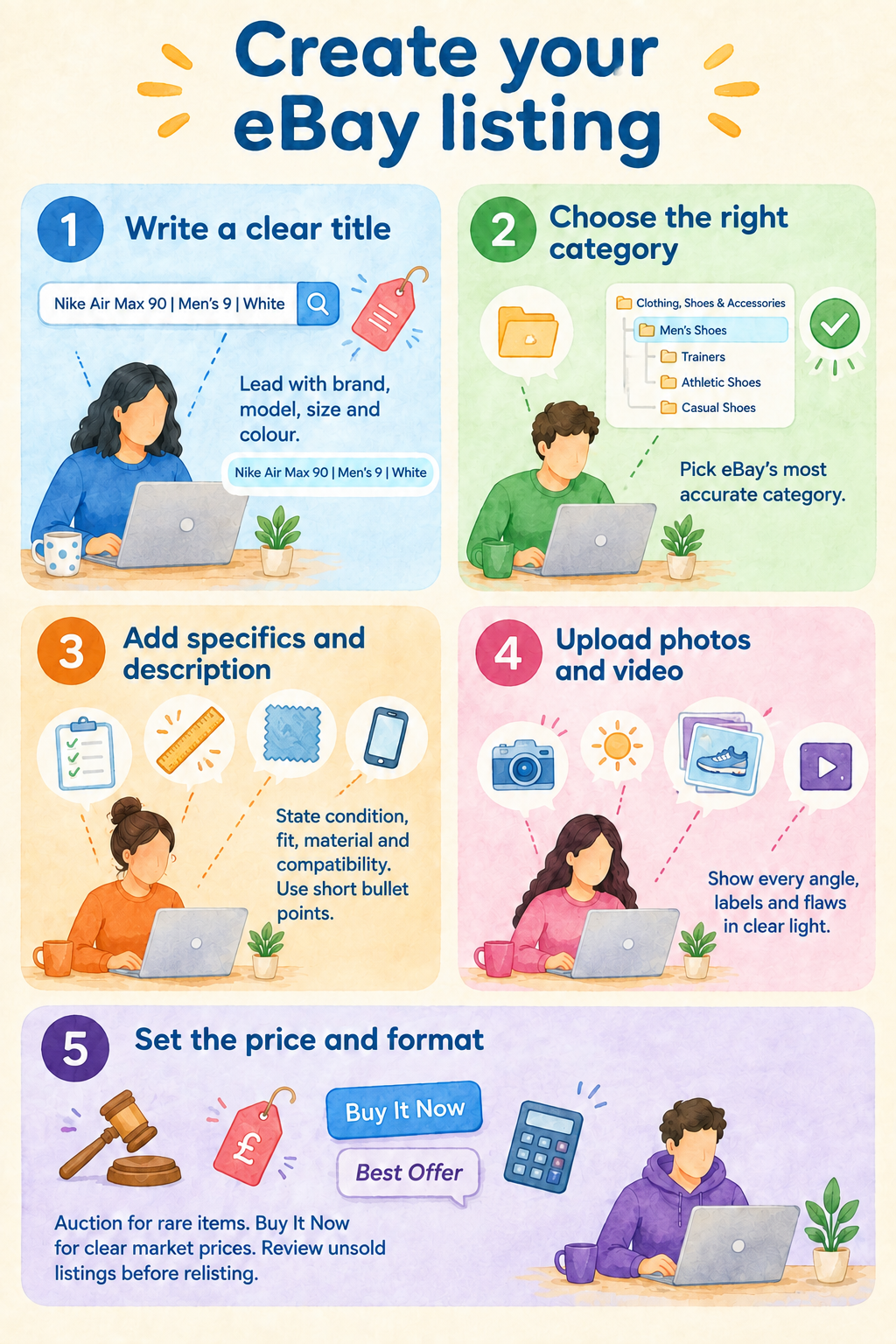
When you create your eBay listing, you’ll write a title, a description, and upload photos. Here’s a look at the process:
Write a title and description
Start creating your listing by writing your eBay title, which lets you use up to 80 characters. Prioritise front-loading the keywords that buyers are looking for. Include the item type, brand, and model. Don’t use filler like “gorgeous” or “splendid.” These informative titles can also help your listings perform better in eBay’s search results.
For instance, if you title your Nike trainer as “Nike Air Max 90 Men’s Size 9 White,” you can make it easier for buyers to find and visit your listing.
Avoid fluffy titles like “Amazing Nike Air Max Kicks.” This title leaves out information, such as size and whether it’s for men or women. Always include clear, specific information about size, colour, condition, model name or number, and any standout feature.
If you want to speed up title writing, use a crosslisting and automation tool like Nifty or Vendoo, which includes an AI tool for generating SEO-optimised titles and listings. Simply upload up to 8 photos, and these tools will create a title and listing description for you.
Next, choose the most accurate category from eBay’s suggestions to help your listing appear where buyers expect to find it. Miscategorising an item (for example, a laptop as a tablet) can confuse shoppers and limit visibility.
Fill out item specifics and description
Item specifics and descriptions are central to your listing’s visibility and how much buyers trust it. Here are some tips for writing a description that converts a browser into a buyer:
- Disclose your item’s condition: Describe the item’s brand name and sizing first. Then highlight all flaws, wear, repairs, defects, or missing parts in both the condition field and description to prevent disputes and returns.
- Add other specifics: Include fit, material, or compatibility information to help buyers find an exact match.
- Use mobile-friendly formatting: Many buyers will browse eBay on the app. So use short sentences and bullet points so your description remains skimmable and easy to read on phones and tablets.
Upload photos and video
eBay UK lets you add up to 24 pictures and one video per listing. Make each image clear, accurate, and well lit, then choose a main photo that shows the entire item clearly.
Follow these tips to improve your listing photos:
- Use multiple, good-quality photos: Upload several high-quality images so buyers can evaluate the item's appearance and condition before purchasing.
- Optimise lighting and background: Use natural or soft lighting and an uncluttered background that keeps attention on the item.
- Capture all key angles: Photograph the front, back, sides, labels, and important features so buyers can see exactly what you're selling.
- Show flaws and details: Include close-ups of scratches, defects, wear, or other imperfections to set accurate buyer expectations.
- Add a video when useful: Use a short video when movement, operation, or a feature is easier to demonstrate than to photograph.
- Edit photos where needed: eBay's editor includes cropping, rotation, brightness and contrast adjustments, and background editing. Nifty has photo-editing tools within its crosslisting workflow, including filters, fine-tuning, redaction, and AI background removal, so you can prepare and manage photos while creating listings for multiple marketplaces.
Choose pricing format and set the price
Using the research you did during Step 4, set your item's price. Here’s how to choose between auction and Buy It Now based on the item and how you want to sell it:
- Consider an auction for unique or hard-to-price items, such as trading cards, collectables, and vintage items, where you want buyers to compete on price. You choose a starting price, and the highest bidder wins when the auction ends.
- Choose Buy It Now when you know the price you want for the item and want buyers to purchase immediately. This format can suit common products with plenty of comparable sold listings to guide your pricing.
- Use Best Offer when available if you're willing to negotiate. On fixed-price listings, you can set a minimum offer amount and an optional auto-accept amount. Best Offer is also available on some auction listings, although restrictions apply.
If an auction goes unsold, review your price, photos, title, and item details before trying again. You can also relist the item as a fixed-price listing if that format better suits the item. For more information about setting prices on eBay, read our eBay pricing guide.
6. Set your UK postage and returns
Postage and returns settings decide what buyers pay, when parcels arrive, and who covers mistakes. Here’s what you need to organise:
- Measure the packed parcel: Weigh and measure the item after adding its box, mailer, padding, and other packaging to avoid selecting the wrong service.
- Choose a suitable delivery option: Compare the eBay UK postage options available for the item's size, value, and destination, including supported Royal Mail or Evri services where applicable.
- Consider tracking: Use an appropriate tracked service, particularly for higher-value items, and make sure tracking is associated with the order when available.
- Set a realistic dispatch time: Choose a handling time you can always meet. Don’t promise a faster dispatch than you can provide.
- Offer collection when appropriate: Large, heavy, or awkward items may make more sense for local collection if possible.
- Set your returns: Select the applicable return settings and accurately communicate the terms to buyers. Business sellers also need to account for UK consumer cancellation and return rights.
7. Review and publish your listing
With listing details and postage set, it’s time to review and publish. Follow these 5 pointers:
- Carefully review your listing: Use eBay’s preview option to catch errors, missing photos, or formatting problems.
- Correct errors: Edit any problems, red highlights, or warning icons.
- Check any fees: Review the charges shown before publishing, particularly fees for optional listing upgrades.
- Choose the right listing duration: Fixed-price listings use Good ’Til Cancelled, while auctions can run for 1, 3, 5, 7, or 10 days.
- Edit cautiously after publishing: You can revise many listing details later, but your options become more limited once an auction receives bids.
8. Check the order, pack, and post the item
Once the buyer pays, check the order details in Seller Hub. Then pack the item and use the delivery option you promised in your listing. Here are some pointers for packing and posting:
- Pack the item securely: Use strong packaging and enough padding to keep the item from moving during delivery. Shake the sealed box before sending it. If your item rattles around inside, add more padding.
- Check the delivery details: Send the parcel to the address shown in the eBay Order details. If the buyer asks you to use another address, cancel the order. Then, allow them to buy the item again using the correct address.
- Buy or print the postage label: Check the parcel's weight and size before buying postage. Royal Mail and Evri can print labels from QR codes at some drop-off locations, so you may not need a printer at home.
- Post within your handling time: Send the parcel within the handling time shown in your listing. If you're using tracked delivery, upload the correct tracking details on time. Some eBay postage options automatically add tracking.
- Keep tracking and proof of postage: Your proof of postage may help if you need to make a claim with the delivery company. And if a buyer says the item didn't arrive, tracking can show that it reached the address on the order.
9. Receive your eBay payout
How you get paid on eBay UK depends on your account type: Private sellers receive money in their eBay balance and can withdraw it to a linked bank account. Business sellers receive payouts directly to their linked bank account.
Your money may not be available right after a sale. The timing can depend on your selling history, delivery status, and whether eBay puts the payment on hold.
Once eBay sends a payout, your bank may take up to 4 business days to process it.
Check the Payments tab in Seller Hub to see the status of your money. It may show as pending, available, on hold, or sent.
If a payout fails, check your bank details. You should also check whether eBay has asked you to verify any information.
How Nifty can help rocket your eBay UK sales
Learning how to sell on eBay UK is the easy part. Keeping up once orders start is harder, because every item needs photos, a searchable title, postage settings, and a price that still makes sense after fees. List the same stock on Depop or Etsy to reach more buyers, and that admin doubles. Nifty is a crosslisting and automation tool that takes on the busywork, so you list once and manage your items across marketplaces from one interface.
Here's why Nifty's so helpful:
- Customised AI listings: Upload photos of the item you're selling and let Nifty generate search-optimised titles, descriptions, and item details that help eBay buyers find it. Review the draft, then use custom instructions to match your shop's writing style.
- Crosslist now: List eligible items across eBay, Etsy, Depop, Whatnot, and other supported marketplaces from one tool, so the stock you list on eBay reaches shoppers elsewhere too. Marketplace access and features depend on your region, connected accounts, and plan.
- Bulk crosslisting: Select multiple existing eBay listings in Nifty, choose your target marketplaces, pricing, and postage, then save the AI-generated results as drafts or publish them in one go.
- Marketplace-specific Pricing Rules: Set your price once on a primary marketplace, and Nifty auto-calculates the rest with percentage or pound adjustments so your take-home stays consistent when you crosslist.
- Built-in auto-delisting: Enable auto-delisting, and Nifty can remove an eligible sold item from your other connected marketplaces, helping reduce the risk of selling the same item twice when an eBay order comes in.
- Bulk tools = less busywork: Relist unsold items in batches, schedule ready-to-publish drafts, and use supported automations to handle recurring selling tasks while you pack and post orders.
- Analytics and profits, made clear: Track sales, fees, profit, and your top-selling brands and categories, so you know which items are worth sourcing again. You can also set seller goals and check your progress from Nifty's home screen.
Start with a 7-day free trial and see how Nifty can help you turn your first eBay UK sales into a steady selling routine, with less time spent on listings and more time moving stock.
FAQs
1. How much does it cost to sell on eBay UK?
It costs private sellers nothing in final value fees to sell on eBay UK in most categories, because buyers pay a Buyer Protection fee. Business sellers pay a category fee (6.9–14.9%), a 30–40p per-order fee, and a 0.35% regulatory fee, so factoring fees protects margins.
2. Do you have to pay tax when selling on eBay UK?
You usually don't pay tax when selling unwanted personal possessions on eBay UK. If your total gross trading income exceeds the £1,000 trading allowance in a tax year, you generally need to tell HMRC and register for Self Assessment. eBay may report your details to HMRC if you make 30 or more sales or receive roughly £1,700 in a calendar year.
3. Can you sell on eBay UK for free?
Yes, you can sell on eBay UK as a private seller for free, in most cases. You pay no transaction fees when an item sells, except for Cars, Motorcycles & Vehicles, and you get 300 free listings each month. Fees can still apply for optional listing upgrades, listings above the monthly allowance, and some international sales.
4. Should I sell on eBay UK as a business or private seller?
You should sell on eBay UK as a private seller if you're clearing unwanted personal items. But register as a business seller if you buy stock to resell for profit. Choosing the right account type helps you comply with eBay's seller rules. You can upgrade from a private to a business account later, but eBay doesn't let you switch that account back to private.




.png)