
How to bundle items on Poshmark: Steps for buyers & sellers (2026)
.png)
Bundling items on Poshmark is helpful for both buyers and sellers. Buyers can get good deals, and sellers can move more inventory. But some buyers aren’t sure how to use the Bundle feature. And many sellers don’t know when to offer Bundles, which can lead to stale inventory.
I’ve helped Poshmark buyers and sellers use Poshmark’s Bundle feature. Learn how to Bundle items on Poshmark, in 3 simple steps, for both buyers and sellers. Sellers will also learn the different Bundle types and when to use them.
How to bundle items on Poshmark: TL;DR
| Bundles for buyers | Bundles for sellers |
|---|---|
| Step 1: Find the items you want | Step 1: Open your seller discount settings |
| Step 2: Add the item to your bundle | Step 2: Set your Bundle discount |
| Step 3: Review, negotiate, or complete the purchase | Step 3: Poshmark applies the discount |
What is a Poshmark Bundle?
A Poshmark Bundle groups multiple listings from one seller into a single purchase. Bundles allow buyers to purchase several items for one shipping charge, subject to Poshmark's package weight limits.
They also help sellers move multiple listings in one transaction.
Both buyers and sellers can use Bundles: Buyers can add listings to a Bundle, while sellers can share listings from their closet directly to a buyer's Bundle. Sellers can also send private Bundle offers, set an automatic Bundle discount, or create Bundle listings.
For example, a seller could combine three $15 tops and send an interested buyer a $35 Bundle offer to encourage a larger purchase. Or, during a negotiation, the seller could add another T-shirt to the buyer's Bundle and discount the combined offer to make the deal more attractive.
Buyer tips: How to bundle items on Poshmark as a buyer
Poshmark's Bundle feature lets buyers combine many listings from the same seller into one purchase. You can add items yourself, review the combined price, and either purchase the Bundle or make an offer. Follow these steps:
Step 1: Find the items you want
Start in a seller's closet and find all the listings you want to buy. Bundles contain items from one seller. Look through the same closet for additional clothing, accessories, or other products you want.
Step 2: Add the item to your bundle
Use the Bundle option on a listing to add it to your Bundle with that seller. Continue browsing the same closet and add any other listings you want to purchase together. When you’re done shopping, open the Bundle to confirm that you've included the correct items.
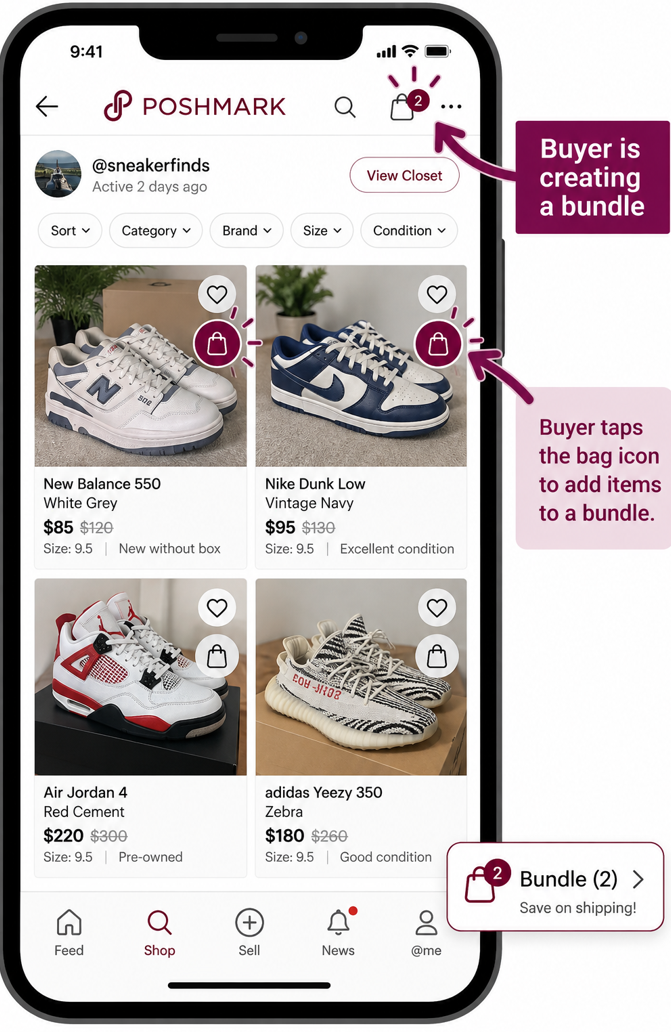
Step 3: Review, negotiate, or complete the purchase
The Bundle screen is a single checkout page listing every item added from that seller. It shows one shipping charge and a combined total. Poshmark shows this before payment so you can review your items one final time.
From here, you have 2 options: Accept the price shown or make an offer. You can send a Bundle offer once your Bundle has two or more items and doesn't already have an active offer. The seller can then accept, counter, or decline.
Seller tips: How to bundle as a seller
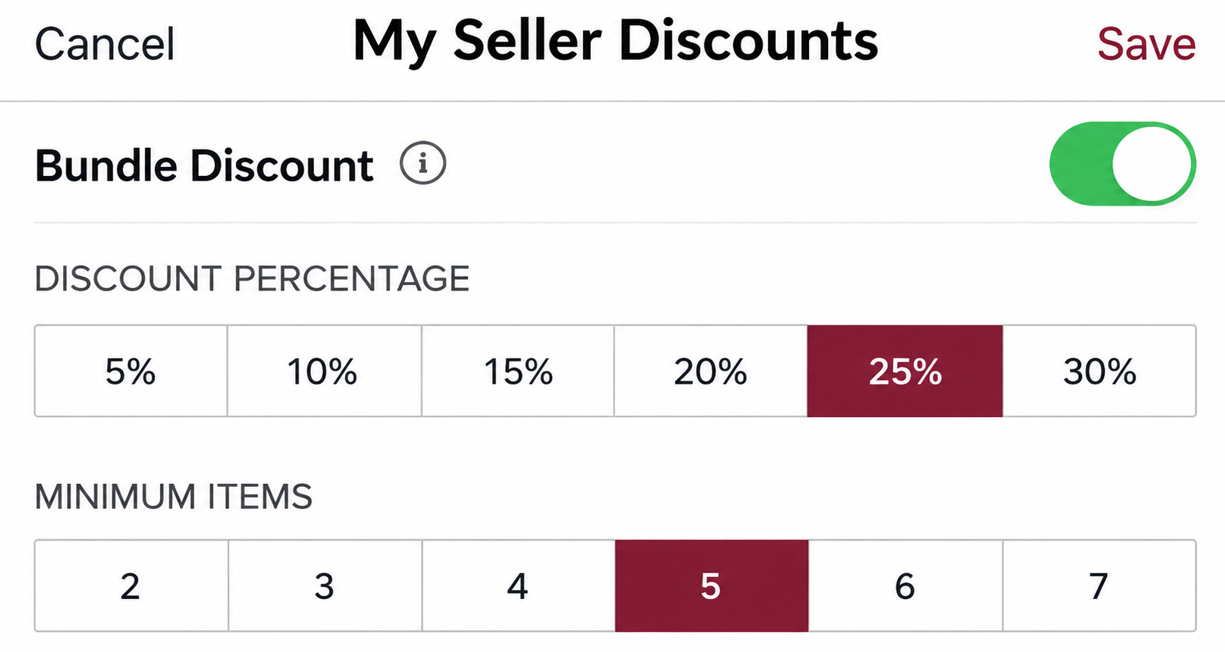
If you’re a seller, you can set an automatic discount that applies when a buyer creates a qualifying Bundle from your closet. Follow these 3 steps:
- Open your seller discount settings: In the app, go to the Me Tab > Marketing & Promotions > Seller Discounts.
- Set your Bundle discount: Turn on the Bundle Discount toggle, then choose the discount percentage and minimum number of items.
- Let Poshmark apply the discount: When a buyer purchases a qualifying Bundle, Poshmark automatically applies your discount.
Bundle types you can offer
Several situations make a Bundle offer worth sending to a Poshmark buyer. Let’s look at the main ones and when each approach makes sense:
1. Liked-item Bundle
You can combine several listings that one shopper has already liked from your closet. Add those listings to their Bundle and send a discounted combined offer. For example, if someone likes a $30 sweater and a $20 skirt, you could Bundle both and offer them for $42.
2. Add-on Bundle
An add-on Bundle combines an item a shopper has liked with another relevant item from your closet. If someone likes a pair of jeans, you could add a matching belt or top and offer the combination at a discount.
The buyer doesn't need to have liked the additional listing first. Just keep the additional items relevant (don’t pair a summer tank top with a down jacket) so the Bundle feels useful.
3. Multi-buy Bundle
A multi-buy Bundle groups several similar products into one offer, such as three T-shirts, two pairs of jeans, or several children's outfits in the same size. This approach works when a shopper may have a reason to purchase multiples at once. You can also discount the combined price to make taking several items more attractive than purchasing only one.
4. Outfit Bundle
An outfit Bundle combines pieces that can be worn together, such as a blazer, trousers, and a blouse, or a dress, handbag, and shoes. Sellers can build these proactively when their closet contains complementary items in appropriate sizes and styles.
The goal is to show the shopper a complete combination while giving them the option to purchase the pieces together through a Bundle offer.
5. Clearance Bundle
Use a clearance Bundle to offload older or slow-moving inventory into a discounted multi-item offer. For example, you could combine several tops that have been sitting unsold and offer the group below their combined listing prices. Check your minimum acceptable price first, since a larger Bundle discount only makes sense when the final proceeds still work for you.
6. Negotiated Bundle
A negotiated Bundle introduces another item while you are already discussing price with a shopper. If a buyer wants a $40 jacket but you cannot accept their $25 offer, for example, you might add another item and negotiate a combined price instead. This gives you another way to structure the deal without simply continuing to lower the price of the original item.
7. Pre-made multi-item listing (aka Bundle)
A pre-made multi-item listing packages several products together in a single regular Poshmark listing, such as a three-shirt lot or a set of children's clothes. The buyer purchases the entire group as one listing rather than combining separate listings through Poshmark's Bundle feature. Our article about listing multiple items on Poshmark can give you more tips.
Sell more on Poshmark with Nifty
Now that you know how to bundle items on Poshmark, how about listing the same items on other platforms like Depop and eBay to expand your buyer base? I recommend getting a crosslisting and automation tool like Nifty so you can manage your items all in one place.
Here's why Nifty's so helpful:
- Customized AI listing: Snap a pic and let Nifty's AI build a high-quality listing, with SEO-optimized titles and descriptions, and trending hashtags already filled out for you. You can even customize how AI writes your listings to follow your unique style.
- Crosslist now: With a couple of clicks, post your items across Whatnot, Poshmark, eBay, Mercari, Depop, and Etsy. No copy-paste clutter and no multi-tab hopscotch. (More marketplaces coming soon!)
- Bulk crosslisting: Publish up to 25 listings at once with marketplace-specific pricing rules, shipping presets, and AI-enhanced titles and descriptions. Start in Nifty or import from eBay, then export everywhere in one action.
- Marketplace-specific Pricing Rules: Save pricing templates for each marketplace and apply them automatically during bulk crosslisting to keep listings consistent without manual edits.
- Built-in auto-delisting: When you make a sale, Nifty's sales detection auto-delists that item from every marketplace once you turn on auto-delisting. Say goodbye to double-selling disasters and "sorry, it's already gone" apology messages.
- Bulk tools = no busywork: Share and relist daily in just a few clicks. You can even schedule drafts to go live while you sleep and set automatic discounts that run deeper over time.
- Analytics and profits are real: Track sales, fees, top performers, and slow movers in one clean dashboard, so you can actually see what's working and what's just dead space. You can also set and track seller goals directly from your home screen.
Start with a 7-day free trial and see how Nifty can help you spend less time chasing Bundle offers and more time actually selling.
And if you're in the UK or Australia, Nifty is now available for eBay, Depop, Etsy, and Whatnot.
FAQs
1. Can you bundle items from different sellers on Poshmark?
No, you can’t bundle items from different sellers on Poshmark. A Poshmark Bundle only combines listings from one seller’s closet. If you want items from multiple sellers, you must purchase from each seller separately.
2. Can a seller create a Bundle for a buyer on Poshmark?
Yes, a seller can create a Bundle for a buyer on Poshmark. Sellers can share listings from their closet directly to a shopper’s Bundle and then send a private discounted offer. The buyer doesn’t need to have liked every item before the seller adds it.
3. Does Poshmark combine shipping on Bundles?
Yes, Poshmark combines shipping for items purchased together in a Bundle. The items ship together under one shipping charge, subject to Poshmark’s applicable package-weight limits. This can save the buyer money on shipping compared with purchasing the same items separately.


.png)
.png)
.png)