
Top Poshmark keywords to rocket your listings (2026)
.png)
Every Poshmark listing competes against thousands of others using the same three or four generic words. So I checked sold listings across 10 categories, from denim to designer bags, and compared what buyers actually typed into search against what sellers put in their titles.
I found that sellers who wrote “gorgeous jeans” attracted fewer buyers than those who wrote titles that actually give useful information, like “Levi's 501 high-rise straight-leg.”
Here, I’ll show you how to use the right Poshmark keywords to attract more buyers. I’ll also show you where to find the best keywords and how to place them in your listing titles and descriptions.
Strong Poshmark keyword examples
| Item | Weak keywords | Better keywords |
|---|---|---|
| Levi’s jeans | Cute jeans, trendy denim | Levi’s 501 high-rise straight-leg jeans |
| Zara dress | Party, cute, going out | Zara black satin midi slip dress |
| Nike sneakers | Shoes, athletic, trendy | Nike Air Force 1 white leather sneakers |
| Free People top | Boho, cute, festival | Free People embroidered oversized boho blouse |
| Coach handbag | Nice bag, designer purse | Coach brown leather crossbody shoulder bag |
| Lululemon leggings | Workout pants, comfy leggings | Lululemon Align high-rise black leggings |
| Patagonia jacket | Warm coat, outdoor jacket | Patagonia women’s Nano Puff insulated jacket |
| Madewell sweater | Cozy, fall sweater | Madewell cream oversized cable-knit sweater |
| Reformation skirt | Cute skirt, summer outfit | Reformation floral high-waisted midi skirt |
| Ray-Ban sunglasses | Trendy sunglasses, cute shades | Ray-Ban Wayfarer black polarized sunglasses |
The Better Keywords column avoids broad terms like “cute,” “trendy,” and “nice.” Instead, strong Poshmark keywords are details buyers actually search for. They identify attributes such as the brand, product line, color, material, fit, and item type.
You don’t need to stuff every possible keyword into a listing for success on Poshmark. Choose a few accurate, specific terms that describe the item and match how a buyer might search for it.
How to find strong Poshmark keywords
To find strong Poshmark keywords, start with the item itself. Ignore any temptation to use a generic list of popular search terms. Follow these pointers:
Start with the product
The product is the source of the most accurate search terms for a listing. Start with the brand name, style, item type, and visible characteristics such as condition (e.g., NWT). These terms give searchers concrete ways to find a match.
Check Poshmark search
Poshmark search is a great reference to find items that are getting engagement. Simply search for items similar to yours, and see how much interaction they get. Listings with more likes and shares often avoid fluffy keywords and get straight to the point.
You can also research similar sold listings and compare the keywords. Studying these listings helps provide stronger evidence of the words that helped items sell.
Find the original product listing
The original product listing is on the manufacturer’s or retailer’s website. This listing often contains an item’s official name and specifications, so you can check how the original manufacturer describes the product.
Although a new product won’t reflect the condition of your used item, you can still adopt accurate details. Look for the official style name, material, cut, pattern, color name, and design features.
How to choose the best Poshmark keywords
Choosing the best Poshmark keywords means favoring precise product language over a long collection of loosely related terms. Specific details help buyers recognize listings that match their actual searches.
Brand and product name
Brand and product names connect a listing to the exact merchandise a shopper already recognizes. These terms help buyers find the label, model, or product line they have in mind rather than a broad clothing category.
Using the established name also separates the item from visually similar products sold by the same brand. When creating a listing, always ask yourself: Does this string of words match what some buyers are looking for?
Item type
By item type, I mean the precise product category that tells buyers what the listed piece actually is. A more exact description aligns the listing with searches built around garment shape, length, or construction.
Successful sellers classify the product before adding secondary descriptors. They don’t fill titles with loosely related synonyms. That approach keeps keyword choices tied to physical characteristics buyers recognize and removes redundant wording from the title.
For example, describe Levi’s 501s as “straight-leg jeans” rather than repeating “pants, bottoms, denim pants.”
Defining attributes
Defining attributes are physical characteristics that distinguish an item from other products within the same category. Materials, rises, fits, finishes, and construction details all fall under the defining attribute category. Shoppers use them to narrow broad searches down toward the item they’re looking for.
Accurate attributes also prevent generic keywords from taking up valuable title space. Always check the garment, tag, and original product information before choosing additional search terms. Each descriptor communicates something concrete about the product rather than repeating its category.
The keyword “high-rise embroidered straight-leg jeans” identifies three searchable characteristics beyond the basic term “jeans.”
Style keywords
Style keywords are words that describe an item’s look and connect it to a known fashion style when the item actually fits that style. Terms like Western, minimalist, Y2K, and boho are style keywords that shoppers use when searching for a specific look or trend.
Don’t add unrelated trends to your listing just to appear in more searches. Start with keywords that accurately describe your item, such as the brand, size, and gender. Then add a relevant style keyword at the end. This keeps your keywords accurate and avoids cluttering your listing with unrelated terms.
For example, if you’re selling a women’s Nike size medium oversized hoodie, use keywords like “Nike women’s medium oversized hoodie streetwear”. Don’t add unrelated terms like “Y2K,” “vintage,” or “cottagecore” just to attract more searchers.
Where to put keywords on Poshmark: Step-by-step
Put essential identifiers first, then use supporting fields for more specific product details. Follow these steps:
Step 1: Listing titles
Poshmark listing titles should include the most important details about your item: Start with the brand, product name, item type, and key details such as size or color. Use words that buyers are likely to search when looking for a product like yours. For example, use “Levi’s 501 Women’s Straight Leg Jeans Size 28.”
This approach also makes creating listings easier because you can focus on useful keywords instead of adding different versions of the same term. Keep the title easy to read so buyers can quickly understand what you’re selling. Clean titles also carry over when multichannel listing software posts the same listing to other marketplaces.
Step 2: Listing descriptions
Poshmark listing descriptions provide additional product information. They let you give more context than the title allows. This is where you can describe material, fit, cut, pattern, condition, features, and other details buyers might search when narrowing their options.
You can add secondary terminology here because that provides additional information, but be careful that you don’t repeat yourself. For example, describe jeans as “high-rise cotton denim with a straight-leg cut and light wash.”
Step 3: Categories and listing details
When you sell on Poshmark, you can use categories and listing details to organize your items and help shoppers find them through search and filters.
Choose the correct category, brand, size, color, and other details. Don’t try to make up for missing information with extra keywords. This strategy keeps your title and description clear because you don’t need to repeat the same details everywhere.
If you’re listing women’s running shoes, try this: Women > Shoes > Athletic Shoes and select the correct size.
Step 4: Style Tags
Poshmark Style Tags are labels that describe an item’s aesthetic, trend, occasion, or other style characteristics. You can use them to add helpful context alongside core listing details such as the brand, product type, and size. These tags keep your listing accurate and make its style clearer to interested shoppers.
The platform only allows 3 Style Tags per listing, so choose the ones that actually match your item rather than adding popular but unrelated terms.
For example, tag a Free People floral maxi dress as “Boho” if it fits that aesthetic instead of using unrelated tags like “Y2K” or “Streetwear.”
How to optimize a Poshmark listing with keywords
If you already have some listings with weak keywords, you can make them stronger and more attractive. Here’s an example of a positive Poshmark listing makeover:
Before
Listing title: Cute Free People Top Size M
This title includes the brand and size, but “cute” and “top” don’t provide any solid information that would help a buyer find what they want.
The fix: Identify the product
Research the item on Poshmark’s search results using the brand tag, fabric label, product photos, and similar Free People listings.
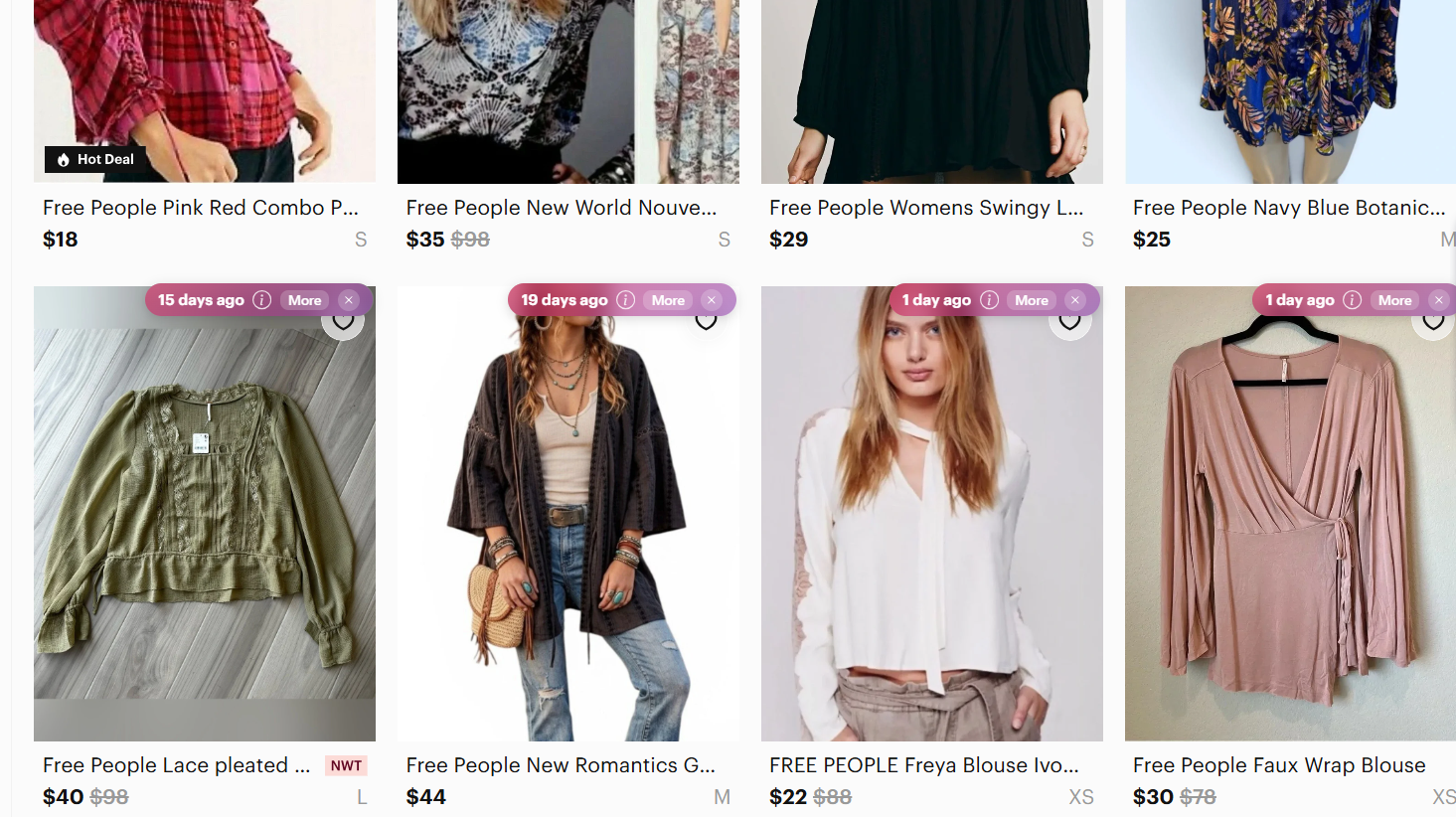
Here’s what you need to add when reconfiguring your listing:
- Brand: Free People
- Item: Blouse
- Material: Cotton
- Feature: Embroidered
- Fit: Oversized
- Style: Boho
After
New title: Free People Embroidered Cotton Oversized Boho Blouse
Your new title eliminates vague words and uses specific terms that describe what shoppers may search for.
Description: Free People size M cotton blouse with embroidered details, an oversized fit, and a relaxed boho style. Lightweight with long sleeves and a loose, flowy fit. Great for casual wear, layering, or festival outfits.
Terms like “long sleeve,” “flowy,” “festival,” “layering,” and “relaxed” give shoppers more details without making the description hard to read.
How many keywords should you use on Poshmark?
Poshmark doesn’t specify an ideal number of keywords for every listing. But you should use enough relevant terms to describe the item accurately and avoid keyword stuffing.
The key is balance: Keep your title focused on useful identifying details, such as the brand, item type, material, color, style name, and other defining features. Use the description to expand on details such as fit, measurements, condition, patterns, and styling terms.
For example, you could title a listing “Free People Embroidered Cotton Oversized Boho Blouse,” then use relevant terms such as “flowy” and “long sleeve” naturally in the description. If you crosslist, tools handle titles differently. List Perfectly vs. Vendoo breaks down how two of the big ones compare.
Use Nifty to create Poshmark listings
To choose the right Poshmark keywords, you’ll need to research your product to correctly identify the exact item type, material, style, fit, and other details shoppers use in searches.
Nifty cuts down that work by using AI to turn product photos into SEO-optimized titles and descriptions, so you can build more complete Poshmark listings with less research.
Here’s why Nifty’s so helpful:
- Customized AI listing: Snap a pic and let Nifty’s AI create your listing with SEO-optimized titles and descriptions based on the item. Instead of guessing which Poshmark keywords describe your product, you get relevant terminology you can review and refine before publishing. You can also customize how the AI writes listings to match your preferred style.
- Crosslist now: Once your Poshmark listing is ready, post the same item across Whatnot, eBay, Mercari, Depop, and Etsy with a couple of clicks. You avoid rebuilding listings from scratch for every marketplace, and more marketplaces are coming soon.
- Bulk crosslisting: Publish up to 25 listings at once with marketplace-specific pricing rules, shipping presets, and AI-enhanced titles and descriptions. Start in Nifty or import from eBay, then export your inventory across marketplaces in one action.
- Marketplace-specific pricing rules: Save pricing templates for each marketplace and apply them automatically during bulk crosslisting. Your pricing stays consistent without editing every listing individually.
- Automatic delisting? Handled: When an item sells, Nifty’s sales detection auto-delists it from your other marketplaces once you turn on auto-delisting. That reduces the risk of selling the same one-off item twice.
- Bulk tools = no busywork: Share and relist items in a few clicks instead of managing each listing individually. You can also schedule drafts to publish later and set automatic discounts that increase over time.
- Analytics and profits are real: Track sales, fees, top performers, and slow movers from one dashboard. You can see which inventory sells, which listings need attention, and how you’re progressing toward your seller goals.
Stop researching every Poshmark keyword from scratch. Start with a 7-day free trial and use Nifty to turn your product photos into detailed Poshmark listings with stronger titles and relevant search terms.
FAQs
1. Do keywords help on Poshmark?
Yes, keywords help on Poshmark. But you need to use accurate keywords like brand, item type, and material. These words help your listing appear in relevant buyer searches instead of generic ones, which reduces wasted views and mismatched inquiries. Specific terms also cut manual relisting since the right buyers find you faster.
2. Does Poshmark search listing titles and descriptions?
Yes, Poshmark's search considers both titles and descriptions. So brand, item type, and attribute keywords should appear in the title first. Add supporting details in the description. This approach improves match accuracy and reduces missed sales from buyers using different search terms.
3. Should I use trending keywords on Poshmark?
Yes, you should use trending keywords on Poshmark, but only if the term truly matches your item. Forcing unrelated trends like Y2K or cottagecore into a listing confuses buyers and hurts search relevance. Stick to accurate descriptors first, since honest keywords cut return requests and build buyer trust.


.png)
.png)
.png)