
12 Whatnot selling tips to rocket your sales (2026)
.png)
Going live on Whatnot with no plan is the fastest way to make no sales. Sellers who consistently move product treat every show like a system: Scheduled in advance, priced before the pressure of a live auction hits, and built around data instead of guesswork.
I’ve pulled apart 12 Whatnot selling tips, like scheduling your shows in advance and discovering optimal show times, based on my experience selling 1990s GI Joe action figures and helping other sellers.
By the end, you'll know exactly how to schedule, price, and run a Whatnot show that turns viewers into returning buyers.
12 Whatnot selling tips: At a glance
- Schedule your shows in advance
- Choose optimal show times
- Prepare your listings before going live
- Use accurate shipping weights
- Set starting bids from your minimum acceptable margin
- Run items consistently without waiting for chat requests
- Treat buyer requests as sourcing data
- Keep a consistent show schedule
- Make your show easy to watch
- Focus on buyers more than followers
- Organize sold inventory during the show
- Promote your shows on social media
1. Schedule your shows in advance
Whatnot recommends scheduling shows in advance, giving you time to prepare inventory, promote the event, and let interested buyers bookmark it. That lead time also gives you a promotion window for sharing your show and building interest around specific inventory.
Try to avoid last-minute scheduling, which can leave your audience little time to plan around the stream, especially if you sell within a niche. For example, schedule a vintage clothing show seven days ahead, promote featured pieces during the week, then go live to waiting buyers.
2. Choose optimal show times
Your show time should match when your specific audience is most likely to watch, bid, and buy. To find optimal show times, you’ll need to take a trial-and-error approach: In the beginning, run shows at different times and compare results in Seller Analytics, including sales, orders, buyers, and maximum concurrent viewers.
Record your results over time, and use best-performing times to build a schedule around proven buyer activity. To illustrate, if you’re a sports card seller, you could test Tuesday afternoon against Friday evening. Then prioritize whichever time consistently delivers stronger results.
3. Prepare your listings before going live
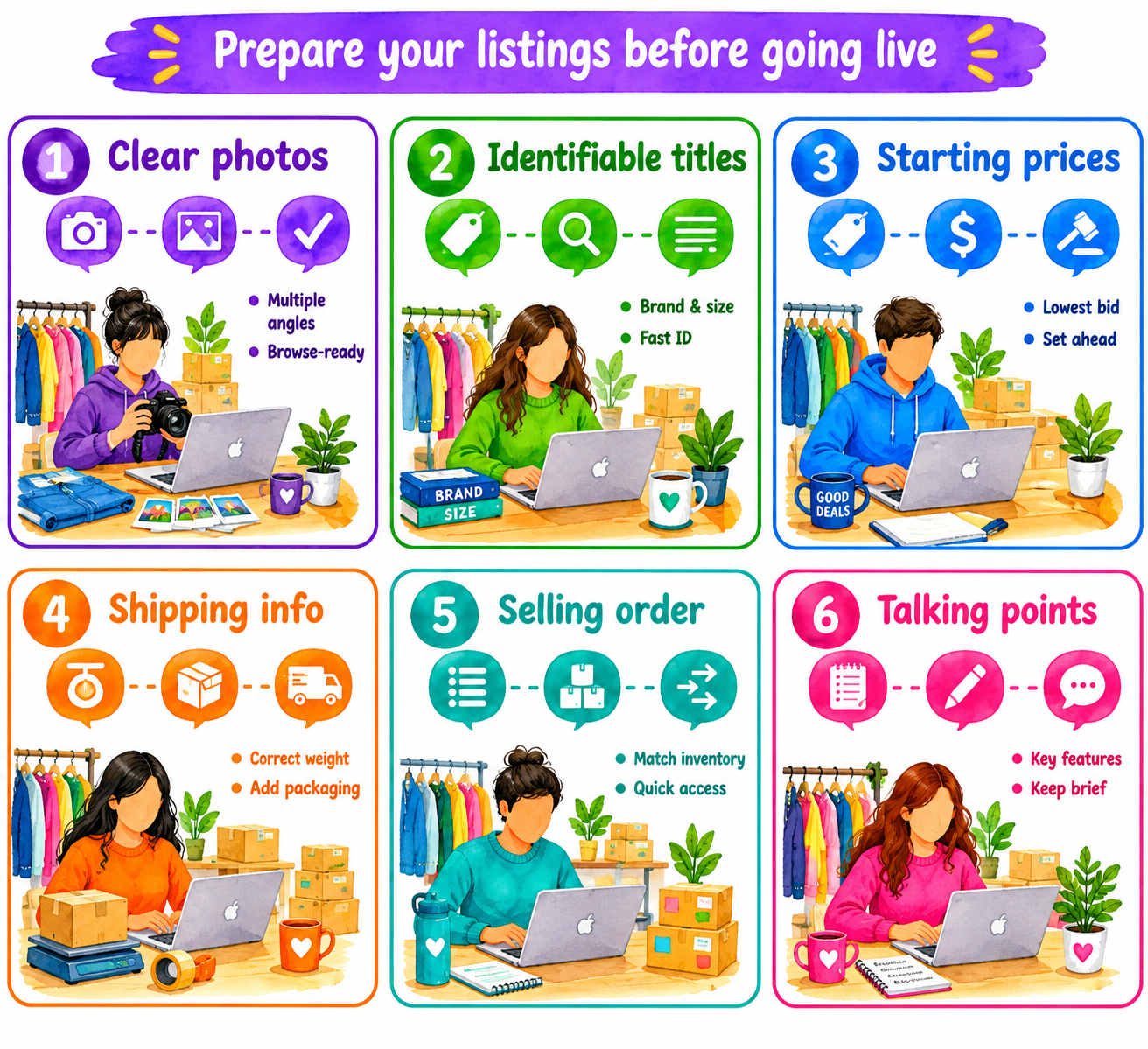
Don’t slap together your listings an hour before the show starts. Have a clear lineup of items ready at least 24 hours before the go time. Follow these pointers:
- Add clear product photos: Give buyers something useful to browse before and during the show. Don’t rely entirely on the livestream view.
- Write identifiable titles: Include the brand, product type, size, model, or other details buyers need to recognize each item quickly.
- Set starting prices: Decide the lowest acceptable opening bid before going live rather than making pricing decisions under pressure.
- Enter accurate shipping information: Add the correct item weight and account for packaging so buyers receive appropriate shipping charges.
- Organize listings in selling order: Arrange your inventory so you can find the physical item quickly when its listing comes up during the show.
- Jot down your talking points: You don’t need to write the Gettysburg Address. Just note a few major selling points for each item that you can easily reference during the show.
4. Use accurate shipping weights
Accurate shipping weights include the item, box or mailer, and packaging materials used to prepare a Whatnot order for shipment. Overestimating weight can increase buyer shipping costs, while underestimating it can require shipping adjustments or additional postage.
Consider investing in a scale to measure packed items because relying on visual estimates can result in the wrong weights, producing inaccurate prices. Include padding and other packing materials in the total weight. Dimensions also matter for some shipments.
For example, if a collectible weighs 14 ounces by itself, weigh it again inside its padded mailer and enter the packed weight for the listing.
5. Set starting bids from your minimum acceptable margin
Your starting bid should protect the profit you need from each sale before auctions begin. Work backward from your costs so buyer excitement never determines your financial floor during auctions.
Your minimum sale price is the amount an item must sell for to meet your profit target after applicable costs and Whatnot fees. Account for sourcing costs, seller-paid packaging or shipping expenses, applicable transaction fees, and your required profit.
Because some Whatnot fees range from 4% to 8% plus a 2.9% + $0.30 payment-processing fee, calculate your minimum price using the expected transaction value.
You also shouldn’t take shots in the dark on pricing. Research recently sold items on Whatnot, and consider attending shows of sellers who offer items similar to yours. Doing this will give you a better understanding of what buyers expect to pay.
Here’s how I calculated my minimum acceptable price for a recent sale of a GI Joe action figure:
Cost of vintage GI Joe figure from an estate sale: $20
Target profit: $10
Estimated Whatnot fees: $5
Packaging: $1
Minimum required price: $36
Starting bid: $40
6. Constantly run items without waiting for chat requests
By running items, I mean putting products up for sale on a steady schedule. Many buyers watch without commenting, so silence doesn’t mean nobody wants your inventory.
Avoid repeatedly asking viewers what they want. This creates dead time and makes a small audience feel smaller than it is. Keep presenting products at a steady pace. Describe their condition, and start auctions while watching chat for specific questions. For example, show the next vintage action figure and start its auction even when nobody requests it first.
7. Treat buyer requests as sourcing data
Buyer requests provide signals about products your existing Whatnot audience is interested in seeing. Record recurring requests and compare them with completed sales and profit margins before purchasing additional inventory for future shows.
- Track requested brands: When audience members repeat requests, they give you clues about the brands they actively want.
- Record sizes and variations: Note recurring sizes, colors, styles, models, or product specifications in a spreadsheet.
- Prioritize repeated requests: One request only tells you what one person wants. But multiple buyers asking for similar inventory gives you a stronger reason to source it.
- Compare requests with sales: A requested product that repeatedly sells deserves more attention during shows than something viewers ask for but never purchase.
- Use the data when sourcing: Build future inventory around demonstrated demand. This strategy works better than buying solely on personal preference or general trends because you have the numbers to back up what’s working.
8. Keep a consistent show schedule
A consistent show schedule means going live on recurring days and times that returning buyers learn to expect. If you follow a predictable schedule, it’s easier for buyers to anticipate and attend upcoming shows. Whatnot’s bookmarks and promotion features can remind them when you go live.
For example, run your vintage toy show every Thursday at 7 p.m. and promote that slot consistently.
9. Make your show easy to watch
A watchable Whatnot show allows buyers to see products, hear descriptions, and follow auctions. Use these tips:
- Stabilize your camera: Camera stability keeps products consistently visible during your stream. Position your device securely (I recommend using a fixed phone mount) so you can handle inventory without repeatedly adjusting the camera.
- Use enough lighting: Adequate lighting makes product details and visible flaws easier to see. Position lights so buyers can evaluate the item while you accurately describe relevant condition issues. For example, clearly show scratches on a collectible before its auction.
- Prioritize clear audio: Clear audio helps buyers understand product descriptions, condition disclosures, and auction commentary. Minimize unnecessary background noise and always test your microphone before starting the show.
- Keep the selling area organized: An organized selling area keeps upcoming inventory accessible while you stream. Arrange products within easy reach and keep unnecessary clutter away from the presentation area. I recommend staging your items beside your selling table so they follow your selling order.
- Consider a second device: A second compatible device can provide another screen for monitoring your live show while your primary device remains positioned for streaming. Mute the monitor device to prevent audio feedback or echo.
10. Focus on buyers more than followers
Buyer-focused performance measures how many members of your audience turn into paying customers. Track these metrics and record them in a bookkeeping system:
- Returning buyers: These folks are previous customers who purchase again, and they often attend your shows.
- Orders per show: This simple metric measures orders generated during each livestream. Make it a habit to re-watch high-sales shows and see who attended, what you sold, and when you hosted the show. Try to replicate high-order shows.
- Sell-through rate: By tracking your sell-through rate, you measure items sold against items auctioned. This number helps you judge inventory demand. For instance, if you sold 20 items and put up 30 for auction, your sell-through rate is ~67%.
- Average sale price: You can calculate this number by dividing total item sales by the number of items sold. I suggest calculating this for each show. If you sold 20 items and made $657, your average sales price is $32.85/item. You can also categorize each item and calculate averages per category to reveal demand trends.
- Revenue and profit per show: Revenue per show measures sales generated, while profit per show subtracts applicable inventory costs, seller fees, and expenses from that number. Tracking both revenue and profit helps expose weak margins.
11. Organize sold inventory during the show
Immediately after inventory sells, you’ll want to organize it in a separate place and tag it with the buyer’s info. Here’s what to do:
Separate each sold item
By moving purchased inventory away from unsold products, you can start packing it after the auction closes. Put the item in a designated holding area, such as a large bin, so you can easily identify sold items while the show continues. This system helps keep similar products physically distinct when necessary to avoid confusion.
Label items for identification
After an item sells, attach a sticky note with the buyer’s username to distinguish it from other sold items. Keep the note on the item until you verify it against the corresponding shipment information or packing slip.
Whatnot packing slips include the buyer’s username and the item details for each shipment, helping sellers match items to the correct packages. For example, mark a sold figure with the buyer’s username, then verify it against the packing slip before shipment.
12. Promote your shows on social media
Promote your shows on social accounts, like TikTok and Instagram, so you can let more people know about your showtimes and gain new followers. For promotional content, you can highlight specific inventory to show potential buyers what they can expect during the stream. Always share your show link early enough for people to bookmark the stream.
You don’t need to create accounts on every social platform. Just prioritize channels that fit your existing audience and available promotional time.
Use Nifty for more Whatnot sales
If you’re looking to expand your selling to other platforms, these Whatnot selling tips are just a starting point. Here’s a general reselling tip: Get a crosslisting and automation tool like Nifty to organize your inventory in one command center and save time with listing generation and automated actions.
Here’s why Nifty’s so helpful:
- Customized AI listing: Snap a photo and let Nifty generate optimized titles, descriptions, tags, and product details. Customize the AI to match your listing style and prepare Whatnot inventory faster.
- Crosslist now: With a couple of clicks, publish items across Whatnot, Poshmark, eBay, Mercari, Depop, and Etsy. Put the same inventory in front of buyers across multiple marketplaces with far less manual listing work.
- Bulk crosslisting: Publish up to 25 listings at once with marketplace-specific pricing rules, shipping presets, and AI-generated listing details. Start in Nifty or import from eBay, then distribute inventory across supported marketplaces.
- Marketplace-specific Pricing Rules: Save pricing templates for each marketplace and apply them during bulk crosslisting, so your Whatnot pricing does not have to dictate what you charge elsewhere.
- Automatic delisting? Handled: When an item sells, Nifty detects the sale and removes the corresponding listing from supported marketplaces, reducing the risk of selling inventory you no longer have.
- Bulk tools = no busywork: Share and relist inventory in a few clicks. Schedule drafts for later publication and set automatic discounts that deepen over time.
- Analytics and profits are real: Track orders, fees, profit margins, top sellers, and slower inventory from one dashboard. Use actual sales performance to decide what deserves another Whatnot show and what should go elsewhere.
Nifty pays for itself in just a few weeks. Start with a 7-day free trial and see how Nifty can help you prepare more Whatnot inventory, reach buyers across marketplaces, and spend more of your time selling.
FAQs
1. How much does it cost to sell on Whatnot?
Whatnot charges commission ranging from roughly 4% to 8% as a seller fee, plus a 2.9% + $0.30 payment-processing fee per sale. The platform takes 4% from coins and currencies and 8% from all other categories. But for a limited time, on eligible categories (collectibles such as comics, trading cards, sports singles, and toys; coins & money; and bags & jewelry), Whatnot charges 0% commission on the portion of a sale above $1,500. The 2.9% + $0.30 still applies.
2. How do beginners get sales on Whatnot?
Beginners get sales on Whatnot by scheduling shows in advance, prepping clear listings with accurate photos and titles, and keeping a consistent schedule buyers can follow. Testing show times against Seller Analytics data cuts guesswork and builds repeat buyer traffic faster. You can also advertise your shows on social media to gain more followers.
3. What sells best on Whatnot?
Collectibles, trading cards, vintage toys, and similar niche items sell best on Whatnot. The platform’s auction format appeals to collectors and folks who love bidding. Consider sticking to a focused niche to gain expertise and a following of buyers who have a genuine interest in your products.


.png)
.png)
.png)