
Sell-through rate: Formula, examples, and how to use it (2026)
.png)
Sell-through rate is the percentage of your inventory that actually sold in a given window of time. If you ever wonder why your inventory isn't selling, calculating sell-through rate can help you find the answer.
I'll walk you through the calculation in plain English, because if there's one thing I agree with Jimmy Buffett on, it’s that Math Suks. By the end, you'll know exactly how to calculate your own sell-through rate, what counts as "good" for your situation, and what can throw the number off before you trust it.
What is sell-through rate?
Sell-through rate measures how much of your available inventory sells within a set time period. You can check this rate before buying more stock. A low rate may mean products are selling slowly, and your money could stay tied up in unsold items.
Retailers and resellers use sell-through rate to help decide what to buy and restock. Say you're thinking about restocking a pair of sneakers. A low sell-through rate over the past few months may suggest weak demand. You could then look for another product that has been selling faster.
How do you calculate sell-through rate?
Calculate sell-through rate by using the number of items sold during a set period, such as 30 or 90 days, and dividing it by your total number of current active listings. Resellers and retailers may calculate it in different ways. Resellers often compare sales with active listings, while retailers compare sales with their own available stock.
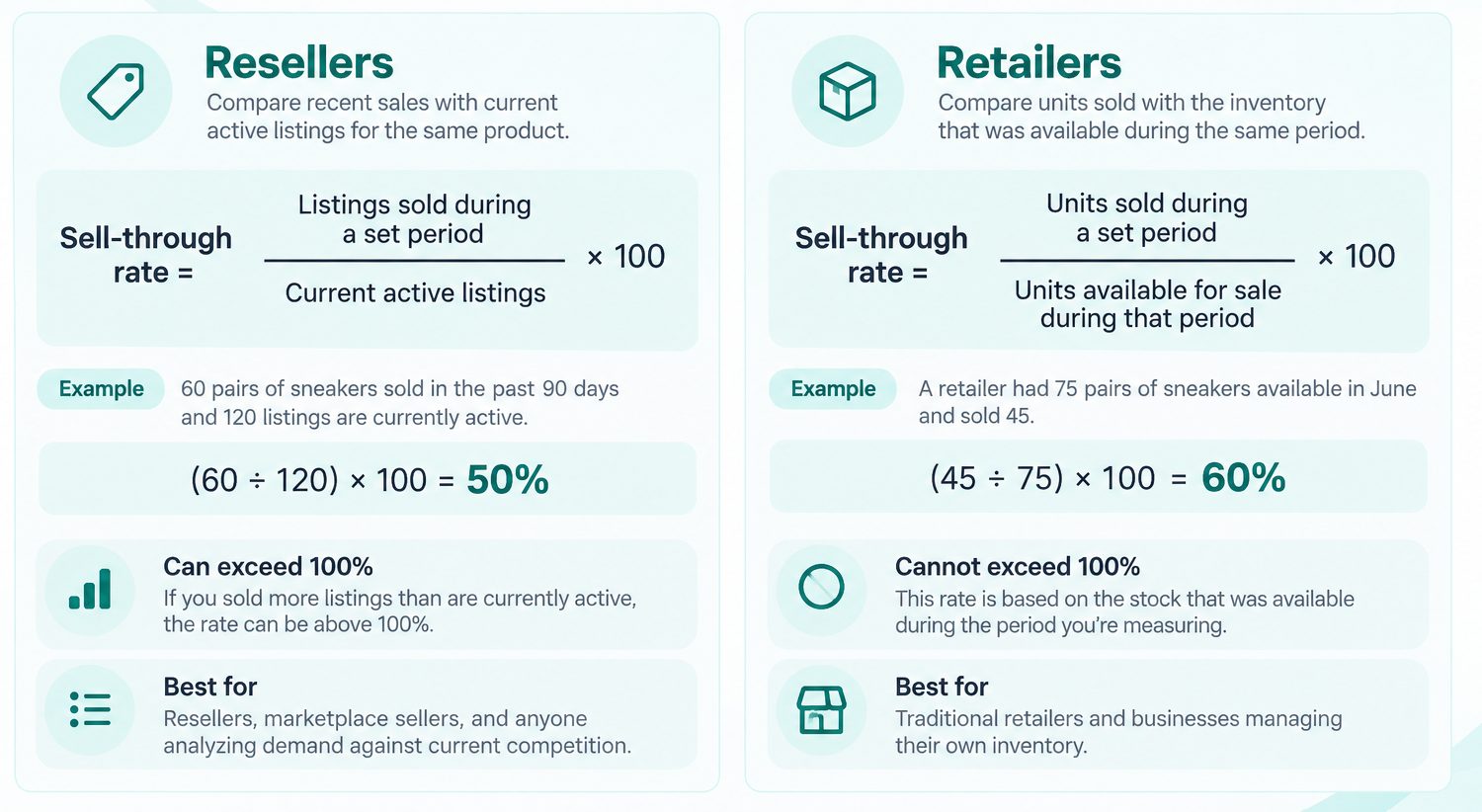
Reseller sell-through formula
Resellers can compare the number of sold listings with the number of active listings for the same product:
- Reseller sell-through rate during a set period = listings sold during a set period ÷ current active listings × 100
For example, you could count sales from the past 90 days and compare them with listings that are active today. Say 60 pairs of a certain sneaker sold during those 90 days, and 120 listings are currently active. The sell-through rate is 50%.
Here’s how the math checks out:
- 90-day sell-through rate = (60 ÷ 120) x 100 = 50%
When you have more listings sold than active listings, the rate goes above 100%. If you sold 200 listings during the period and only have 100 listings currently active, your sell-through rate is 200%. This can happen because you are comparing past sales with the number of listings available today.
Retail sell-through formula
Retailers compare the number of units sold with the inventory available for sale during the same period. Current active listings show what is available now. Retail inventory looks at the stock that was available during the period you are measuring:
- Retail sell-through rate = units sold during a set period ÷ units available for sale during that period × 100
Say a retailer has 75 pairs of sneakers available to sell during June and sells 45. The June sell-through rate is 60%. The remaining 30 pairs are the retailer's ending inventory. Dividing 45 by those 30 pairs would give the wrong result because those 30 units were only what remained after the sales.
What is a good sell-through rate for resellers?
A good sell-through rate depends on your profit per sale, sourcing costs, and the number of sales you make over a period of time. Consider the following:
- Profit per sale: This is the money left after subtracting the item's cost and selling expenses. A product may sell quickly but earn only a small profit on each sale. Compare your expected profit with how quickly the item sells before buying it.
- Purchase cost: The amount of money you pay when sourcing an item is your purchase cost. Expensive inventory requires more money upfront, and slow sales can then leave that money tied up in stock for weeks or months. Compare the purchase price with your expected profit and how quickly the item sells.
- Number of sales: This number shows how many items actually sold. A 100% sell-through rate based on two sales shows much less demand than a 50% rate based on 200 sales. Always check the sales numbers behind the percentage.
- Number of competing listings: Competing listings show how many similar items buyers can choose from right now. More active listings can mean more sellers are competing for the same buyers. Compare current listings with recent sales to see how supply compares with demand.
- Expected holding time: This metric is the length of time you expect an item to sit before it sells. You can estimate this by researching how long competing listings took to sell on other platforms.
- Seasonality: For some items, demand changes at different times of the year. To illustrate, winter coats may sell faster in autumn and winter than in summer. Check sales from similar times of year when researching seasonal products.
- Storage and shipping requirements: Some products cost more money and take more work to store and ship. Large items need more storage space, while fragile products may need extra packaging. And in some cases, you might want to cover shipping costs on your own. Include these costs when estimating how much profit you could make.
How to check sell-through rate on eBay
You can calculate sell-through rate manually by using eBay’s search results and recording the current active listings. Follow these steps:
Step 1: Search for the exact item
Enter enough details to find genuinely comparable listings. Include identifiers such as the brand, model, size, color, and condition. The results will show the current supply. You'll use this to calculate the sell-through rate.
For example, searching “Nike Dunk Low Panda size 10” produces a more specific comparison than searching “Nike sneakers.”
Keep the search terms consistent when you check active and sold listings so you're comparing similar products.
Step 2: Record the current active listings
Break out a spreadsheet and record the number of comparable active and sold listings for the item you're researching. Leave out different models, sizes, conditions, quantities, or bundles that could make the comparison less accurate.
For example, say you find 120 comparable active listings and 60 comparable sold listings from the past 90 days. Record both numbers for the sell-through calculation.
Step 3: Filter the search to sold listings
Apply eBay's sold or completed listings filter to see recent sales instead of current asking prices. eBay's regular completed-listing results cover items that ended as sold within the previous 90 days.
Use the same search terms and filters for active and sold listings. This keeps both counts focused on comparable items and makes the sell-through rate more accurate.
Step 4: Calculate the sell-through rate
Divide the listings sold during your defined period by the current active listings, then multiply by 100. Here’s a look:
- Sell-through rate = listings sold during the defined period ÷ current active listings × 100
- With 60 comparable listings sold during the past 90 days and 120 currently active listings:
- 60 ÷ 120 × 100 = 50%
- Plain English answer: The sell-through rate for those sold listings over the past 90 days is 50%.
- 60 ÷ 120 × 100 = 50%
- With 60 comparable listings sold during the past 90 days and 120 currently active listings:
The result gives you a sold-to-active ratio for that specific search. Use the same measurement period when comparing products so you're not comparing, for example, 30 days of sales for one item with 90 days for another.
Step 5: Check the sales volume behind the rate
Look at the raw numbers alongside the percentage. A high rate based on only a few listings provides much less evidence of sustained sales activity than a rate supported by hundreds of sales.
Also consider the other sourcing factors that affect whether the item is worthwhile, including profit, purchase cost, competition, expected holding time, seasonality, and storage requirements.
Or, use eBay Product Research for more data
eBay Product Research can save you from manually counting listings.
The seller analysis tool provides calculated sell-through rates for searches covering 90 days or less. You can also find metrics such as average sold price, sold price range, sales trends, and seller counts. Its broader sales database extends back three years.
Product Research is available through Seller Hub and the eBay mobile app, subject to eBay's access requirements.
How to use sell-through rate when sourcing
Use your sell-through rate when sourcing to learn which items have the best profit potential. Here’s how to use it:
High sell-through and strong profit
This combination means an item sells often and earns a good profit per sale. Check your expected profit after purchase cost, marketplace fees, shipping, packaging, and other selling costs.
For example, a jacket has an 80% sell-through rate and could earn $40 profit per sale. It may be worth sourcing if recent sales are steady and the purchase cost fits your budget.
High sell-through but low profit
Some items sell often but earn little profit per sale. But fast sales can still add up when you sell a large number of items. Check whether the total profit is worth the time and money needed to source, pack, and ship them.
For example, a phone case may sell quickly but earn only $2 profit per sale. That return may be too low if each sale takes a lot of time to handle.
Low sell-through but high profit
Some items sell more slowly but earn a larger profit when they sell. Consider how long you may need to wait for a sale. Your money could get tied up during that time, and you may also have storage costs. Determine if long storage times affect your item’s condition, too.
For example, you might buy a vintage jacket for $8 and expect to sell it for $90. It could still be worth considering with a 20% sell-through rate. Calculate your profit after fees, shipping, and other selling costs before comparing it with faster-selling items.
Similar rates with different sales volumes
The same sell-through rate can come from very different sales numbers. 10 sold listings against 10 active listings gives a 100% rate. So does 500 sold listings against 500 active listings. The second example has much more sales activity behind the percentage.
Check the actual number of sales when comparing products. A rate based on only a few listings gives you less information about demand. Hundreds of similar sales give you more data to judge how often the product sells.
What can distort sell-through rate?
Overly broad searches and making calculations from a small sample size can distort your sell-through rate. Here’s what you need to watch out for:
Overly broad searches
Broad searches can mix products that aren't close matches. Different models, sizes, conditions, quantities, and bundles may have different levels of demand. Combining these attributes can make your sell-through rate less accurate.
For example, if you’re researching a size 7 boot, don’t include every size in the active and sold counts. Narrow the search to similar listings so the rate better reflects the item you're researching.
Small sample sizes
Small samples can produce high percentages from very few sales. One sold listing against one active listing gives you a 100% sell-through rate. However, if you add more listings, your sell-through rate will most likely decrease.
Check the number of sold and active listings along with the percentage. I always recommend that sellers start with at least 10 comparable listings so you can have more data about demand.
Seasonality
Demand for some products changes throughout the year. Christmas decorations, for example, may sell very differently in April than during the months before Christmas.
Find out when the sales happened and when you plan to sell the item. For seasonal products, compare sales from similar times of year.
Unusual sold prices
Some items sell for much higher or lower prices than similar listings. One unusually high sale shows that one buyer paid that price. It doesn't show that other buyers will regularly pay the same amount.
Remedy this possible error by checking several similar sales and their prices before estimating your expected revenue or profit. This keeps one unusual sale from having too much influence on your estimate.
Listing quality
The quality of a listing can affect whether an item sells and how much a buyer pays. Price, photos, titles, item details, condition, shipping terms, and seller reputation can all affect a sale.
Always take quality photos and use strong keywords in your titles that buyers actually search for. We wrote articles that walk you through how to create quality listings that help you make money on eBay, Poshmark, Mercari, Depop, Etsy, and Whatnot.
Changing inventory
The reseller calculation compares past sales with the number of listings available today. However, the number of competing listings may have changed during the period you're measuring. There could have been 50, 100, or 500 listings at different points. Check recent sales and current competition when the number of available listings is changing quickly.
For example, 100 listings may have sold during the past 90 days, while 50 are active today. That gives you a 200% sell-through rate. However, you don't know how many competing listings were active throughout those 90 days.
Sell-through rate vs. conversion rate
Both sell-through rate and conversion rate measure different parts of the selling process.
Sell-through rate compares sales with available inventory or, for resellers, current active listings.
Conversion rate shows how often visitors make a purchase. Many sellers compare purchases with sessions or visitors.
Looking at both rates can help you find possible sales problems.
For instance, a low sell-through rate may point to weak demand, too much supply, or slow sales. Low conversion on a listing with plenty of traffic may point to problems with the price, photos, condition, shipping, or description.
If you get steady views but few purchases while your competitors are selling similar items, you should check your listings’ prices, photos, shipping terms, and competing offers.
How does crosslisting affect sell-through rate?
Crosslisting is posting the same physical item on multiple marketplaces, such as eBay, Poshmark, and Mercari. It affects sell-through rate because crosslisted items still represent one unit of owned inventory. Counting each marketplace listing as separate inventory would overstate how much stock the seller actually holds.
When tracking your own inventory performance, count the physical item once regardless of how many marketplaces it appears on. Once it sells on one platform, record one unit sold and remove or deactivate the duplicate listings on the other platforms to avoid selling an item you no longer have.
For example, a jacket listed on eBay, Poshmark, and Mercari represents one unit of inventory. When the jacket sells on eBay, record one unit sold, not three, and remove the Poshmark and Mercari listings.
Rocket your sell-through rate with Nifty
Tracking sell-through rate by hand across several marketplaces means many separate tabs, several separate counts, and stock that goes unsold on one platform while sitting "active" on three others. Nifty, our crosslisting and automation tool, fixes the bottleneck by letting you manage your crosslisted items in one place.
Here's why Nifty's so helpful:
- Customized AI listing: Snap a pic and let Nifty's AI build a complete listing, with SEO-optimized titles and descriptions, and trending hashtags already filled out for you. You can even customize how AI writes your listings to follow your unique style.
- Crosslist now: With a couple of clicks, post your items across Whatnot, Poshmark, eBay, Mercari, Depop, and Etsy. No copy-paste clutter and no multi-tab hopscotch. (More marketplaces coming soon!)
- Bulk crosslisting: Publish up to 25 listings at once with marketplace-specific pricing rules, shipping presets, and AI-improved titles and descriptions. Start in Nifty or import from eBay, then export everywhere in one action.
- Marketplace-specific Pricing Rules: Set your price once on a primary marketplace, and Nifty auto-calculates the rest with percentage or dollar adjustments so your take-home stays consistent when you crosslist.
- Automatic delisting? Handled: When you make a sale, Nifty's sales detection auto-delists that item from every marketplace. Say goodbye to double-selling disasters and "sorry, it's already gone" apology messages.
- Bulk tools = no busywork: Share and relist daily in just a few clicks. You can even schedule drafts to go live while you sleep and set automatic discounts that run deeper over time.
- Analytics you can act on: Track sales, fees, top performers, and slow movers in one clean dashboard, so you can actually see what's working and what's just dead space. You can also set and track seller goals directly from your home screen.
Start with a 7-day free trial and see how Nifty can help you turn a sluggish sell-through rate into a number worth checking. And if you're selling on Etsy, Whatnot, Depop, or eBay from the UK or Australia, Nifty is now available.
FAQs
1. Can sell-through rate be over 100%?
Yes, sell-through rate can be over 100%. This happens with the reseller sold-to-active formula when past sales outnumber today's listings. But traditional retail sell-through can't exceed 100% since it's capped by available stock.
2. What does a 100% sell-through rate mean?
A 100% sell-through rate means the numerator and denominator in the chosen formula are equal. But a 100% sell-through rate can change by formula: Resellers see sold listings equal active listings, while retailers see all stock sold. Knowing which applies avoids misreading demand signals.
3. Is a higher sell-through rate always better?
No, a higher sell-through rate isn't always better on its own. Profit margin, sales volume, sourcing cost, competition, and holding time all shape real value. Checking these together prevents chasing fast-selling items with thin returns.
4. Does sell-through rate tell you how fast an item will sell?
No, sell-through rate doesn't predict how fast an item will sell. It shows past demand compared with inventory or competition. Check expected holding time as well to get a better idea of how long an item may take to sell.


.png)
.png)